
Breno
top
Posted on Chrome Web Store
See on Store
Oct 2026 
Send bulk WhatsApp messages to hundreds of contacts in one click — import from Excel or CSV and send without saving contacts. A free WhatsApp bulk sender with spam-safe anti-ban delays and 100% local processing.

top

Great

good

Works reallllyyyy wellll. So easy to use too.

Love this. Works great and easy to use.

Works Great. Highly Recommended

Best app for contacts extraction

Tried using it it works

This feature saves both time and effort. I find it very practical and easy to use. I highly recommend the premium version.

easy to use and very helpful

feels good

perfect and smooth

This feature is a life as well as time saver. I find it very useful and friendly to use. Highly recommend the premium version.

Top one

hey, saw it on reddit, could you please give me premium access?

working good ! it have all the features i wanted to !

Nice!

Very good tool

Needs premium to extract group contacts just like all the rest

Very Good...far better then orther...
WASendly turns WhatsApp Web into a complete WhatsApp bulk messaging and automation workspace — built for businesses, sellers and support teams.
Send bulk WhatsApp messages to hundreds of numbers at once. Reach your whole customer list in a single click and save hours of manual sending.
Import contacts directly from Excel or CSV files. No need to save numbers to your phone or build broadcast lists — just upload and send.
Use dynamic variables like name, company or order number to personalize every WhatsApp message, so each one feels written by hand.
Message new and unknown numbers without saving the contact. No groups, no broadcast lists — bulk send straight from your imported list.
Adjustable, randomized intervals mimic human behaviour to send bulk WhatsApp messages without getting banned and keep your number safe.
Pick the hour and walk away. The built-in WhatsApp message scheduler starts the send on its own and tells you afterwards how it went — so your campaign lands in working hours, not at midnight.
Attach images, videos, PDFs and Word documents to your WhatsApp bulk messages for richer, more effective campaigns.
Filter and verify active WhatsApp numbers before sending, so your campaigns reach real users and you don't waste sends on dead numbers.
Extract contacts from WhatsApp groups, chat lists and saved contacts to quickly build your bulk messaging list.
Track sent, delivered and failed messages with detailed delivery reports and statistics for every campaign.
Stay in full control of every WhatsApp bulk campaign — start, pause or stop sending at any moment.
A modern, fast interface available in many languages, making WhatsApp bulk messaging accessible to users worldwide.
All data is processed locally on your device. Your contacts and messages are never sent to external servers.
Getting started with WASendly takes just a couple of minutes — no technical setup, no API.
Add the free WhatsApp bulk sender to Chrome, Edge, Brave or Opera and open WhatsApp Web.
Upload numbers from Excel/CSV or extract them from WhatsApp groups and chats.
Create a template, add variables and attach media to personalize each message.
Set anti-ban delays, hit send and follow live delivery reports.
A clean, intuitive interface for your entire WhatsApp bulk messaging workflow.


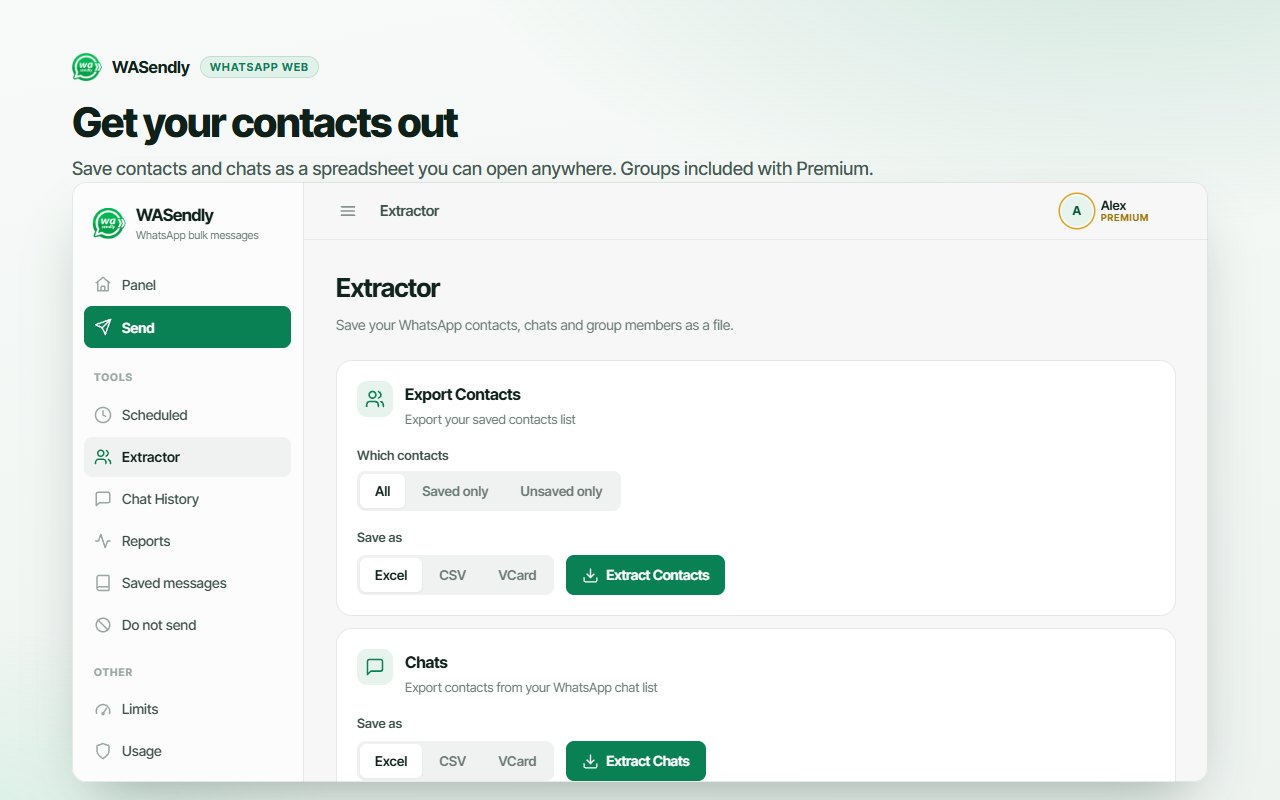
The go-to WhatsApp bulk message sender for anyone who needs fast, personal, large-scale communication.
Send order confirmations, shipping updates and promotions via WhatsApp bulk messaging.
Launch campaigns and offers with personalized messages that boost conversion rates.
Share service updates, reminders and support info quickly with your whole customer base.
Notify students about schedules, exams and announcements in seconds.
Send invitations, reminders and updates so every attendee stays informed.
Anyone sending alerts and announcements at scale — fast, personal and reliable.
Everything you need to know about sending bulk WhatsApp messages with WASendly.
WASendly is a free WhatsApp bulk message sender Chrome extension. It runs on top of WhatsApp Web — with no WhatsApp Business API required — and lets you send bulk and automated messages to hundreds of contacts, import lists from Excel/CSV, personalize templates, attach files, extract contacts and verify active numbers.
Yes. Import your list directly from Excel (XLSX) or CSV and send personalized WhatsApp bulk messages using variables such as name, order number or any column in your sheet.
Absolutely. WASendly sends bulk messages without saving numbers to your phone and without creating broadcast lists or groups. Just import the numbers and start sending.
WASendly includes spam-safe anti-ban delays with adjustable, randomized intervals between messages to mimic human behaviour and reduce the risk of WhatsApp number blocking. You can also verify active numbers first and pause or stop a campaign anytime.
WASendly is free to install with a generous free plan. All data is processed locally on your device — your contacts and messages are never uploaded to external servers, ensuring maximum privacy.
Yes — send images, videos, PDFs and Word documents along with your WhatsApp bulk messages for more engaging campaigns.
WASendly works on all major Chromium browsers — Google Chrome, Microsoft Edge, Brave, Opera and Vivaldi. Just install it and open WhatsApp Web to start sending.
No. WASendly works on top of regular WhatsApp Web, so you can use it with a normal WhatsApp account — no WhatsApp Business app or Business API required. It works with WhatsApp Business accounts too.
Yes. Use dynamic variables — name, company, order number or any column from your Excel/CSV — so every recipient gets a message that reads as if it was written just for them.
You should always message responsibly: only contact people who opted in to hear from you, keep volume reasonable, personalize your content and respect WhatsApp's Terms of Service. WASendly's spam-safe delays and active-number verification are designed to help you message responsibly.
Join businesses worldwide using WASendly to reach customers on WhatsApp — free, fast and safe.
Add WASendly to Chrome — FreeWASendly is an advanced WhatsApp bulk messaging and auto-messaging tool that helps businesses, e-commerce sellers and professionals communicate with customers quickly and effectively. In one click you can reach hundreds of people, personalize each message and manage the whole sending process with smart automation — saving significant time and effort.
A WhatsApp bulk message sender lets you send the same (or a personalized) message to many WhatsApp contacts at once. WASendly is a free Chrome extension that does exactly this on top of WhatsApp Web, so there is no WhatsApp Business API setup, no broadcast lists and no need to save every number.
Import your contacts from Excel or CSV and map columns to message variables. WASendly personalizes each message — name, company, order number or any field — so your WhatsApp bulk messages look individual, not mass-sent. There's no limit to creativity: combine variables with emojis, line breaks and attachments to build campaigns that feel hand-written.
There are three common ways to reach many people on WhatsApp. Here's how a free WhatsApp bulk sender like WASendly compares to the official API and built-in broadcast lists:
| Feature | WASendly | Broadcast lists | Business API |
|---|---|---|---|
| Send without saving contacts | Yes | No — must save first | Yes |
| Import from Excel / CSV | Yes | No | Via integration |
| Personalized variables | Yes | No | Yes (approved templates) |
| Setup & approval | Install & go | Manual, per list | Complex, paid onboarding |
| Cost | Free | Free | Per-message fees |
| File & media attachments | Yes | Limited | Yes |
For most small and medium businesses, WASendly hits the sweet spot — the reach and personalization of the API, without the cost, template approvals or technical setup.
Bulk doesn't have to mean impersonal. To get the best response rates from your WhatsApp bulk messaging campaigns:
Beyond plain text, WASendly supports rich WhatsApp bulk messages with attachments:
To stay safe while sending in bulk, WASendly recommends and supports:
Unlike many tools, WASendly keeps everything local and private, requires no API, and bundles a WhatsApp contact extractor and active number verification alongside bulk sending. It's the practical, free WA sender for everyday WhatsApp marketing, notifications and customer updates. Install it today and start sending professional WhatsApp bulk messages efficiently.
Working on shared or public computers? Pair WASendly with our Privacy Guard for WhatsApp Web to lock and blur your chats while you send.
More free tools to boost your productivity and workflow.

Instagram Unfollow AI detects those who don't follow you back and helps you unfollow them to optimize your account easily.
Learn more
Manage your X (Twitter) following, detect users who don't follow you back, and unfollow safely with smart filters.
Learn more
See who doesn't follow you back on TikTok, then bulk unfollow all, everyone or only non-followers. Safe pacing, one click.
Learn more
Easily export WhatsApp contacts and group members to Excel, CSV, or vCard.
Learn more
Save & export ChatGPT, Claude, Gemini, Grok, DeepSeek & Perplexity to PDF, Word, Markdown, HTML, JSON or Image. Private & free.
Learn more
Find who doesn't follow you back on Instagram. Track unfollowers & mass unfollow non-followers in one click.
Learn more
Instagram toolkit for desktop. Track unfollowers, upload stories from PC, download media, and manage Instagram.
Learn more
Send bulk Telegram messages, scrape group members to Excel and add members to groups. Safe speed limits, works in Telegram Web.
Learn more
Export IG follower and following lists, likes and comments to CSV, Excel or JSON in one click. Fast, private, no password.
Learn more
Export tweets, replies, likes, bookmarks and followers from any Twitter/X account to Excel, CSV or JSON. No API key needed.
Learn more
Export TikTok follower and following lists, video comments and post stats to CSV or Excel. Resume long exports.
Learn more
ChatGPT Speed Booster is a free Chrome extension that fixes slow ChatGPT performance in long conversations.
Learn more
Export Instagram followers, following, likes, and comments to CSV or Excel in one click
Learn more
Rewrite any AI prompt into a clear, structured version in one click. Press Ctrl+M on ChatGPT, Claude or Gemini. 50+ languages, free.
Learn more
IGFollow AI is an AI-powered tool to grow your Instagram. Boost engagement and expand your audience effortlessly
Learn more
See exactly who doesn’t follow you back on Instagram, protect the accounts you care about, and unfollow the rest at a safe, adjustable pace.
Learn more
Sort Instagram & TikTok feeds by likes, views, comments or date. See post stats at a glance and find viral content fast. Free.
Learn more
AI-powered Instagram auto follow tool to boost engagement, grow followers, and expand your audience effortlessly.
Learn more
Fix slow Claude.ai in long conversations. Speed Booster hides older messages to stop lag, freezing & high memory use — instantly.
Learn more
Remove TikTok reposts in bulk. See the full list first, pick what goes, and set your own pace. Nothing goes without you.
Learn more
Bulk delete & archive ChatGPT chats, add message timestamps and navigate conversations fast. Clean up ChatGPT in one click.
Learn more
Email Extractor helps you find visible email addresses on websites and works locally with no tracking or data collection.
Learn more
A visual gallery of AI image prompts. Use them instantly in ChatGPT, Gemini, Sora, and Nano Banana.
Learn more
Audit any page, then crawl the whole site: indexability, duplicate titles, orphan pages, click depth and Core Web Vitals. Your pages are never uploaded.
Learn more
Secure your WhatsApp Web with smart lock, panic button, and blur mode. Your privacy, your control.
Learn more
Transform your cursor with stunning click effects & animations. Perfect for streamers, presenters & content creators.
Learn more
InkShot is a free screenshot Chrome extension that lets you capture full page screenshots, visible viewport, or selected areas
Learn more
Detechtor AI checks what any website is built with — CMS & WordPress theme detector, frameworks, analytics, CDN, tech stack.
Learn more
Bulk check which numbers are on WhatsApp. Validate lists, filter by country, spot business accounts, export to Excel or CSV.
Learn more
Delete all your chats and messages on Instagram in bulk. One click, and the chats you protect stay untouched.
Learn more
See what a car on Sahibinden is really worth: market value for the exact trim, how damage and repaint move the price, and the engine's known faults. Turkish interface, Turkey market.
Learn more
See who doesn't follow you back on Threads, protect the accounts you want to keep, and tidy your following list at your own pace.
Learn more
Create custom and professional email signatures effortlessly with SignedRise. Perfect for personal and work emails.
Learn more