Chrome Extension · 164 technologies · 22 categories

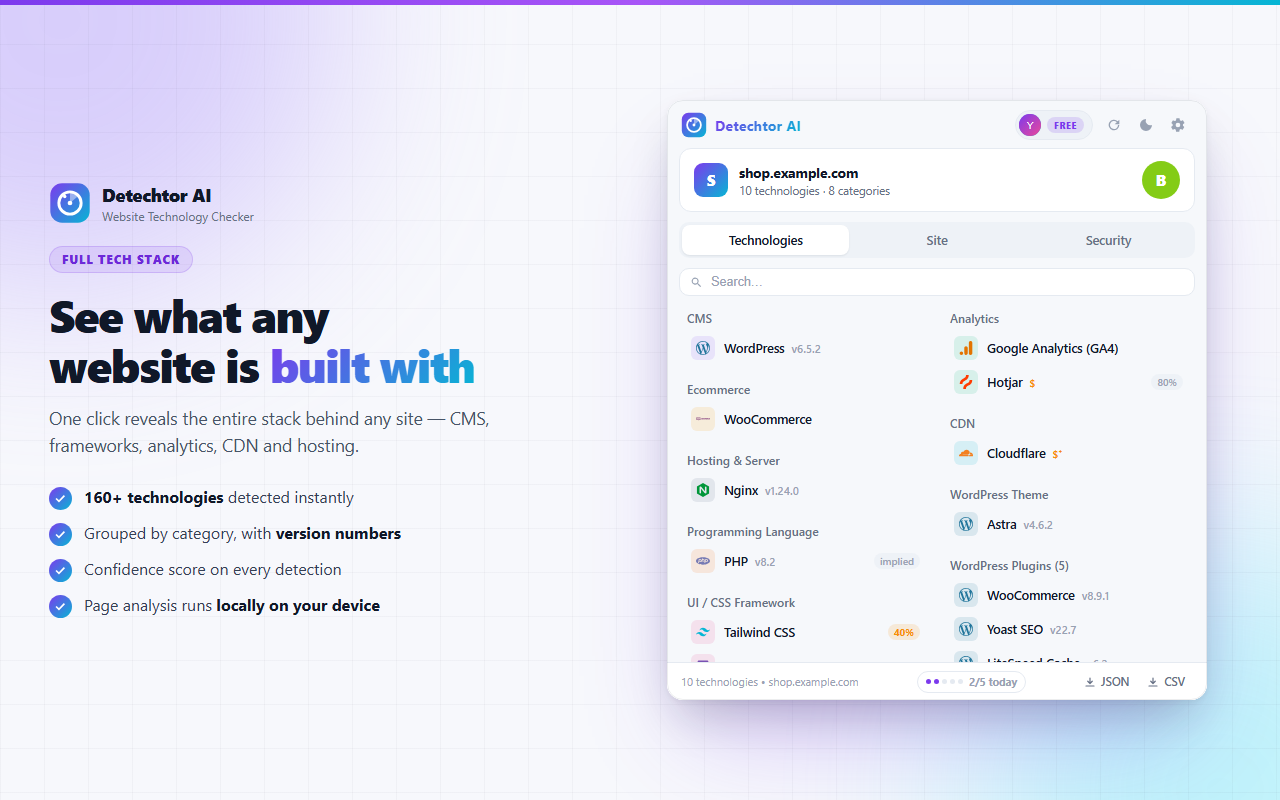
See what any website is built with

Detechtor AI is a free website technology checker that reveals the entire tech stack behind any site in one click — CMS, frameworks, analytics, CDN, hosting and payment systems — with version numbers and the evidence to prove it.

  • 164 technologies detected instantly, grouped by category
  • WordPress X-Ray — active theme & plugins with versions
  • Security grade from A+ to F, based on real headers
  • Runs 100% locally — nothing leaves your device

Works on Chrome, Edge, Brave & Opera · No account, no tracking, no data collection.

🎉

Just installed? You're 30 seconds away

Detechtor is already working — here's how to see your first tech stack.

1

Pin the icon

Click the puzzle icon in your toolbar and pin Detechtor AI so it's always one click away.

2

Visit any website

Detechtor analyzes pages automatically — the badge on the icon shows how many technologies it found.

3

Click & explore

Open the popup to browse Technologies, Site and Security — click any technology to see the evidence.

Tip: the toolbar icon morphs into the logo of the site's main technology — you'll know it's WordPress before you even click.

0 Technologies detected
0 Categories
0 Detection signals
Free 100% on your device
The website technology checker

What is Detechtor AI?

Detechtor AI is a free Chrome extension that answers one question instantly: "what is this website built with?" Open any site, click the icon, and the full technology stack appears — the CMS or e-commerce platform, JavaScript frameworks, analytics and marketing tools, CDN, server and hosting provider, payment systems, live chat widgets and more, all grouped into clear categories.

Unlike a simple website technology lookup, Detechtor combines 14 detection signals — scripts, HTTP headers, cookies, DOM markup, global variables and even the content of external script files — to identify 164 technologies with version numbers and a confidence score. It's a powerful Wappalyzer and BuiltWith alternative that shows its work: click any detection and see exactly which signals triggered it.

GERÇEK YORUMLAR

Kullanıcılar ne diyor?

5 · 6 değerlendirme Chrome Web Mağazası'nda
Kara Kedi
Kara Kedi

Fantastic productivity tool for web developers. The detection is quick, the UI is intuitive, and it even helps identify AI-powered websites. Looking forward to future updates and new features!

Chrome Web Mağazası yorumu See on Store
Jul 2026
Osman Muratoğulları
Osman Muratoğulları

This is exactly what I was looking for. Instead of inspecting source code manually, I can instantly see the technologies used on a website. Saves me a lot of time when researching new projects.

Chrome Web Mağazası yorumu See on Store
Jul 2026
Chrome user
Chrome user

Excellent extension! I use it for competitor research and learning how modern websites are built. It's fast, lightweight, and provides useful insights with just one click. Highly recommended.

Chrome Web Mağazası yorumu See on Store
Jul 2026
Erdem Düzlüce
Erdem Düzlüce

I've tested several tech stack detectors, and this one is surprisingly accurate. It detects frameworks, CMS, hosting, and AI-related technologies within seconds. Definitely becoming part of my daily workflow.

Chrome Web Mağazası yorumu See on Store
Jul 2026
Chrome user
Chrome user

Really impressed with this extension. It quickly identifies the technologies and AI tools behind any website without slowing down my browser. The interface is clean, and the results are easy to understand. Great tool for developers and marketers!

Chrome Web Mağazası yorumu See on Store
Jul 2026
Gürkan Bayraktar
Gürkan Bayraktar

Clean, fast, and very easy to use. I often analyze websites for inspiration and this extension gives me a quick overview of the technologies they're using without any hassle. It's accurate, lightweight, and has become one of my go-to developer tools.

Chrome Web Mağazası yorumu See on Store
Jul 2026
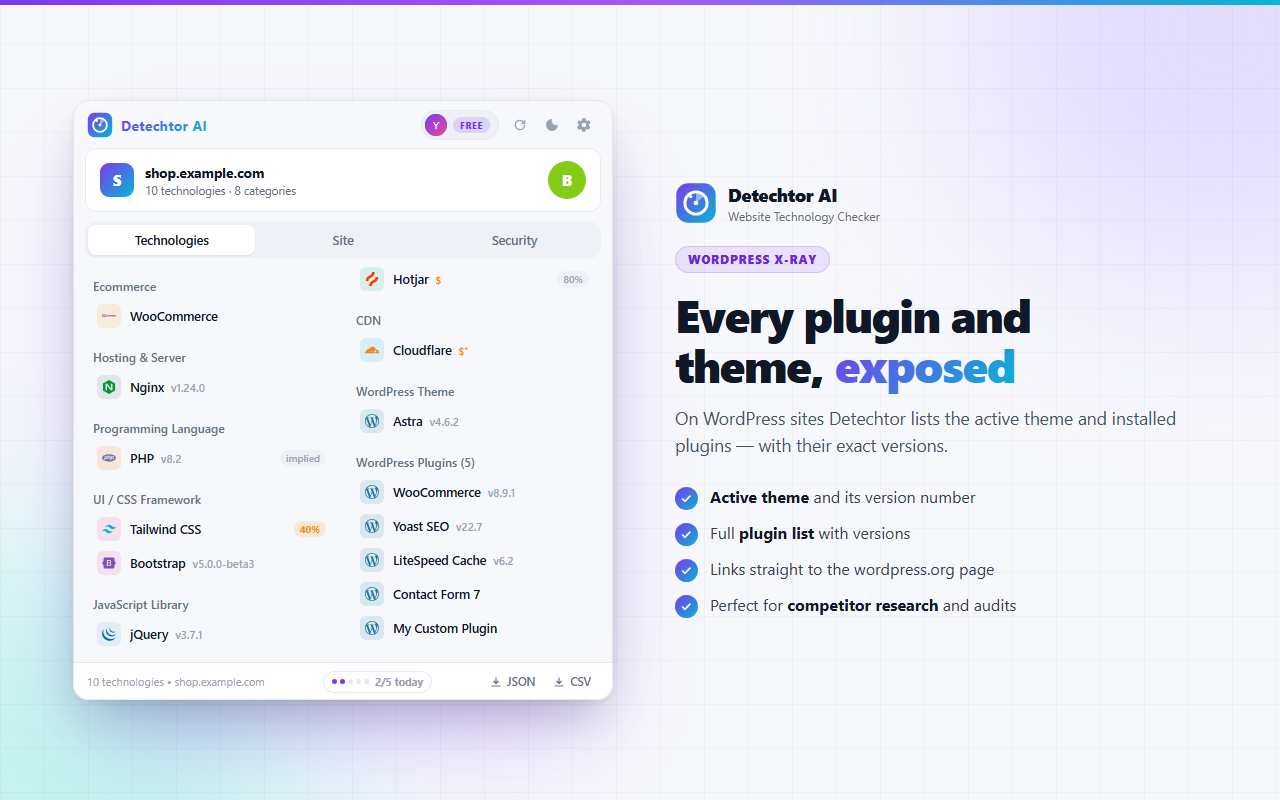
WordPress X-Ray

Every theme and plugin, exposed

On WordPress sites, Detechtor works as a WordPress theme detector and plugin detector in one — it lists the active theme and installed plugins with their exact versions, and links each one straight to wordpress.org.

WordPress theme and plugin detector — Detechtor AI lists the active theme and installed plugins with versions
Active theme + version Full plugin list Catches cached & merged assets Perfect for competitor research
Proof, not guesses

See exactly how we detected it

Most technology checkers are a black box. Detechtor opens it: click any technology to see every signal behind the match — script URLs, HTTP headers, cookies, meta tags, CSS rules and markup — with a confidence score you can verify yourself.

Detechtor AI detection evidence panel showing the scripts, headers, cookies and markup behind a technology match
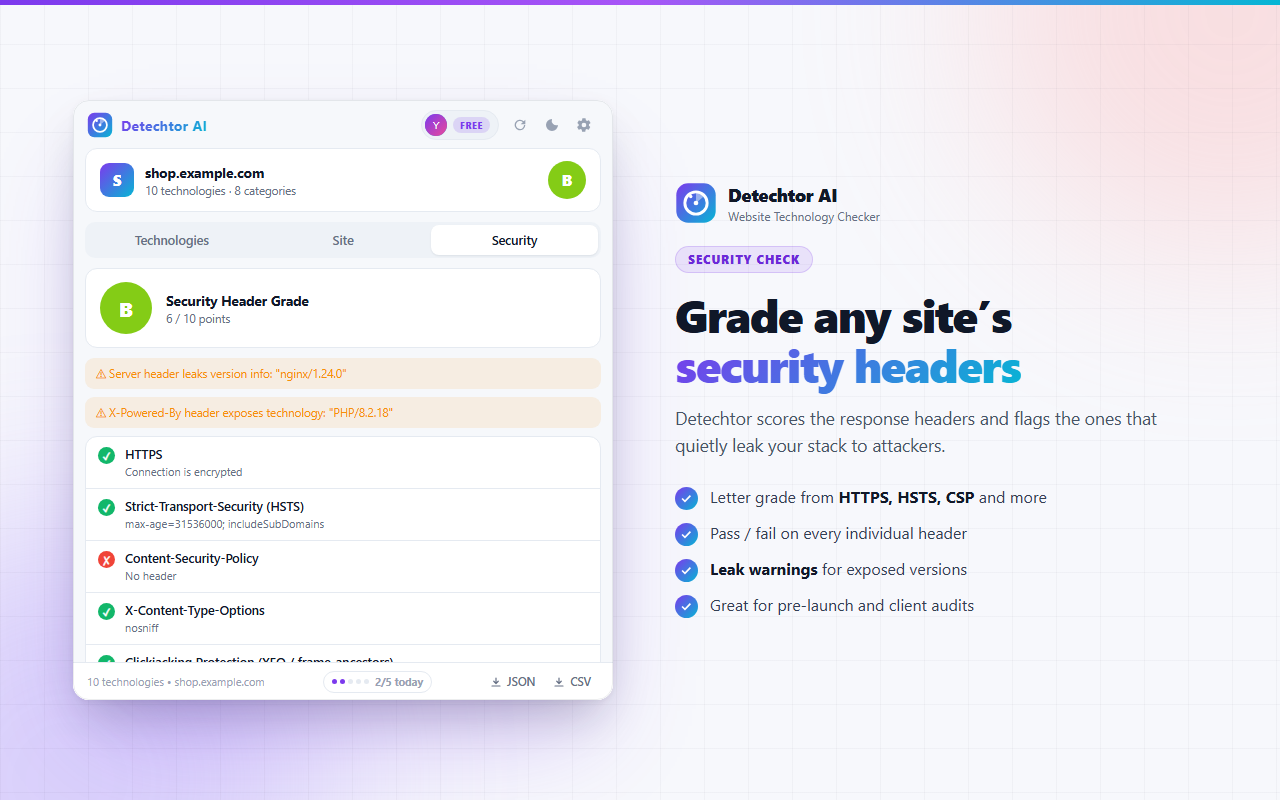
Security check

Grade any site's security headers

Detechtor doubles as a security headers checker: it scores HTTPS, HSTS, Content-Security-Policy, X-Frame-Options and more into a clear A+ to F grade — and flags headers that quietly leak your server or PHP version to attackers.

Security headers checker — Detechtor AI grades HTTPS, HSTS, CSP and X-Frame-Options from A+ to F with leak warnings
Letter grade A+ … F Pass / fail per header Version-leak warnings Great for pre-launch audits
Site intelligence

Server, SEO and page vitals

Beyond the stack: IP address, server software, status code, HTTP/2 & HTTP/3 protocol, page title and description, canonical, robots meta, OG image, and script, stylesheet, image and cookie counts — everything exportable to JSON or CSV.

Detechtor AI site intelligence tab showing IP address, server software, HTTP protocol, SEO meta tags and page statistics
Key features

A complete tech stack detector

Everything you need to check website technology — in one lightweight extension.

164 technologies, 22 categories

CMS, e-commerce, JS frameworks, analytics, CDN, hosting, payments, live chat, cookie consent and more.

Version detection

Exact versions for jQuery, React, Vue, Angular, Bootstrap, Nginx, PHP, WordPress themes & plugins and more.

14 signal channels

Scripts and their contents, headers, cookies, DOM, CSS rules, window variables and URL patterns — combined for accuracy.

Smart inference

Detections imply each other: WooCommerce reveals WordPress, which reveals PHP and MySQL — automatically.

48-hour site memory

Findings accumulate per domain, so technologies seen on different pages merge into one complete report.

Dynamic toolbar icon

The icon transforms into the logo of the site's main technology — 108 official brand logos built in.

Pricing indicators

Paid services are marked with $ and freemium tools with $⁺ — see a site's software budget at a glance.

JSON & CSV export

Export the full analysis for audits, reports and spreadsheets in one click.

Private by design

All analysis runs locally in your browser. No data collection, no telemetry, no account needed.

Who it's for

Built for people who ask "how was this made?"

Developers

Identify frameworks, libraries and versions on any site — and learn from stacks you admire.

Marketers & SEOs

See which analytics, tag managers and A/B tools competitors run, and audit SEO meta in seconds.

Agencies & freelancers

Scope client projects fast: CMS, page builder, plugins and hosting — before the first call.

Security-minded teams

Grade security headers, catch version leaks and check your own sites before attackers do.

100% private

Analysis that never leaves your browser

Detechtor inspects pages on your device. Your browsing history and the sites you analyze are never uploaded anywhere.

No data collection No telemetry No account required Disable per site anytime Dark & light theme
FAQ

Frequently asked questions

How do I check what technology a website is using?

Install Detechtor AI, open any website, and click the Detechtor icon in your toolbar. In one click you'll see the site's full tech stack — CMS, e-commerce platform, JavaScript frameworks, analytics, CDN, hosting and more — grouped by category with version numbers.

How can I find out what CMS a website is built with?

Detechtor identifies WordPress, Shopify, Wix, Squarespace, Drupal, Joomla and many other CMS platforms — usually with the exact version. On WordPress sites it also lists the active theme and installed plugins.

Can Detechtor detect WordPress themes and plugins?

Yes. It lists the active theme and installed plugins with versions, using two detection paths — asset URLs and HTML signatures — so it even catches plugins whose files are merged or cached. Each entry links to its wordpress.org page.

Is Detechtor a good Wappalyzer alternative?

Yes. Detechtor detects 164 technologies across 22 categories using 14 signal channels, shows the exact evidence behind every match, adds a security header grade — and runs 100% locally with no account required.

Does Detechtor show version numbers?

Yes — for jQuery, React, Vue, Angular, Bootstrap, Nginx, PHP, WordPress themes and plugins and more, whenever the site exposes them.

What is the security grade?

Detechtor scores the site's HTTP response headers — HTTPS, HSTS, Content-Security-Policy, X-Frame-Options and more — from A+ to F, and flags headers that leak server or PHP version information.

Is Detechtor free and private?

Detechtor is free to install and use. All analysis happens locally in your browser — your browsing data is never uploaded to any server, and there is no telemetry.

Can I export the results?

Yes. Every analysis — technologies, site information and the security report — exports to JSON or CSV in one click.

Which browsers work with Detechtor?

Chrome, Edge, Brave, Opera and other Chromium-based browsers.

Everything you need to know about Detechtor AI

Detechtor AI is a free Chrome extension built to check website technology in one click. If you've ever wondered what a website is built with, what CMS a site uses, or which WordPress theme and plugins power a competitor's site, Detechtor answers instantly — right in your browser.

How does the website technology checker work?

As a page loads, Detechtor listens to 14 signal channels: meta tags, script URLs, the contents of external script files, cookies (including HttpOnly), HTTP response headers, DOM selectors, JavaScript variables, CSS rules and URL patterns. A regex engine matches these signals against a database of 164 technology signatures across 22 categories, extracts version numbers where possible, and assigns each detection a confidence score. Indirect inference fills in the rest — detecting WooCommerce implies WordPress, which implies PHP and MySQL.

What can Detechtor detect?

  • CMS & e-commerce: WordPress, Shopify, Wix, Squarespace, Drupal, Joomla, WooCommerce, Magento and more.
  • JavaScript frameworks & libraries: React, Vue, Angular, Next.js, jQuery, Bootstrap, Tailwind CSS — with versions.
  • Analytics & marketing: Google Analytics, Tag Manager, Hotjar, Amplitude, PostHog, Umami, Fathom and more.
  • Infrastructure: CDNs like Cloudflare, servers like Nginx, hosting providers, HTTP/2 & HTTP/3.
  • Payments & widgets: payment gateways, live chat tools and cookie consent platforms.
  • WordPress internals: active theme and installed plugins with exact versions.

Why choose Detechtor over other tech stack detectors?

  • Proof, not guesses: every detection opens an evidence panel showing the exact scripts, headers, cookies and markup behind the match.
  • Deeper signals: Detechtor also scans the content of external script files, catching technologies like Webpack, Vite and Sentry that URL-only checkers miss.
  • Security built in: an A+ to F security header grade with version-leak warnings — a mini audit on every site.
  • Site memory: detections accumulate per domain for 48 hours, so multi-page browsing builds one complete picture.
  • Truly private: everything runs locally. No uploads, no account, no telemetry.

Common uses

People use Detechtor for competitor research (which platform, plugins and marketing tools rivals use), sales prospecting (find sites running a specific CMS or missing a tool you sell), project scoping (know a client's stack before the first call), learning (see how impressive sites are built) and security checks (grade headers and catch version leaks on your own sites before launch).

Is Detechtor safe?

Yes. Detechtor analyzes pages entirely on your device and never sends your browsing data to a server. You can disable it per site, and the results panel works in dark or light theme. Detechtor is an independent tool and is not affiliated with any detected technology vendor.

Stop guessing what sites are built with. Install Detechtor AI and get the full tech stack, WordPress details and security grade of any website — in one click, completely free.
Uncover the stack behind any website

Add Detechtor AI to your browser and see the technologies, WordPress plugins and security grade of every site you visit — instantly.

Add Detechtor to Chrome — Free

No account  •  100% Free  •  Nothing leaves your device  •  Instant install

More tools

Explore our other Chrome extensions

Discover more powerful tools to enhance your browsing experience.

ChatGPT Speed Booster

ChatGPT Speed Booster is a free Chrome extension that fixes slow ChatGPT performance in long conversations.

PromptJolt – AI Prompt Enhancer for ChatGPT, Claude & Gemini

Rewrite any AI prompt into a clear, structured version in one click. Press Ctrl+M on ChatGPT, Claude or Gemini. 50+ languages, free.

X Unfollow AI – Manage Your Twitter Following List

Manage your X (Twitter) following, detect users who don't follow you back, and unfollow safely with smart filters.

Extract AI – Email Extractor

Email Extractor helps you find visible email addresses on websites and works locally with no tracking or data collection.

Prompt Trove — Visual AI Image Prompts Gallery

A visual gallery of AI image prompts. Use them instantly in ChatGPT, Gemini, Sora, and Nano Banana.

Claude Speed Booster

Fix slow Claude.ai in long conversations. Speed Booster hides older messages to stop lag, freezing & high memory use — instantly.

ExportPal - Save & Export ChatGPT, Claude, Gemini to PDF & Word

Save & export ChatGPT, Claude, Gemini, Grok, DeepSeek & Perplexity to PDF, Word, Markdown, HTML, JSON or Image. Private & free.

Numsift — Bulk WhatsApp Number Checker & Validator | Export to Excel

Bulk check which numbers are on WhatsApp. Validate lists, filter by country, spot business accounts, export to Excel or CSV.

FeedRank – Instagram & TikTok Feed Sorter

Sort Instagram & TikTok feeds by likes, views, comments or date. See post stats at a glance and find viral content fast. Free.

ChatPilot – ChatGPT Bulk Delete, Archive & Timestamps

Bulk delete & archive ChatGPT chats, add message timestamps and navigate conversations fast. Clean up ChatGPT in one click.

TikTok Unfollow AI - Mass & Auto Unfollow All, Everyone & Non-Followers

See who doesn't follow you back on TikTok, then bulk unfollow all, everyone or only non-followers. Safe pacing, one click.

InkShot — Webpage Screenshot & Draw Tool

InkShot is a free screenshot Chrome extension that lets you capture full page screenshots, visible viewport, or selected areas

SEO Analyzer Pro AI
SEO Analyzer Pro AI

AI-powered SEO analysis tool. Analyze and optimize your website's meta tags, titles, images and links.

SignedRise - Professional Email Signature

Create custom and professional email signatures effortlessly with SignedRise. Perfect for personal and work emails.

Clickaroo - Mouse Effect Designer

Transform your cursor with stunning click effects & animations. Perfect for streamers, presenters & content creators.

Privacy Guard for WhatsApp Web

Secure your WhatsApp Web with smart lock, panic button, and blur mode. Your privacy, your control.

İletişime Geçin

contact@addonschrome.com