Free Chrome Extension

Mass Unfollow on TikTok Clear everyone — or just the accounts that never followed you back

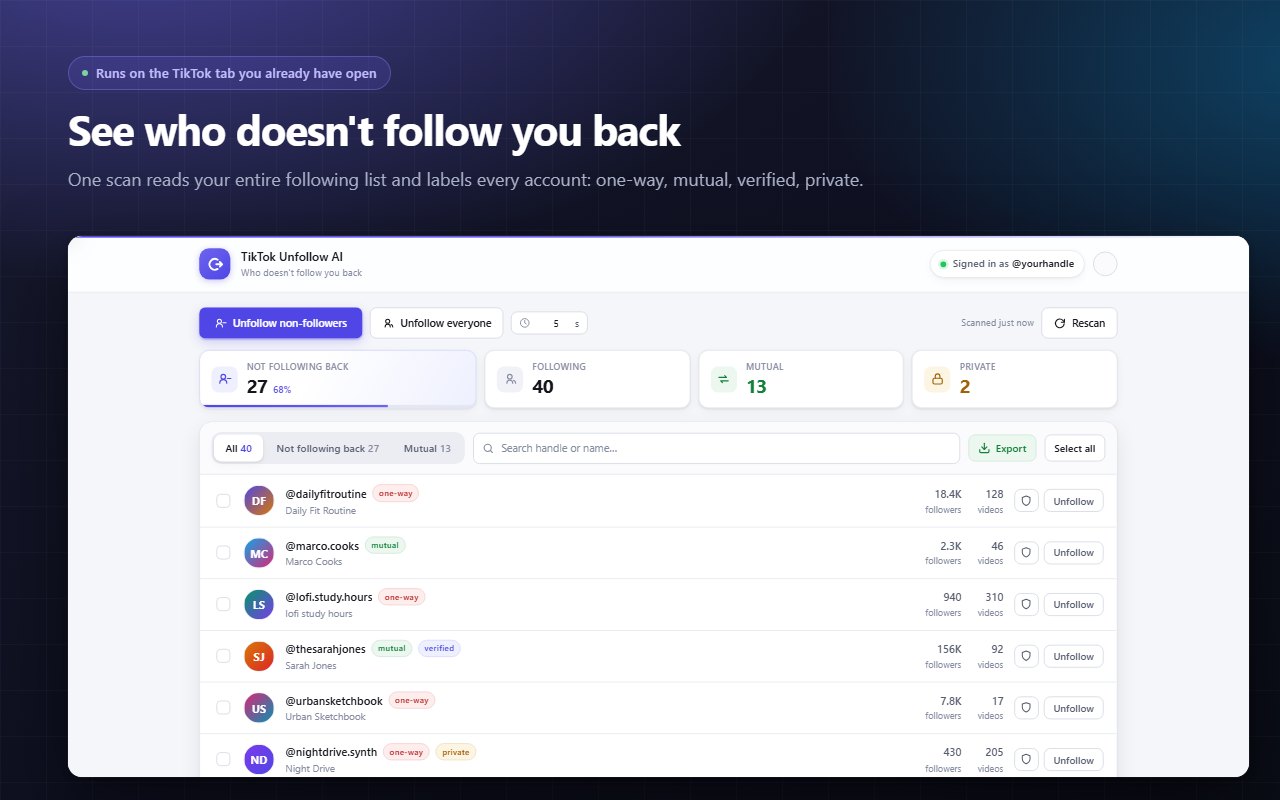
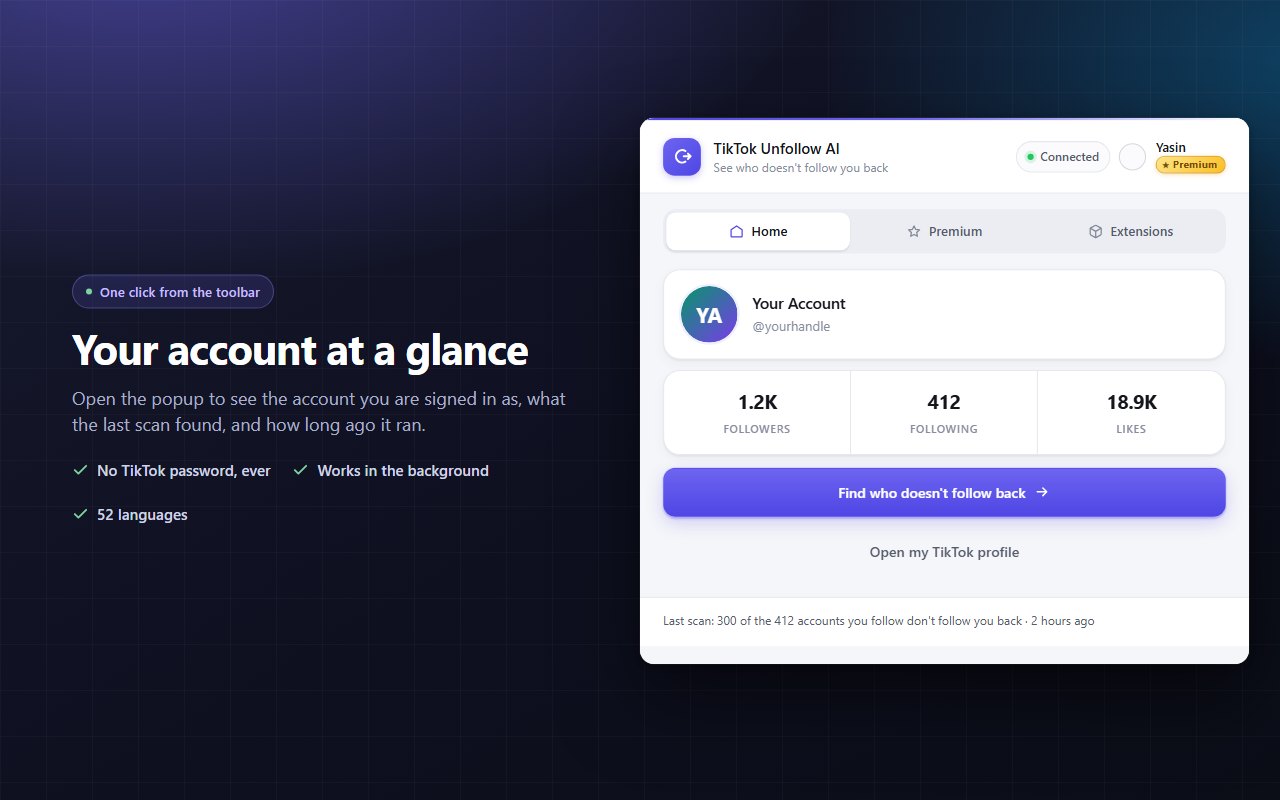
TikTok has no unfollow all button. This free Chrome extension reads your following list, shows you exactly who does not follow you back, and handles the rest — auto unfollow at a pace you set, while you go and do something else. Works on tiktok.com in your own browser. No TikTok password, ever.

  • No TikTok password
  • You set the pace
  • 52 languages
  • 159+ users
Wall of love

Loved by real users.

5 · 12 ratings on the Chrome Web Store
Rin Saito
Rin Saito

i love it

Posted on Chrome Web Store See on Store
Sep 2026
Abdullah Alyati
Abdullah Alyati

nice extension

Posted on Chrome Web Store See on Store
Sep 2026
Soref Sixel
Soref Sixel

Very useful and easy to use

Posted on Chrome Web Store See on Store
Sep 2026
Aygün Kalafat
Aygün Kalafat

This extension makes unfollowing people on TikTok so much easier. It works as expected and saves me a lot of time. Simple, useful, and easy to use!

Posted on Chrome Web Store See on Store
Aug 2026
Metin Dikmen
Metin Dikmen

Realllllly handy for getting rid of accounts I don't follow anymore. Saved me a lot of time compared to doing it one by one.

Posted on Chrome Web Store See on Store
Aug 2026
Dijitarya Reklam Ajansı

The interface is pretty straightforward and the whole process is much faster than manually unfollowing people.

Posted on Chrome Web Store See on Store
Aug 2026
NMO ELEKTRİK
NMO ELEKTRİK

Really simple to use. I didn't have to figure out a bunch of settings or anything.

Posted on Chrome Web Store See on Store
Aug 2026
Kara Kedi
Kara Kedi

Honestly pretty handy. I had quite a few people to unfollow and this made the process much quicker.

Posted on Chrome Web Store See on Store
Aug 2026
Osman Muratoğulları
Osman Muratoğulları

This made cleaning up my following list so much easier. Doing all of this manually would have taken forever.

Posted on Chrome Web Store See on Store
Aug 2026
Erdem Düzlüce
Erdem Düzlüce

Works as expected and does exactly what I needed. The progress while it’s running is also helpful.

Posted on Chrome Web Store See on Store
Aug 2026
Chrome user
Chrome user

Simple tool and very easy to use. I was able to remove a lot of accounts without going through them one by one.

Posted on Chrome Web Store See on Store
Aug 2026
Chrome user
Chrome user

Really useful for cleaning up my TikTok following list. Much easier than doing everything manually.

Posted on Chrome Web Store See on Store
Aug 2026

How to unfollow everyone on TikTok

Four steps. The first run usually takes under two minutes to set up.

1

Open TikTok in a tab

Sign in to TikTok in your browser as you normally would. One tab is enough and it can stay in the background.

2

Click the extension

It starts scanning your following list right away and fills the table as it goes — you can start reading before the scan finishes.

3

Pick who goes

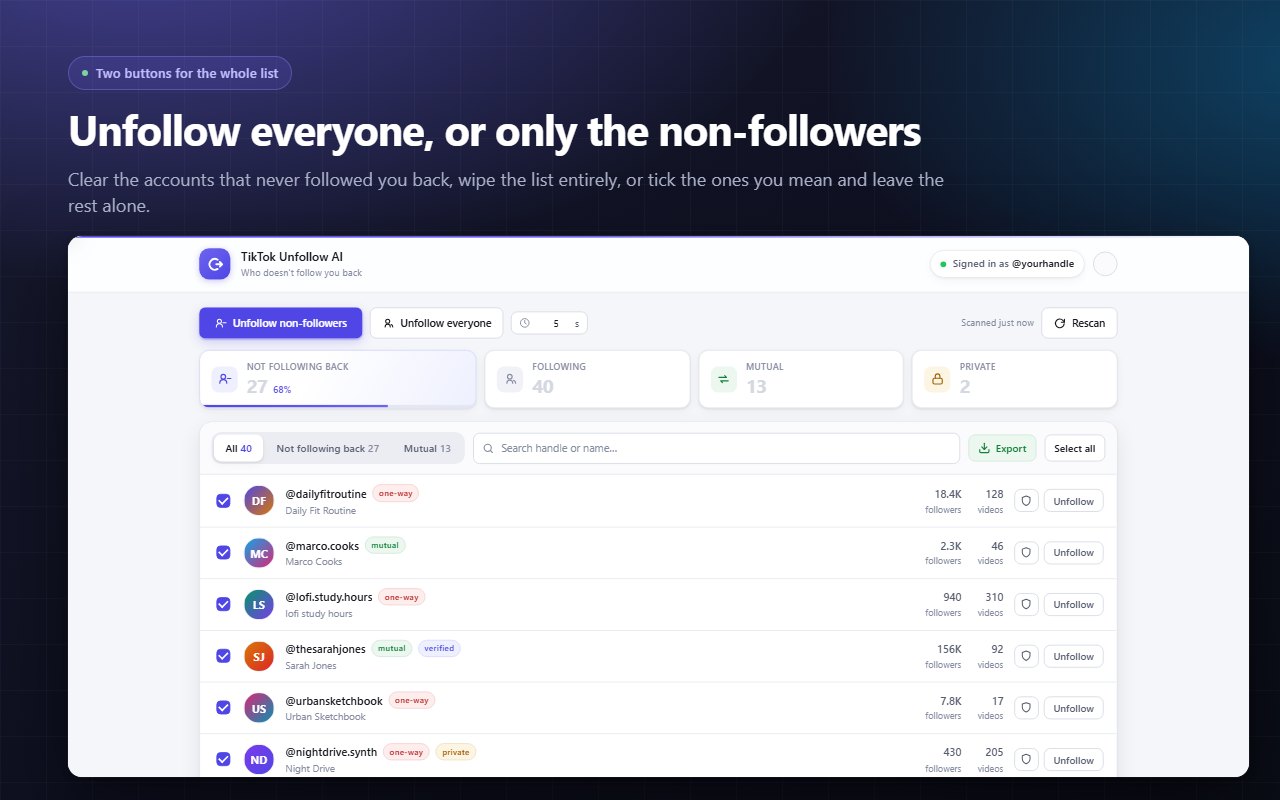
Every account is labelled one-way or mutual. Choose everyone, only the non-followers, or tick specific accounts by hand.

4

Set the pace and start

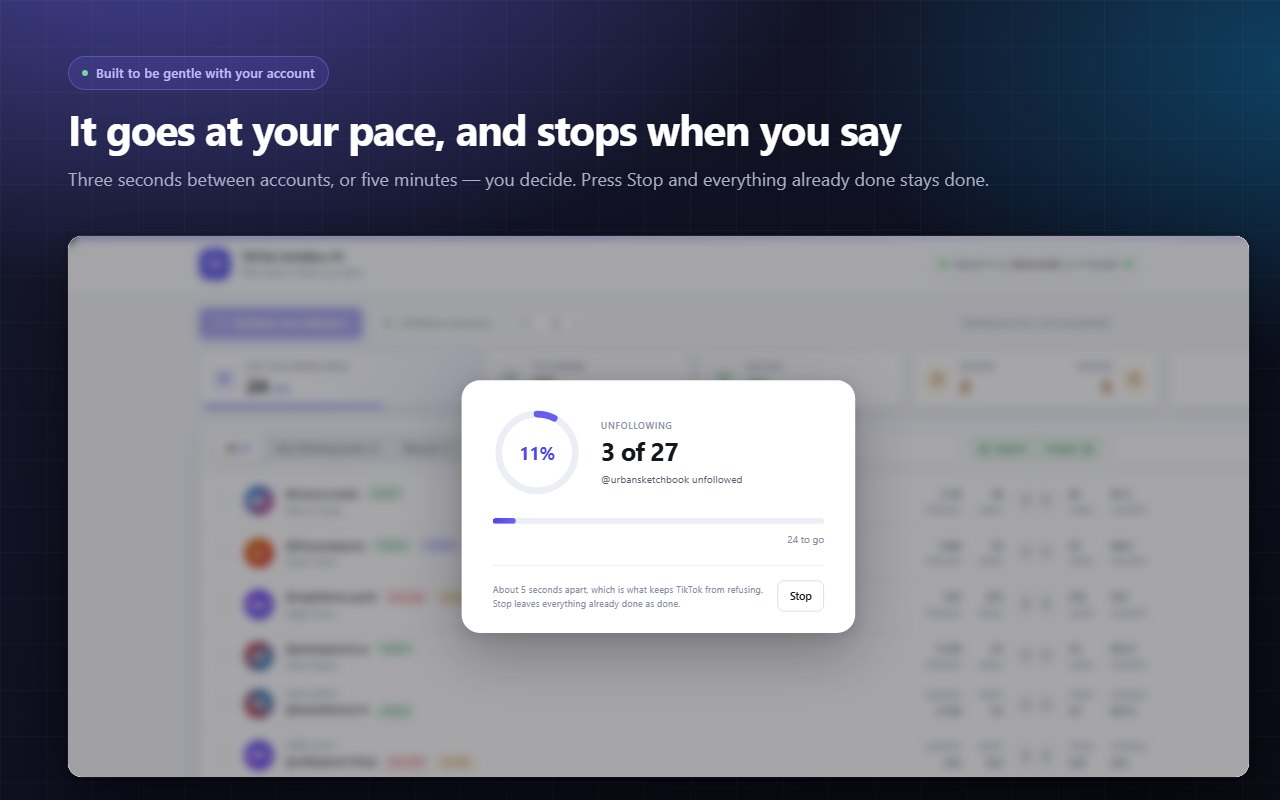
Choose the gap between accounts, confirm the count, then let it run. Watch live progress and stop any time.

Nothing happens without you asking. Every bulk action confirms first — with the number of accounts and how long the run will take. An automatic run of four hundred accounts should not be something you start by accident.

What you can do

One pass through your following list, three ways to clean it up.

Unfollow everyone

Clear your entire following list in one run — no tapping through hundreds of profiles.

Only the non-followers

Keep the accounts that follow you back and drop the ones that never did.

Or just a few

Tick the specific accounts you mean and leave everything else exactly as it is.

Protected list

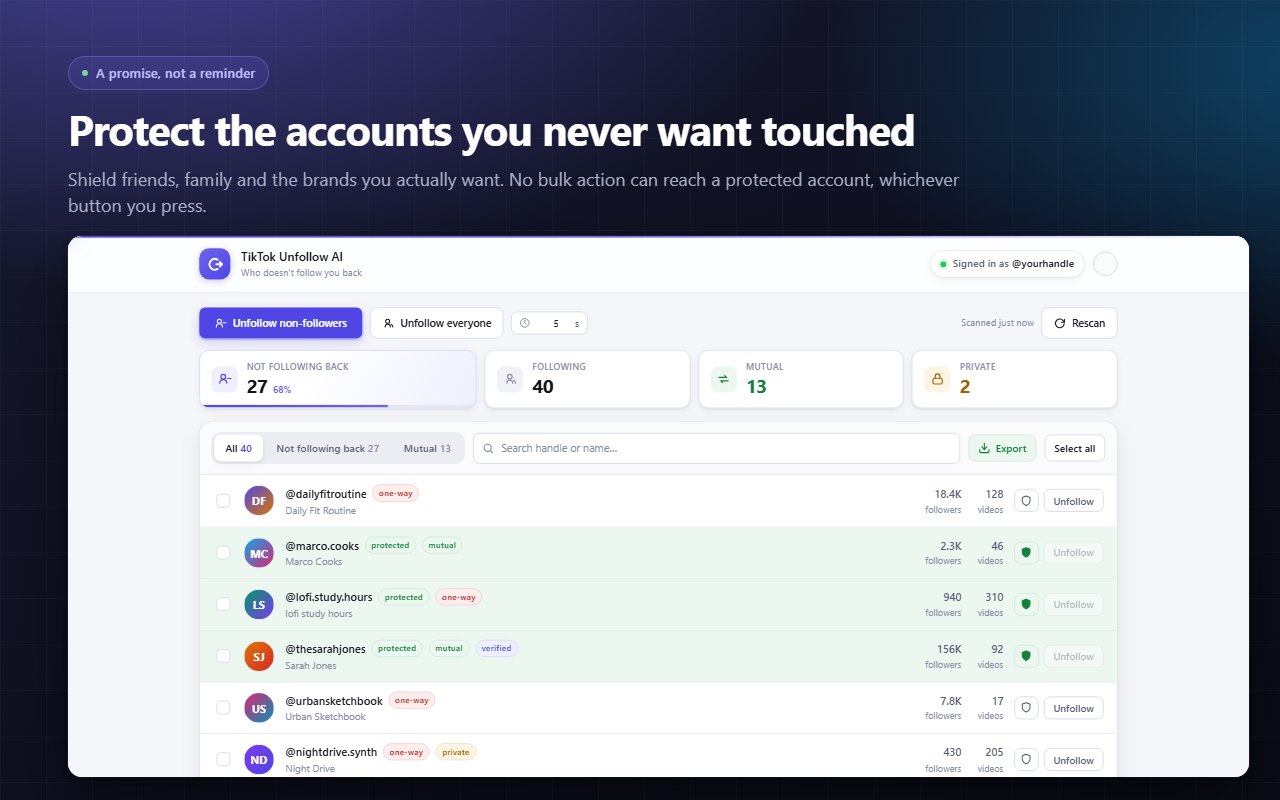
Friends, family, brands you actually want — no bulk action can reach them.

Your pace, your call

Three seconds to five minutes between accounts, with natural variation built in.

Export to Excel or CSV

Take your list with you — usernames, follower counts and follow-back status.

Search and filter

Find accounts by username or display name across three views.

52 languages

Including Spanish, Portuguese, German, French, Turkish, Arabic, Hindi and Japanese.

Inside the extension

Click any screenshot to enlarge.

Watch TikTok Unfollow AI in action

See how it lists your non-followers and clears them at your own pace.

TikTok Unfollow AI Chrome extension demo video preview

Built to be gentle with your account

Speed is what gets accounts restricted, so speed is yours to decide. Set the gap between accounts anywhere from three seconds to five minutes. The extension varies each interval slightly instead of firing on an exact metronome — and if TikTok refuses three times in a row it stops on its own rather than hammering a door that has just closed.

  • Adjustable delay, 3 seconds to 5 minutes
  • Randomised intervals, not a fixed rhythm
  • Auto-stop after three consecutive refusals
  • Stop any time — finished work stays finished
Set your own TikTok unfollow pace
Straight answer

Can you see who unfollowed you on TikTok?

No — and any tool promising it is guessing. TikTok does not expose unfollow events to anybody. There is no feed of "this person unfollowed you", no API for it, and no way to reconstruct it after the fact.

What TikTok does tell you is whether each account you follow currently follows you back. That is what this extension reads, and it covers most of what people are actually asking. Someone who unfollowed you shows up the same way as someone who never followed you in the first place — under "Not following back". If a mutual follow has quietly become one-way, you will see it.

What it does not do

Worth being clear about, because other tools blur these.

Does not remove or block your followers — it only unfollows accounts you follow
Never follows anyone, and will not grow an account or gain you followers
Does not post, comment, message, or read anything you have not asked it to
Cannot see private accounts, other people's lists, or anything that is not already yours

Unfollowing by hand vs. TikTok Unfollow AI

What clearing 400 accounts actually looks like either way.

 By hand in the appTikTok Unfollow AI
Unfollow all at onceNot possible — one at a timeOne run
See who doesn't follow backCheck each profile manuallyLabelled automatically
400 accountsHours of tappingRuns in the background
Protect specific accountsRemember them yourselfProtected list
Export the listNoExcel or CSV
Control the paceYour thumb3 sec – 5 min, adjustable

TikTok unfollow — frequently asked questions

The questions people actually search before installing.

Is there an app to mass unfollow on TikTok?
TikTok — or tik tok, however you spell it — has no built-in "unfollow all" button, so mass unfollowing needs a tool. TikTok Unfollow AI is a free Chrome extension that reads your following list, marks everyone who does not follow you back, and unfollows them one after another at a pace you choose. It runs in your own browser using the TikTok session you are already signed in to.
Can you unfollow everyone on TikTok at once?
Not with a single tap inside the app — TikTok requires you to open each account and confirm. This extension automates that same sequence: you pick who goes, it works through the list one account at a time and shows live progress. You can stop whenever you like, and everything already unfollowed stays unfollowed.
How do I unfollow everyone on TikTok who does not follow me back?
Open the extension with a TikTok tab signed in. It scans your following list and labels every account as one-way or mutual. Switch to the "Not following back" view, select all, and start the run. Only the accounts that never followed you back are touched.
Can you see who unfollowed you on TikTok?
No — and any tool that promises this is guessing. TikTok does not expose unfollow events to anyone. What it does expose is whether each account you follow currently follows you back. Someone who unfollowed you appears the same way as someone who never followed you: under "Not following back". If a mutual follow has quietly become one-way, you will see it there.
Will mass unfollowing get my TikTok account blocked?
Speed is what triggers restrictions, so speed is yours to set — anywhere from three seconds to five minutes between accounts. The extension varies each interval slightly instead of firing on an exact rhythm, and if TikTok refuses three times in a row it stops on its own instead of pushing against a closed door.
Do I need to give my TikTok password?
Never. There is nowhere in the extension to type a TikTok password. You sign in with Google, and the work happens through the TikTok session already open in your browser — the same session you use when you browse TikTok yourself.
Does it remove or block my followers?
No. It only unfollows accounts that you follow. It does not remove followers, block anyone, follow new accounts, post, comment, or send messages.
Can I protect certain accounts from being unfollowed?
Yes. Add friends, family or brands you actually want to a protected list and no bulk action can reach them, no matter which button you press.
Can I export my TikTok following list?
Yes. Whatever you are looking at — everyone, non-followers, or mutuals — can be exported to Excel or CSV, with usernames, display names, follower counts and follow-back status.
Is TikTok Unfollow AI free?
Yes, there is a free tier. It gives you 25 accounts on your first day and 20 more each following day, and the allowance accumulates while you are away. Premium removes the daily limit for people cleaning up very large following lists.
TikTok Unfollow AI icon

Clean up your TikTok following list

Free to install. 25 accounts on your first day, 20 more every day after — and the allowance builds up while you are away.

Add to Chrome — Free

No credit card · No TikTok password · Works on Chrome, Edge, Brave, Opera and Vivaldi

How to unfollow on TikTok: everything in one place

Why there is no "unfollow all" button on TikTok

Whether you type it tiktok or tik tok, the answer that comes back is the same everywhere: open your Following list, tap an account, tap Following, confirm, scroll, repeat. That is the only path the app gives you. There is no multi-select on most versions, no bulk action, and no way to filter by who follows you back. For an account that has been active a few years, clearing a few hundred follows by hand is an evening lost.

What "mass unfollow" actually means

A TikTok mass unfollow tool does not have a secret button that the app is hiding. It performs the same action you would — one account, then the next — but it does the clicking for you, keeps track of where it is, and applies a delay between each step so the pattern does not look automated. That last part matters more than speed: accounts get restricted for acting too fast, not for unfollowing.

Non-followers vs. everyone

Most people do not actually want to unfollow everyone on TikTok. They want to keep the mutuals and drop the rest. The extension separates those two groups before you commit to anything: three views — everyone, not following back, and mutual — with counts on each. You can clear the non-followers and never touch a friend, or wipe the list entirely if you are starting fresh.

About the accounts you want to keep

A protected list exists for exactly this. Add the accounts you never want touched — friends, family, the brands you genuinely follow — and no bulk action can reach them regardless of which button you press. It is the difference between a tool you trust with four hundred accounts and one you babysit.

Does unfollowing hurt your account?

Unfollowing is a normal action; doing four hundred of them in ninety seconds is not. TikTok watches rate, not intent. That is why the pacing control goes all the way up to five minutes between accounts and why intervals vary slightly instead of ticking like a clock. If TikTok starts refusing requests, the run stops on its own — three refusals in a row and it backs off rather than pushing.

Your password is not part of this

There is nowhere in the extension to type a TikTok password, because it never needs one. You sign in with Google, and the actual work happens through the TikTok session already open in your browser — the same session that is there when you scroll your feed. Requests leave from tiktok.com exactly as they do when you tap the button yourself.

Exporting your following list

Anything on screen can leave as a spreadsheet. Export to Excel or CSV with usernames, display names, follower counts, video counts and follow-back status — useful if you manage several accounts, run audits for clients, or simply want a record before you clear the list.

More free Chrome extensions

ChatGPT Speed Booster ChatGPT Speed Booster ChatGPT Speed Booster is a free Chrome extension that fixes slow ChatGPT performance in long conversations. ChatPilot – ChatGPT Bulk Delete, Archive & Timestamps ChatPilot – ChatGPT Bulk Delete, Archive & Timestamps Bulk delete & archive ChatGPT chats, add message timestamps and navigate conversations fast. Clean up ChatGPT in one click. X Unfollow AI – Manage Your Twitter Following List X Unfollow AI – Manage Your Twitter Following List Manage your X (Twitter) following, detect users who don't follow you back, and unfollow safely with smart filters. PromptJolt – AI Prompt Enhancer for ChatGPT, Claude & Gemini PromptJolt – AI Prompt Enhancer for ChatGPT, Claude & Gemini Rewrite any AI prompt into a clear, structured version in one click. Press Ctrl+M on ChatGPT, Claude or Gemini. 50+ languages, free. Extract AI – Email Extractor Extract AI – Email Extractor Email Extractor helps you find visible email addresses on websites and works locally with no tracking or data collection. Claude Speed Booster Claude Speed Booster Fix slow Claude.ai in long conversations. Speed Booster hides older messages to stop lag, freezing & high memory use — instantly. FeedRank – Instagram & TikTok Feed Sorter FeedRank – Instagram & TikTok Feed Sorter Sort Instagram & TikTok feeds by likes, views, comments or date. See post stats at a glance and find viral content fast. Free. Prompt Trove — Visual AI Image Prompts Gallery Prompt Trove — Visual AI Image Prompts Gallery A visual gallery of AI image prompts. Use them instantly in ChatGPT, Gemini, Sora, and Nano Banana. Clearbox — Bulk Chat & Message Deleter for Instagram Clearbox — Bulk Chat & Message Deleter for Instagram Delete all your chats and messages on Instagram in bulk. One click, and the chats you protect stay untouched. Numsift — Bulk WhatsApp Number Checker & Validator | Export to Excel Numsift — Bulk WhatsApp Number Checker & Validator | Export to Excel Bulk check which numbers are on WhatsApp. Validate lists, filter by country, spot business accounts, export to Excel or CSV. Detechtor AI - Website Technology Checker & Tech Stack Detector Detechtor AI - Website Technology Checker & Tech Stack Detector Detechtor AI checks what any website is built with — CMS & WordPress theme detector, frameworks, analytics, CDN, tech stack. ExportPal - Save & Export ChatGPT, Claude, Gemini to PDF & Word ExportPal - Save & Export ChatGPT, Claude, Gemini to PDF & Word Save & export ChatGPT, Claude, Gemini, Grok, DeepSeek & Perplexity to PDF, Word, Markdown, HTML, JSON or Image. Private & free. InkShot — Webpage Screenshot & Draw Tool InkShot — Webpage Screenshot & Draw Tool InkShot is a free screenshot Chrome extension that lets you capture full page screenshots, visible viewport, or selected areas Crawlhive — SEO Audit, Site Crawler & Technical SEO Crawlhive — SEO Audit, Site Crawler & Technical SEO Audit any page, then crawl the whole site: indexability, duplicate titles, orphan pages, click depth and Core Web Vitals. Your pages are never uploaded. SignedRise - Professional Email Signature SignedRise - Professional Email Signature Create custom and professional email signatures effortlessly with SignedRise. Perfect for personal and work emails. Clickaroo - Mouse Effect Designer Clickaroo - Mouse Effect Designer Transform your cursor with stunning click effects & animations. Perfect for streamers, presenters & content creators. Privacy Guard for WhatsApp Web Privacy Guard for WhatsApp Web Secure your WhatsApp Web with smart lock, panic button, and blur mode. Your privacy, your control.


Contact Us

contact@addonschrome.com