Chrome Extension for TikTok

TikTok Repost Remover — clear every repost in one run

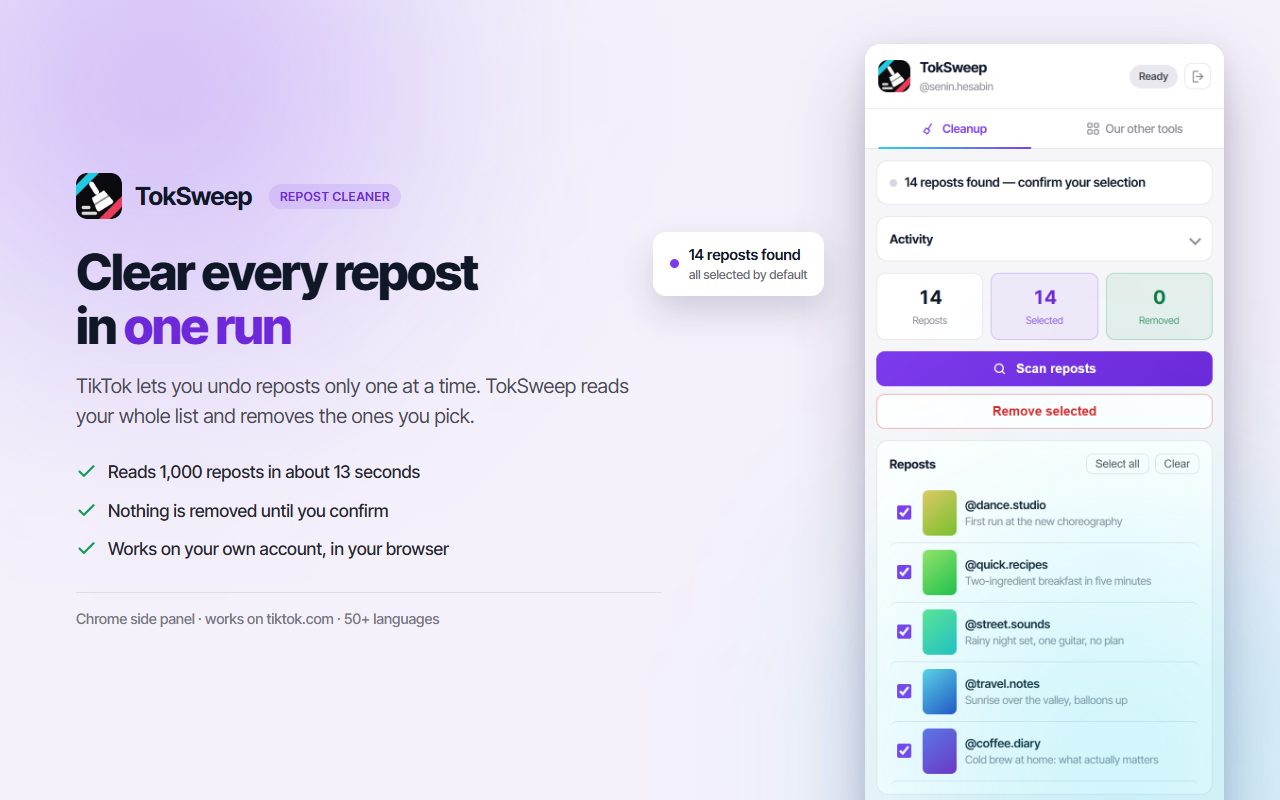
TikTok removes reposts one at a time. TokSweep opens as a side panel next to TikTok, reads your whole repost list, and un-reposts the ones you choose — at a pace you set, without ever asking for your password.

  • 1,000 reposts scanned in ~13 s
  • No password, ever
  • 50+ languages
~13 s to read 1,000 reposts
One confirmation, then it runs
50+ interface languages
0 passwords asked for

How to remove reposts on TikTok — and why it takes so long

There is no bulk option anywhere in the TikTok app. If you are looking for how to remove a repost on TikTok, the answer is the share sheet on that one video — repeat the same four taps for the next one, and the one after that. There is no screen that shows everything you have reposted.

By hand, inside TikTok

  1. Find the video you reposted
  2. Open the share sheet
  3. Tap Repost again to undo it
  4. Go back — and start over for the next one

A few hundred reposts is an afternoon of tapping, and there is no list to check your work against.

With TokSweep

  1. Open the side panel next to TikTok
  2. Scan — the whole list appears at once
  3. Uncheck anything you want to keep
  4. Confirm once, and watch it clear

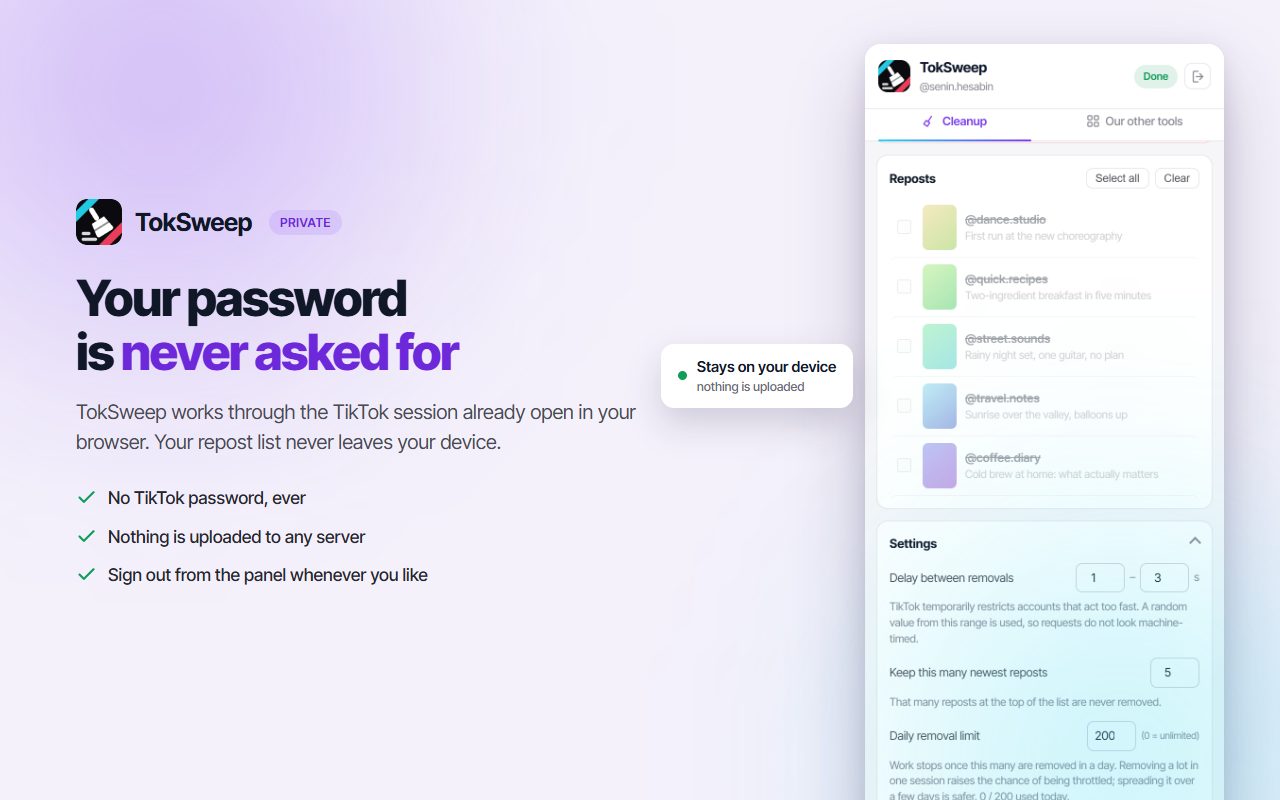
Every repost is listed with its author and caption, so you always know what you are about to remove.

Wall of love

Loved by real users.

5 · 8 ratings on the Chrome Web Store
Robert Antonia
Robert Antonia

Simple concept, easy-to-understand interface. I appreciate that it focuses on one main task.

Posted on Chrome Web Store See on Store
Oct 2026
Yaşar Kurt
Yaşar Kurt

If you like keeping your TikTok profile tidy, an extension like this can be handy.

Posted on Chrome Web Store See on Store
Oct 2026
Kadir Toprak
Kadir Toprak

Does what I expected from a TikTok repost management extension. Pretty easy to get started with.

Posted on Chrome Web Store See on Store
Oct 2026
James Mitchell
James Mitchell

Nice to have a tool like this available directly in Chrome instead of looking for another way to manage reposts.

Posted on Chrome Web Store See on Store
Oct 2026
Addons Chrome
Addons Chrome

The layout is pretty clean and simple. I prefer extensions that don't make things more complicated than they need to be.

Posted on Chrome Web Store See on Store
Oct 2026
Kara Kedi
Kara Kedi

A useful little tool for anyone who wants to keep their TikTok account more organized.

Posted on Chrome Web Store See on Store
Oct 2026
Osman Muratoğulları
Osman Muratoğulları

I like that everything is easy to understand. Makes managing my TikTok reposts less of a hassle.

Posted on Chrome Web Store See on Store
Oct 2026
Chrome user
Chrome user

Pretty straightforward to use. The interface is simple, and I didn't have to spend much time figuring things out.

Posted on Chrome Web Store See on Store
Oct 2026

A bulk repost remover that keeps you in control

Nothing happens until you confirm, and you decide the pace.

See the whole list first

Every repost with its author and caption. Scanning 1,000 of them takes about 13 seconds, and nothing is touched until you say so.

Keep what matters

Everything starts selected, because most people come here to clear the lot. Uncheck anything worth keeping, or leave the newest few untouched.

Set your own pace

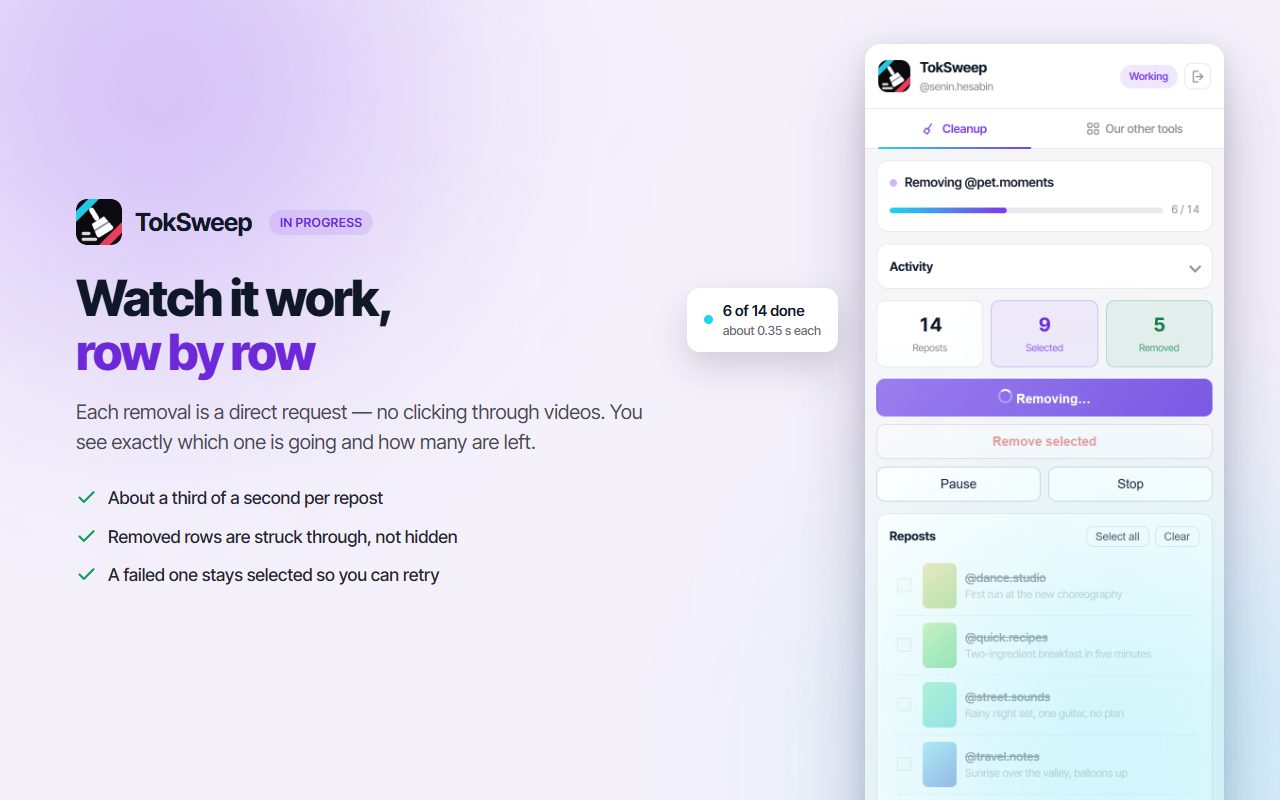
You choose the delay between removals. A random value is taken from your range each time, so requests are not machine-timed.

Spread a big cleanup

Put a daily limit on the run and clear a very large list across several days instead of in one burst.

Pause, resume, stop

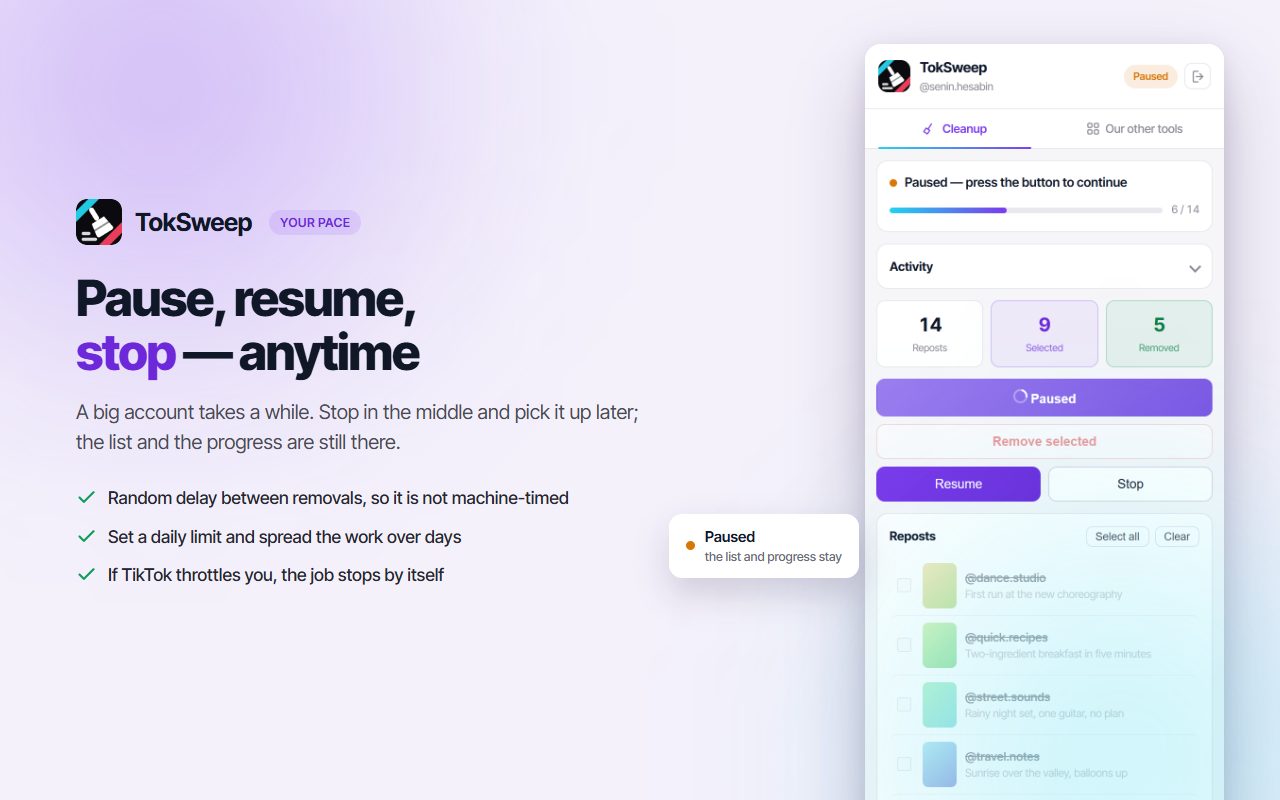
Stop at any moment. Close the panel and come back tomorrow — the scanned list and the progress are still there.

Keep the receipts

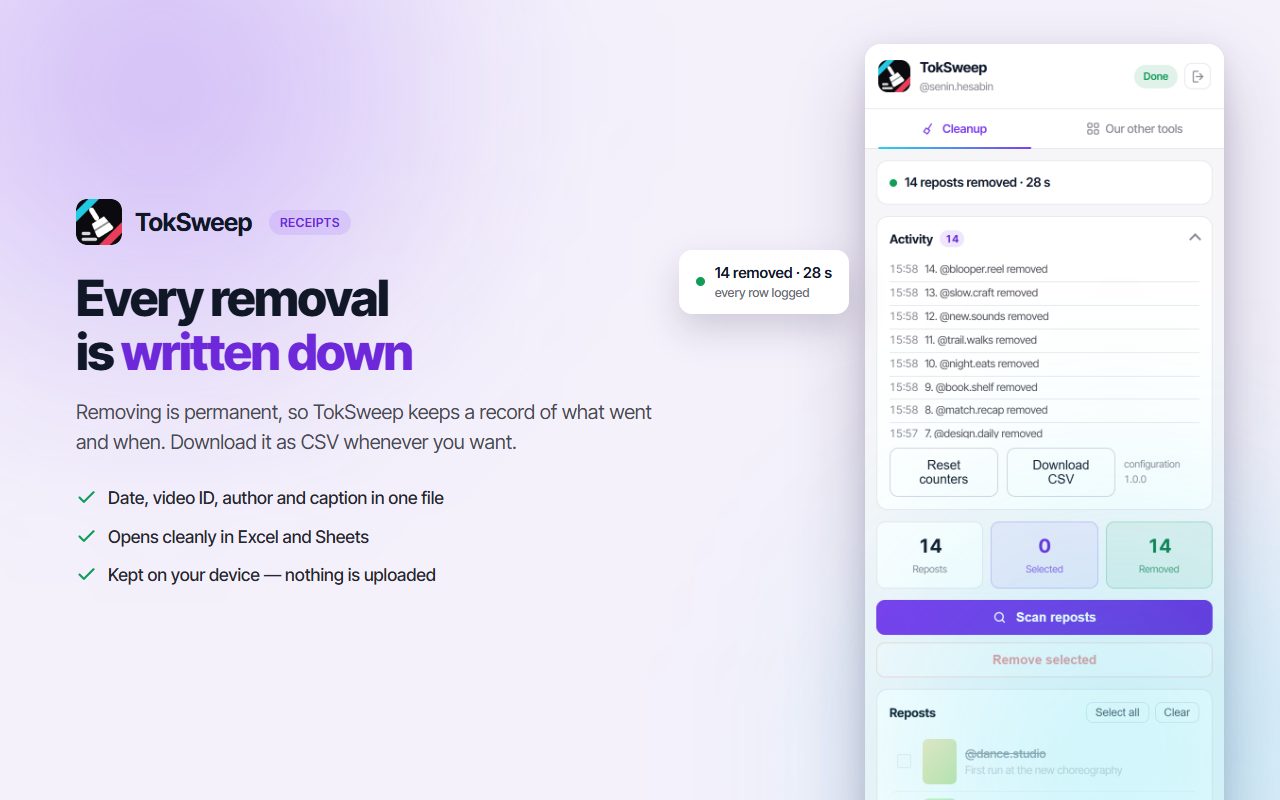
Every removal is written to an activity log you can read in the panel and download as a CSV file: date, video ID, author and caption.

Stops when TikTok pushes back

If TikTok starts throttling requests, the run stops by itself instead of forcing its way through.

Never asks for your password

TokSweep works through the TikTok session already open in your browser. Your list is read inside the page and stays on your device.

How to unrepost on TikTok in four steps

The same flow whether you are clearing twelve reposts or a few thousand.

  1. 1

    Open the panel on TikTok

    Go to tiktok.com and click the TokSweep icon. The extension opens beside TikTok, so your profile stays visible while you work.

  2. 2

    Scan your reposts

    Press Scan reposts. The full list loads with author and caption for every entry — about 13 seconds for 1,000 of them.

  3. 3

    Choose what stays

    Everything is selected by default. Uncheck what you want to keep, set a delay range, a daily limit, or how many of the newest to leave alone.

  4. 4

    Confirm and let it run

    Press Remove selected. Before anything happens the panel tells you roughly how long it will take. Pause or stop whenever you like.

Watch it clear a repost list

Scan, choose, remove — the whole run from start to finish.

Inside the panel

The list, the run, the log and the settings.

Questions about removing TikTok reposts

How do I remove a repost on TikTok?

Inside TikTok you open the video, open the share sheet and tap Repost again to undo it — one video at a time. There is no bulk option in the app, which is why clearing a few hundred reposts by hand takes hours. TokSweep reads your whole repost list in a side panel and removes the ones you select.

Can I remove all my TikTok reposts at once?

Yes. Every repost is selected by default, so you can confirm once and let it clear the whole list. You can also uncheck anything you want to keep, or leave the newest few untouched.

How do I unrepost on TikTok in bulk?

Bulk unreposting is not something the TikTok app offers. TokSweep does it from a Chrome side panel: scan the list, choose what stays, and it unreposts the rest one by one at a pace you set.

Why can’t I repost on TikTok?

The repost button can be missing on some videos because the creator turned sharing off, or because the video is restricted in your region. That is a TikTok setting, and it is separate from removing reposts you already made — which is what TokSweep handles.

Does TokSweep need my TikTok password?

No. It never asks for your TikTok password and never sees it. The extension works through the TikTok session already open in your browser, and your repost list is read inside the page and stays on your device.

Is it safe to remove a lot of reposts in a row?

You control the pace. TokSweep waits between removals using a random value from a range you set, so the requests are not machine-timed, and you can cap how many it removes per day. If TikTok starts throttling, the run stops by itself instead of pushing through.

Does removing a repost affect the original video?

No. Removing a repost only un-shares it from your own profile. The creator’s original video, its views and its comments are untouched.

What happens if I close the panel mid-run?

Nothing is lost. The scanned list and the progress are stored, so you can close the panel, come back the next day and carry on where you left off.

Clear your TikTok reposts today

Install the extension, open TikTok, and let the panel do the repeating.

Add TokSweep - TikTok Repost Remover & Bulk Cleaner to Chrome

Removing TikTok reposts: what actually works

Reposting is the fastest thing you can do on TikTok and the slowest thing to undo. A repost takes two taps; removing it takes four, and TikTok gives you no screen that lists everything you have reposted. People who have been reposting casually for a year often find several hundred entries sitting on their profile with no practical way to review them. Searching for how to delete TikTok reposts turns up the same answer everywhere — do it one by one — because that is the only thing the app itself offers.

Why there is no “remove all reposts” button

TikTok treats a repost as a share rather than as a post of your own, so it never got the bulk management that videos and drafts have. The only official route is the share sheet on each individual video — what people usually mean when they search for how to unrepost on TikTok, or how to unrepost a TikTok video. That is fine for undoing a repost you regretted a minute ago, and unworkable for cleaning up a profile.

What a repost remover should do

The risky part of any bulk tool is that it acts faster than you can check. A repost remover worth installing should show you the full list before anything is removed, let you take entries off that list, and move at a pace you chose rather than as fast as the network allows. It should also be able to stop: halfway through a long run you may want to pause, close the browser, and pick it up the next day without losing your place.

TokSweep is built around those four things. The list comes first and is always visible. Selection is yours. The delay between removals is a range you set, and a random value inside that range is used each time, so the run does not look machine-timed. Pausing, resuming and stopping work at any point, and the scanned list survives closing the panel. Used that way it is less a bulk button than a TikTok repost cleaner you stay in charge of.

Privacy: what leaves your computer

Nothing about your repost list does. TokSweep never asks for your TikTok password and has no way to receive it; it works through the session you already have open in the browser, the same way the TikTok website itself does. The list is read inside the page and stays on your device, and the activity log is a local file you can export as CSV whenever you want a record.

Does removing a repost hurt the creator?

No. Un-reposting is the exact reverse of reposting: it removes the share from your own profile and nothing else. The original video, its view count and its comments are not affected in any way, and the creator is not notified.

Working at scale

Large accounts are where hand-clearing stops being realistic. Scanning a thousand reposts takes about thirteen seconds, so even a very long list is readable in one sitting. For the removal itself, pace matters more than speed: a daily limit lets a multi-thousand cleanup run over several days, and if TikTok starts throttling requests the run halts by itself rather than hammering at a closed door.

Other extensions from AddonsChrome

Instagram Unfollow AI - Manage Unfollowers Effortlessly

Instagram Unfollow AI - Manage Unfollowers Effortlessly

Instagram Unfollow AI detects those who don't follow you back and helps you unfollow them to…

X Unfollow AI – Manage Your Twitter Following List

X Unfollow AI – Manage Your Twitter Following List

Manage your X (Twitter) following, detect users who don't follow you back, and unfollow safely…

TikTok Unfollow AI - Mass & Auto Unfollow All, Everyone & Non-Followers

TikTok Unfollow AI - Mass & Auto Unfollow All, Everyone & Non-Followers

See who doesn't follow you back on TikTok, then bulk unfollow all, everyone or only…

WASendly – WhatsApp Bulk Message Sender

WASendly – WhatsApp Bulk Message Sender

Send bulk and automated WhatsApp messages safely and easily with WASendly.

WASendly – WhatsApp Contacts Extractor

WASendly – WhatsApp Contacts Extractor

Easily export WhatsApp contacts and group members to Excel, CSV, or vCard.

TeleSendly - Telegram Bulk Sender, Scraper & Member Adder

TeleSendly - Telegram Bulk Sender, Scraper & Member Adder

Send bulk Telegram messages, scrape group members to Excel and add members to groups. Safe…

Followgap - Instagram Unfollowers Tracker & Unfollow Non-Followers

Followgap - Instagram Unfollowers Tracker & Unfollow Non-Followers

Find who doesn't follow you back on Instagram. Track unfollowers & mass unfollow non-followers…

FollowStack – Instagram Toolkit for Desktop

FollowStack – Instagram Toolkit for Desktop

Instagram toolkit for desktop. Track unfollowers, upload stories from PC, download media, and…

Rosterbox - IG Follower & Following Export List to CSV, Excel

Rosterbox - IG Follower & Following Export List to CSV, Excel

Export IG follower and following lists, likes and comments to CSV, Excel or JSON in one click…

Roostbox - Twitter/X Exporter: Tweets, Followers, Bookmarks & Archive

Roostbox - Twitter/X Exporter: Tweets, Followers, Bookmarks & Archive

Export tweets, replies, likes, bookmarks and followers from any Twitter/X account to Excel…

Postwash - Delete Tweets, Likes & Reposts for X

Postwash - Delete Tweets, Likes & Reposts for X

Delete tweets, likes and reposts on X in bulk. Preview first, back up to CSV, and every…

ExportPal - Save & Export ChatGPT, Claude, Gemini to PDF & Word

ExportPal - Save & Export ChatGPT, Claude, Gemini to PDF & Word

Save & export ChatGPT, Claude, Gemini, Grok, DeepSeek & Perplexity to PDF, Word, Markdown…

TokExport - TikTok Follower List, Following & Comment Export Tool

TokExport - TikTok Follower List, Following & Comment Export Tool

Export TikTok follower and following lists, video comments and post stats to CSV or Excel…

ChatGPT Speed Booster

ChatGPT Speed Booster

ChatGPT Speed Booster is a free Chrome extension that fixes slow ChatGPT performance in long…

Instagram Follower Export Tool

Instagram Follower Export Tool

Export Instagram followers, following, likes, and comments to CSV or Excel in one click

PromptJolt – AI Prompt Enhancer for ChatGPT, Claude & Gemini

PromptJolt – AI Prompt Enhancer for ChatGPT, Claude & Gemini

Rewrite any AI prompt into a clear, structured version in one click. Press Ctrl+M on ChatGPT…

IGFollow AI - Auto Follow

IGFollow AI - Auto Follow

IGFollow AI is an AI-powered tool to grow your Instagram. Boost engagement and expand your…

Backgap - Threads Followers Tracker & Mass Unfollow

Backgap - Threads Followers Tracker & Mass Unfollow

See who doesn't follow you back on Threads, protect the accounts you want to keep, and tidy…

Backly — Unfollower Tracker for Instagram

Backly — Unfollower Tracker for Instagram

See exactly who doesn’t follow you back on Instagram, protect the accounts you care about, and…

FeedRank – Instagram & TikTok Feed Sorter

FeedRank – Instagram & TikTok Feed Sorter

Sort Instagram & TikTok feeds by likes, views, comments or date. See post stats at a glance…

Instagram Auto Follow

Instagram Auto Follow

AI-powered Instagram auto follow tool to boost engagement, grow followers, and expand your…

Claude Speed Booster

Claude Speed Booster

Fix slow Claude.ai in long conversations. Speed Booster hides older messages to stop lag…

ChatPilot – ChatGPT Bulk Delete, Archive & Timestamps

ChatPilot – ChatGPT Bulk Delete, Archive & Timestamps

Bulk delete & archive ChatGPT chats, add message timestamps and navigate conversations fast…

Extract AI – Email Extractor

Extract AI – Email Extractor

Email Extractor helps you find visible email addresses on websites and works locally with no…

Prompt Trove — Visual AI Image Prompts Gallery

Prompt Trove — Visual AI Image Prompts Gallery

A visual gallery of AI image prompts. Use them instantly in ChatGPT, Gemini, Sora, and Nano…

Crawlhive — SEO Audit, Site Crawler & Technical SEO

Crawlhive — SEO Audit, Site Crawler & Technical SEO

Audit any page, then crawl the whole site: indexability, duplicate titles, orphan pages, click…

Privacy Guard for WhatsApp Web

Privacy Guard for WhatsApp Web

Secure your WhatsApp Web with smart lock, panic button, and blur mode. Your privacy, your…

Clickaroo - Mouse Effect Designer

Clickaroo - Mouse Effect Designer

Transform your cursor with stunning click effects & animations. Perfect for streamers…

InkShot — Webpage Screenshot & Draw Tool

InkShot — Webpage Screenshot & Draw Tool

InkShot is a free screenshot Chrome extension that lets you capture full page screenshots…

Detechtor AI - Website Technology Checker & Tech Stack Detector

Detechtor AI - Website Technology Checker & Tech Stack Detector

Detechtor AI checks what any website is built with — CMS & WordPress theme detector…

Numsift — Bulk WhatsApp Number Checker & Validator | Export to Excel

Numsift — Bulk WhatsApp Number Checker & Validator | Export to Excel

Bulk check which numbers are on WhatsApp. Validate lists, filter by country, spot business…

Clearbox — Bulk Chat & Message Deleter for Instagram

Clearbox — Bulk Chat & Message Deleter for Instagram

Delete all your chats and messages on Instagram in bulk. One click, and the chats you protect…

Araç Data Merkezi — Used Car Valuation & Damage Check for Sahibinden

Araç Data Merkezi — Used Car Valuation & Damage Check for Sahibinden

See what a car on Sahibinden is really worth: market value for the exact trim, how damage and…

SignedRise - Professional Email Signature

SignedRise - Professional Email Signature

Create custom and professional email signatures effortlessly with SignedRise. Perfect for…

TeleCache - Telegram Video & Media Downloader

TeleCache - Telegram Video & Media Downloader

Download Telegram videos, photos, audio and files in bulk. Filter by type, date, size or…

Contact Us

contact@addonschrome.com