
Only what your account can open
Vidtow reaches the videos and photos your own account can already open. If you cannot watch a video, it cannot be saved.
 VidtowChrome extension
Vidtow puts a download button on the video you are watching. Keep Facebook videos and reels as one MP4 with the sound, in HD up to 720p, and save photos in their largest version. One click, inside the tab you are already logged in to.
The video page, the news feed, a page’s video list or a pasted link: one button, one file.
Open a video or a reel and a Download video button waits at the lower right of the page. Switch it off in Settings if you prefer the toolbar.
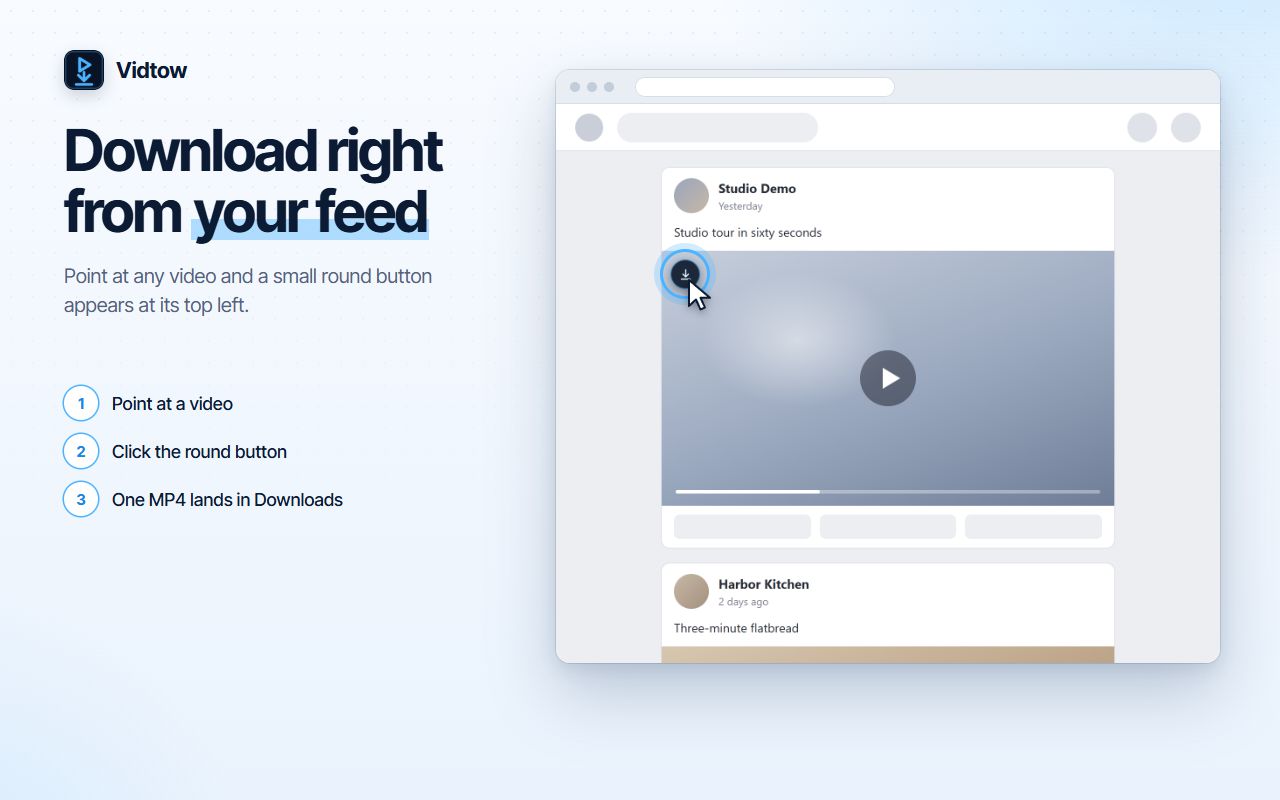
Point at any video in the news feed or a page’s video list: a small round button shows at its top left, away from the three-dot menu.
Open a reel and press the button. Vidtow saves the reel you are watching, not the next one in the list.
The video comes as one ready MP4 file with the sound in it. HD up to 720p, or SD for a smaller file. Nothing to merge.
Open a photo or point at a picture in a post. The largest version the site offers is saved as JPG, PNG or WebP.
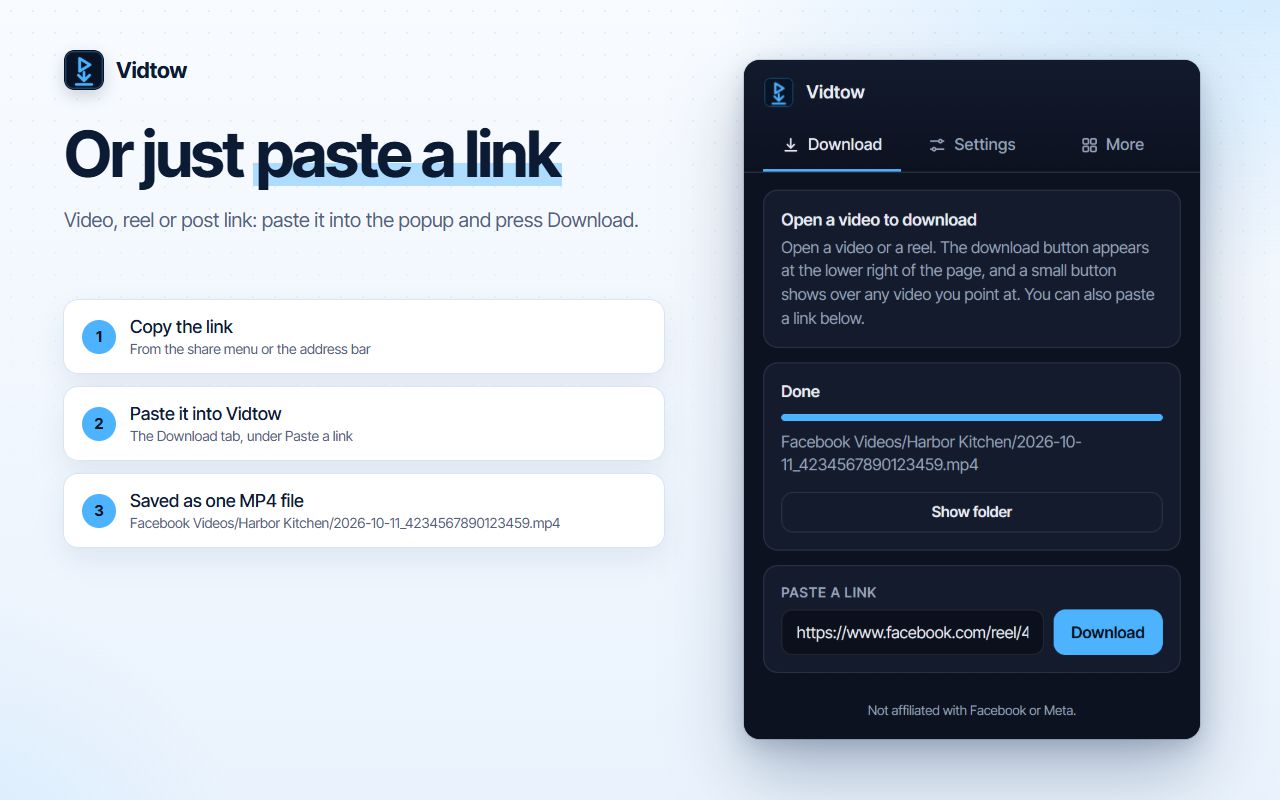
Paste the address of a video, a reel, a photo or a post into the popup and press Download.
Logged out, requests limited, not found, or no file offered: when a download stops, you read why in one sentence.
The popup, the buttons and the messages speak your browser’s language, from Arabic to Vietnamese.
The same flow for a video, a reel and a photo.
Install the extension, then log in to Facebook in Chrome as usual. There is no Vidtow account to create.
A Download video button appears at the lower right of the page. In the feed, point at a video and a small round button shows at its top left.
Or click the Vidtow icon in the toolbar and paste a link. Vidtow picks HD or SD, as you chose in Settings.
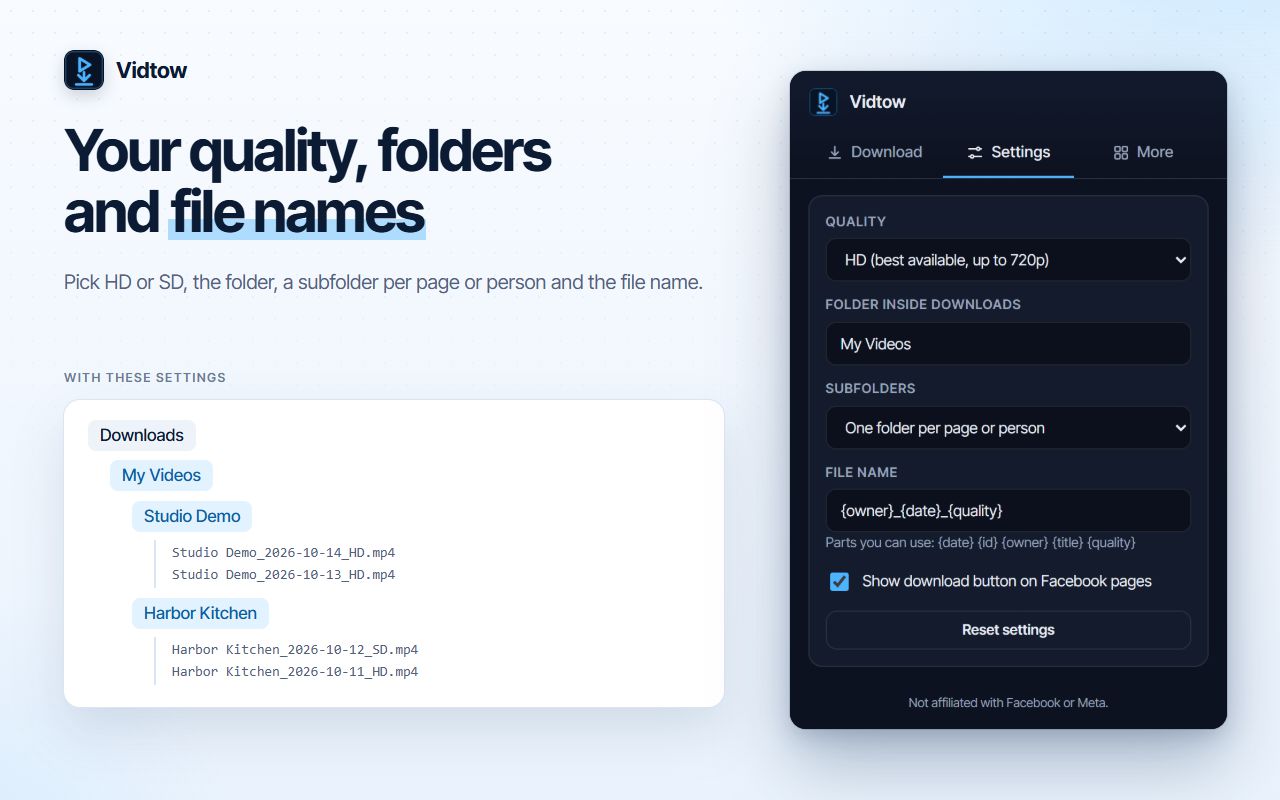
One MP4 with the sound, in a folder named after the page or person who posted it.
Some video downloaders bundle a converter of several megabytes to join picture and sound. Vidtow needs none: the site already offers each video as one MP4 with the sound, so the extension stays at about 350 KB and the file is ready the moment it lands.
The button on a video page, the feed button, a pasted link, your settings and the two permissions.
The honest limits, so nothing surprises you after you press the button.
Vidtow reaches the videos and photos your own account can already open. If you cannot watch a video, it cannot be saved.
Higher qualities exist only as separate picture and sound streams, so Vidtow saves the best quality the site gives as one ready file.
Videos inside sponsored posts show no link to the video itself, so the button tells you it could not tell which video it is.
Stories and short fb.watch links are not supported yet. Open the video on Facebook first, then press the button.
If the site starts limiting requests, Vidtow tells you. Wait a few minutes and try again. No tool can control how a site reacts.
Save only what you have the right to keep. Each save is one file you can see in Downloads; nothing keeps running afterwards.
Videos, reels, photos, links, quality and what Vidtow asks of your browser.
Add Vidtow to Chrome and log in to Facebook as usual. Open a video or a reel: a Download video button appears at the lower right of the page. Press it and one MP4 file goes into your Downloads folder. In the news feed, point at any video and use the small round button that shows at its top left.
Yes. Open a reel and press the button on the page. Vidtow saves the reel you are watching, not the next one in the list. You can also paste a reel link into the popup.
Yes. Open a photo, or point at a picture in a post, and press the button. Vidtow saves the largest version of the image the site offers, as a JPG, PNG or WebP file.
Every video is saved as one MP4 file with the sound in it. In Settings you choose HD, the best the site offers for that video up to 720p, or SD for a smaller file. Videos that exist in a higher quality only as separate picture and sound streams are saved in the best quality the site gives as a ready file.
Yes. Click the Vidtow icon in the toolbar, paste the address of a video, a reel, a photo or a post into the popup and press Download. Watch links, reel links and a page’s video links all work. Short fb.watch links are not supported yet: open the video on Facebook first.
Into a folder inside Downloads, with one subfolder per page or person by default. In Settings you can name the folder, put everything into one folder instead, and write your own file-name template from the date, the video ID, the page or person, the title and the quality.
No. Vidtow never asks for your password and has no sign-up or account of its own. It works inside the Facebook tab you are already logged in to, with your own session, and reaches only the videos and photos your own account can already open.
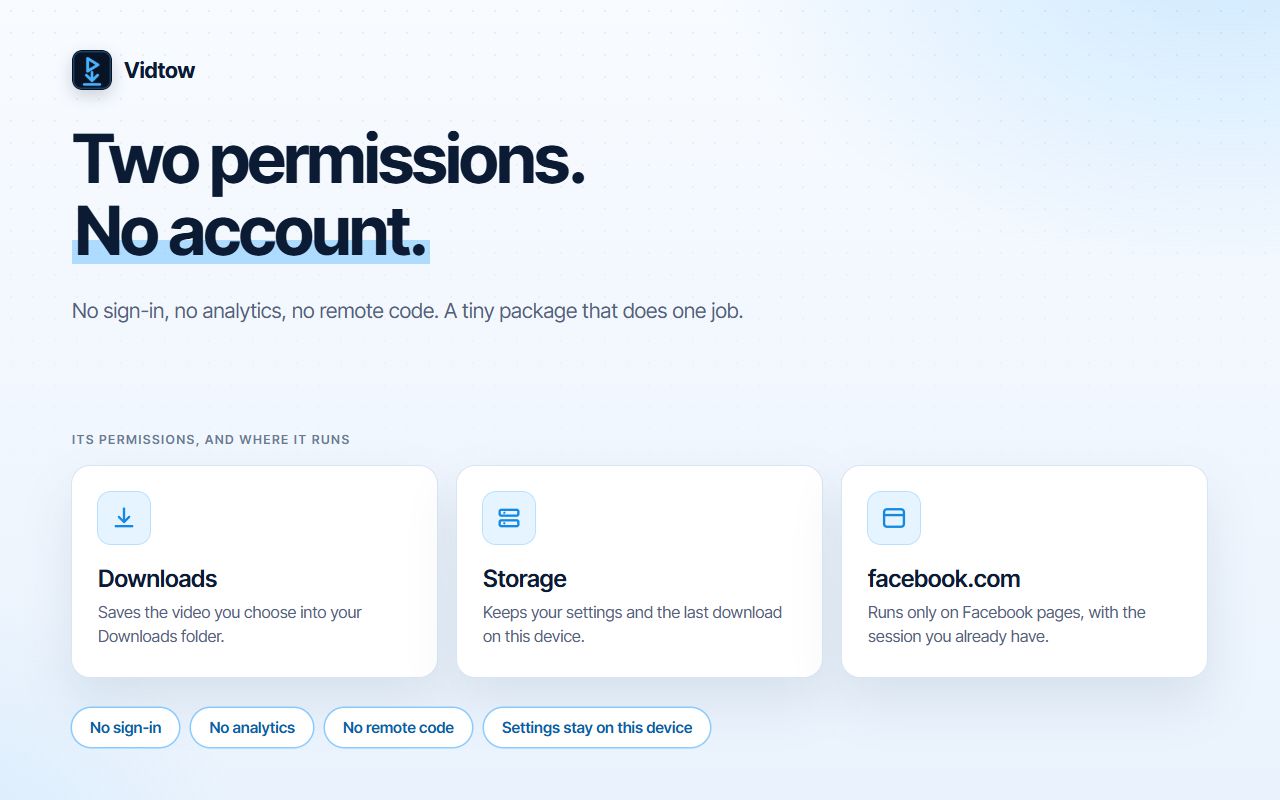
Two browser permissions: downloads and storage. It runs on facebook.com only and does not ask to read your data on every website you visit. What you watch and what you save is not sent to us; there is no analytics, no ads and no remote code. Your settings stay in your browser.
On some posts, such as sponsored ones, the page shows no link to the video itself, so Vidtow cannot tell which video it is. Open the video on its own page and press the button there.
Read the message: Vidtow tells you when you are logged out, when the site is limiting requests, when the video was not found, or when no file is offered for it. Reload the tab if it asks you to and press the button again. If requests are limited, wait a few minutes before the next download.
Not yet. Stories are not supported in this version. Videos, reels and photos that your own account can open are.
No. Vidtow is an independent extension. It is not affiliated with, endorsed by, or connected to Meta Platforms, Inc. Save only what you have the right to keep, and respect the people who made it.
Add Vidtow to Chrome, open a Facebook video and press the button. One MP4 with the sound, two permissions, no account.
Add to ChromeVidtow is a Facebook video downloader extension for Chrome. The site gives you no button to keep a video you like, so Vidtow adds one, right on the video you are watching. It works inside the tab you are already logged in to, with your own session, and the file goes straight into your Downloads folder. There is nothing to sign up for.
On a video, reel or photo page the button waits at the lower right of the page and reads “Download video” or “Download photo”. Everywhere else, such as the news feed or a page’s video list, point at a video or a picture and a small round button shows at its top left. It sits away from the three-dot menu, so it never covers a control of the site.
Open a reel and press the button on the page. Vidtow saves the reel you are watching, not the next one in the list, as one MP4 file with the sound.
Every video is saved as one MP4 file with the sound in it, so there is nothing to merge and no converter inside the extension. Choose HD, the best the site offers for that video up to 720p, or SD for a smaller file. Higher qualities exist on the site only as separate picture and sound streams; Vidtow saves the best quality offered as a ready file.
Open a photo, or point at a picture in a post, and press the button. Vidtow saves the largest version of the image the site offers, as a JPG, PNG or WebP file.
Click the Vidtow icon in the toolbar and paste the address of a video, a reel, a photo or a post into the popup. Watch links, reel links and a page’s video links all work. Short fb.watch links are not supported yet.
Files land in a folder inside Downloads, with one subfolder per page or person by default. In Settings you can rename the folder, keep everything in one folder, and build a file-name template from the date, the video ID, the page or person, the title and the quality.
Vidtow asks for two browser permissions, downloads and storage, and runs on one site instead of asking to read your data on every website you visit. It has no account, no password prompt, no analytics, no ads and no remote code, and what you watch and save is not sent to us. Your settings stay in your browser and disappear when you remove the extension. The only other request is a plain request for the list of the developer’s other extensions, when you open the More tab.
If the site starts limiting requests, Vidtow stops and tells you; wait a few minutes and try again. Save only what you have the right to keep, and respect the people who made it.
Vidtow is an independent extension. It is not affiliated with, endorsed by, sponsored by, or in any way officially connected to Meta Platforms, Inc. or any of its subsidiaries or affiliates. “Facebook” and related names, marks and logos are trademarks of their respective owners and appear here only to describe what this extension works with.
 Instagram Unfollow AI - Manage Unfollowers Effortlessly
Instagram Unfollow AI detects those who don't follow you back and helps you unfollow them to…
 X Unfollow AI – Manage Your Twitter Following List
Manage your X (Twitter) following, detect users who don't follow you back, and unfollow safely…
 TikTok Unfollow AI - Mass & Auto Unfollow All, Everyone & Non-Followers
See who doesn't follow you back on TikTok, then bulk unfollow all, everyone or only…
 WASendly – WhatsApp Bulk Message Sender
Send bulk and automated WhatsApp messages safely and easily with WASendly.
 Contactdock – WhatsApp Contacts Extractor
Easily export WhatsApp contacts and group members to Excel, CSV, or vCard.
 TeleSendly - Telegram Bulk Sender, Scraper & Member Adder
Send bulk Telegram messages, scrape group members to Excel and add members to groups. Safe…
 Followgap - Instagram Unfollowers Tracker & Unfollow Non-Followers
Find who doesn't follow you back on Instagram. Track unfollowers & mass unfollow non-followers…
 FollowStack – Instagram Toolkit for Desktop
Instagram toolkit for desktop. Track unfollowers, upload stories from PC, download media, and…
 Rosterbox - IG Follower & Following Export List to CSV, Excel
Export IG follower and following lists, likes and comments to CSV, Excel or JSON in one click…
 Roostbox - Twitter/X Exporter: Tweets, Followers, Bookmarks & Archive
Export tweets, replies, likes, bookmarks and followers from any Twitter/X account to Excel…
 Postwash - Delete Tweets, Likes & Reposts for X
Delete tweets, likes and reposts on X in bulk. Preview first, back up to CSV, and every…
 ExportPal - Save & Export ChatGPT, Claude, Gemini to PDF & Word
Save & export ChatGPT, Claude, Gemini, Grok, DeepSeek & Perplexity to PDF, Word, Markdown…
 TokExport - TikTok Follower List, Following & Comment Export Tool
Export TikTok follower and following lists, video comments and post stats to CSV or Excel…
 ChatGPT Speed Booster
 is a free Chrome extension that fixes slow ChatGPT performance in long…
 Instagram Follower Export Tool
Export Instagram followers, following, likes, and comments to CSV or Excel in one click
 TokSweep - TikTok Repost Remover & Bulk Cleaner
Remove TikTok reposts in bulk. See the full list first, pick what goes, and set your own pace…
 PromptJolt – AI Prompt Enhancer for ChatGPT, Claude & Gemini
Rewrite any AI prompt into a clear, structured version in one click. Press Ctrl+M on ChatGPT…
 IGFollow AI - Auto Follow
IGFollow AI is an AI-powered tool to grow your Instagram. Boost engagement and expand your…
 Followprune - Fake Follower Checker for Instagram
Scan your followers or the accounts you follow, spot fake and empty ones, and remove them in…
 Backgap - Threads Followers Tracker & Mass Unfollow
See who doesn't follow you back on Threads, protect the accounts you want to keep, and tidy…
 Backly — Unfollower Tracker for Instagram
See exactly who doesn’t follow you back on Instagram, protect the accounts you care about, and…
 TeleCache - Telegram Video & Media Downloader
Download Telegram videos, photos, audio and files in bulk. Filter by type, date, size or…
 FeedRank – Instagram & TikTok Feed Sorter
Sort Instagram & TikTok feeds by likes, views, comments or date. See post stats at a glance…
 Instagram Auto Follow
AI-powered Instagram auto follow tool to boost engagement, grow followers, and expand your…
 Claude Speed Booster
Fix slow Claude.ai in long conversations. Speed Booster hides older messages to stop lag…
 ChatPilot – ChatGPT Bulk Delete, Archive & Timestamps
Bulk delete & archive ChatGPT chats, add message timestamps and navigate conversations fast…
 Extract AI – Email Extractor
Email Extractor helps you find visible email addresses on websites and works locally with no…
 Prompt Trove — Visual AI Image Prompts Gallery
A visual gallery of AI image prompts. Use them instantly in ChatGPT, Gemini, Sora, and Nano…
 Crawlhive — SEO Audit, Site Crawler & Technical SEO
Audit any page, then crawl the whole site: indexability, duplicate titles, orphan pages, click…
 Privacy Guard for WhatsApp Web
Secure your WhatsApp Web with smart lock, panic button, and blur mode. Your privacy, your…
 Clickaroo - Mouse Effect Designer
Transform your cursor with stunning click effects & animations. Perfect for streamers…
 InkShot — Webpage Screenshot & Draw Tool
InkShot is a free screenshot Chrome extension that lets you capture full page screenshots…
 Detechtor AI - Website Technology Checker & Tech Stack Detector
Detechtor AI checks what any website is built with — CMS & WordPress theme detector…
 Numsift — Bulk WhatsApp Number Checker & Validator | Export to Excel
Bulk check which numbers are on WhatsApp. Validate lists, filter by country, spot business…
 Clearbox — Bulk Chat & Message Deleter for Instagram
Delete all your chats and messages on Instagram in bulk. One click, and the chats you protect…
 Araç Data Merkezi — Used Car Valuation & Damage Check for Sahibinden
See what a car on Sahibinden is really worth: market value for the exact trim, how damage and…
 Chatalbum - WhatsApp Chat Export to PDF & Excel
Save any WhatsApp Web chat as a readable file with its photos and voice notes. Everything…
 TokDraw - TikTok Giveaway Picker & Comment Picker
Pick fair, verifiable winners from TikTok video comments on a big, recordable stage: set your…
 Groupdex - Contacts & Chat Exporter for WhatsApp
Export contacts, group members and chats from WhatsApp Web to Excel or CSV. Pull phone numbers…
 Pickmint - Instagram Giveaway & Comment Picker
Instagram giveaway picker: collect a post's comments, set simple rules, pick fair winners and…
 Saveloft - Instagram Video & Story Downloader
Instagram video downloader extension for Chrome: save reels, stories and photos in HD, one…
 SignedRise - Professional Email Signature
Create custom and professional email signatures effortlessly with SignedRise. Perfect for…