
Suchetan Mukherjee
Nice and clean - Worth every penny
Posted on Chrome Web Store
See on Store
Sep 2026 Backly is a free bulk unfollow tool for Instagram. Scan your account once, then unfollow everyone on Instagram — or only the accounts that don't follow you back — at a delay you choose. It doubles as an Instagram unfollower tracker, showing exactly what changed since your last scan.

Nice and clean - Worth every penny

Very good

Very useful

INCEREIBLE

Wonderful extension. Works very well and has an easy and intuitive interface. The best I've tested.
Instagram has no bulk unfollow button — tapping Following on every profile is the only built-in route. The fast way is the free Backly Chrome extension: open instagram.com, run one scan, then press Unfollow Non-Followers to clear the one-sided follows or Unfollow Everyone to empty your following list. Backly queues the accounts and unfollows them one by one at the delay you set, skipping anyone you whitelisted — no Instagram password required.
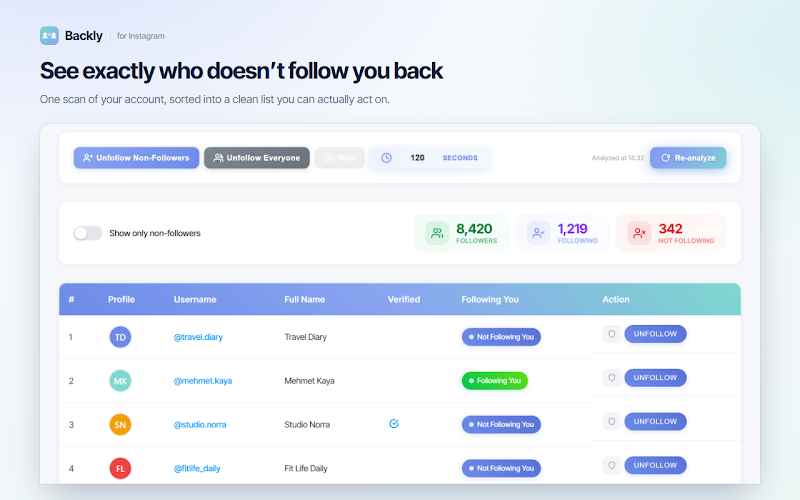
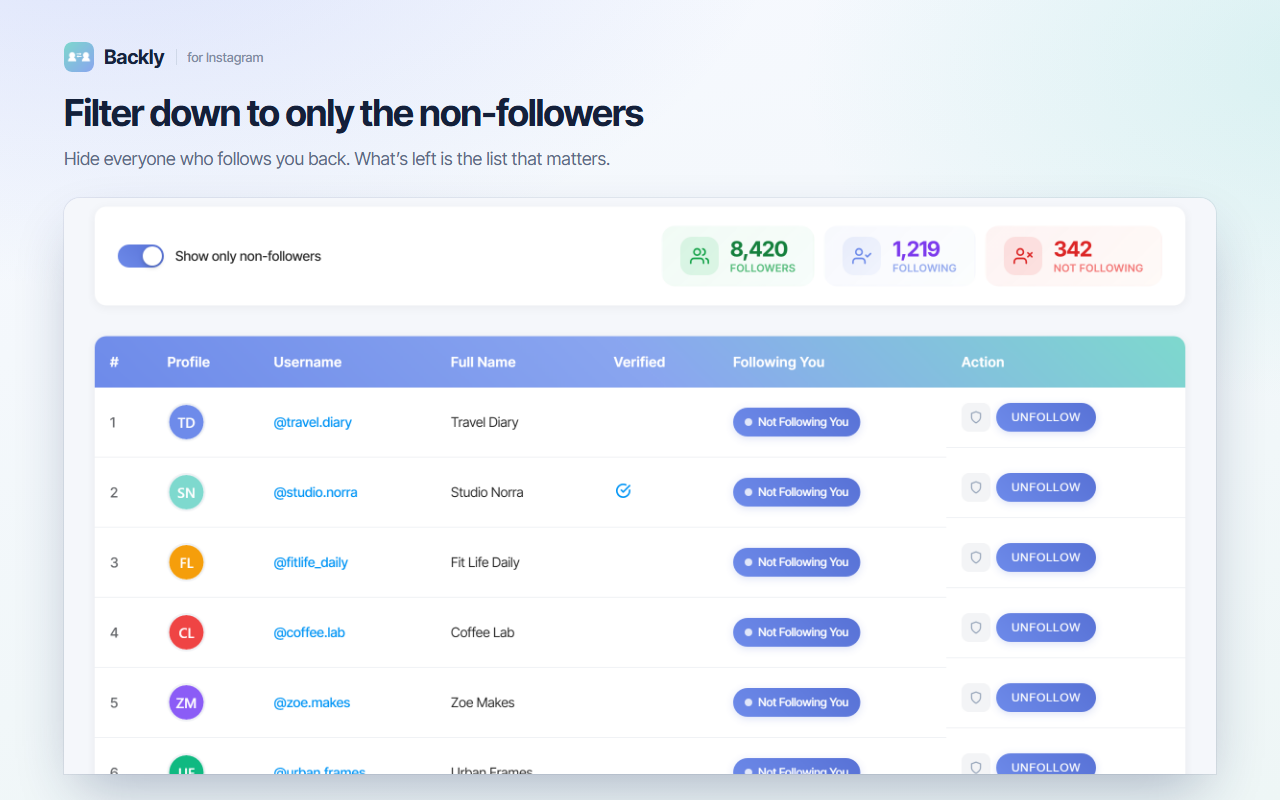
One scan sorts your whole following list into something you can act on. In the example screen above, 1,219 following breaks down into 342 accounts that aren't following back. Two buttons decide what happens next: Unfollow Non-Followers for a targeted clean-up, or Unfollow Everyone for a full reset — an Instagram massive unfollow without touching a single profile page.
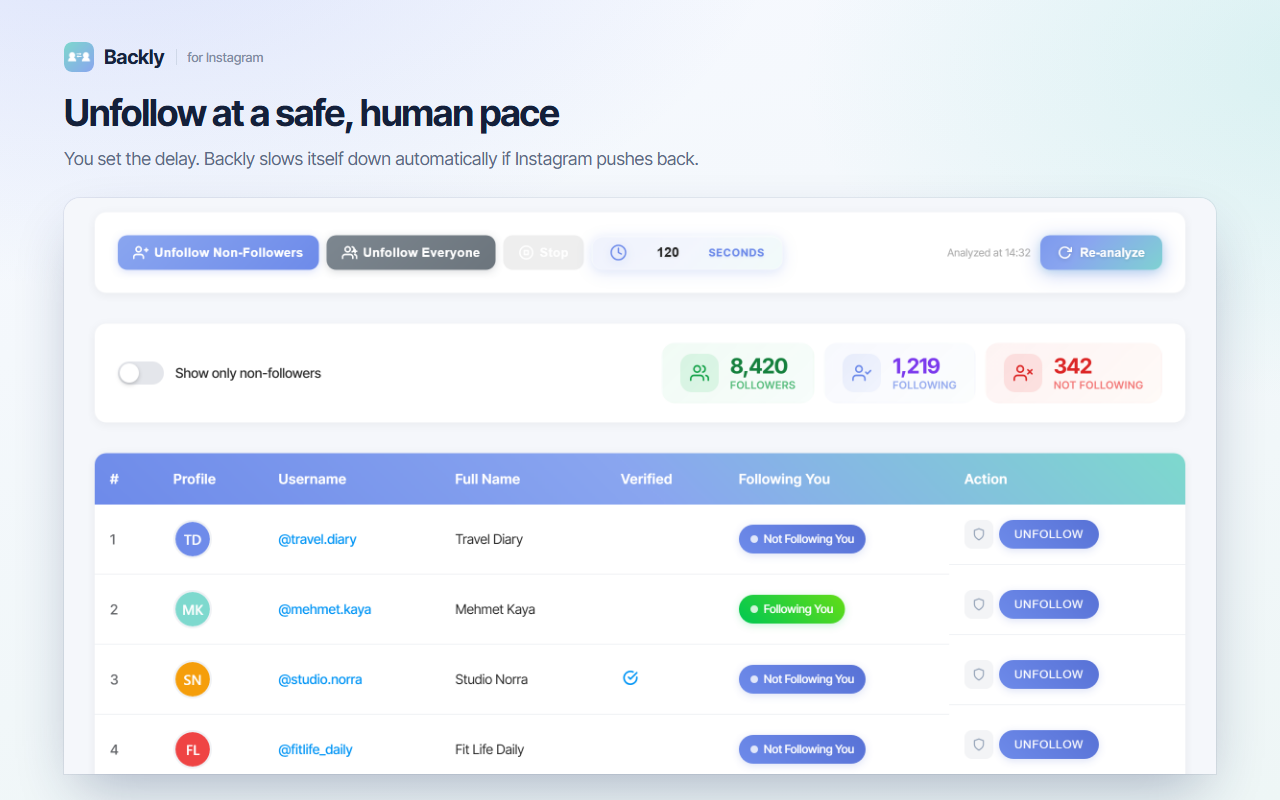
Speed is what gets accounts flagged, so nothing here is instant by design. You pick the wait between unfollows — anywhere from 3 to 300 seconds; the screen above is set to 120 seconds — and Backly keeps that rhythm in the background while you work elsewhere. If Instagram starts pushing back, it slows itself down or stops instead of hammering through the queue.
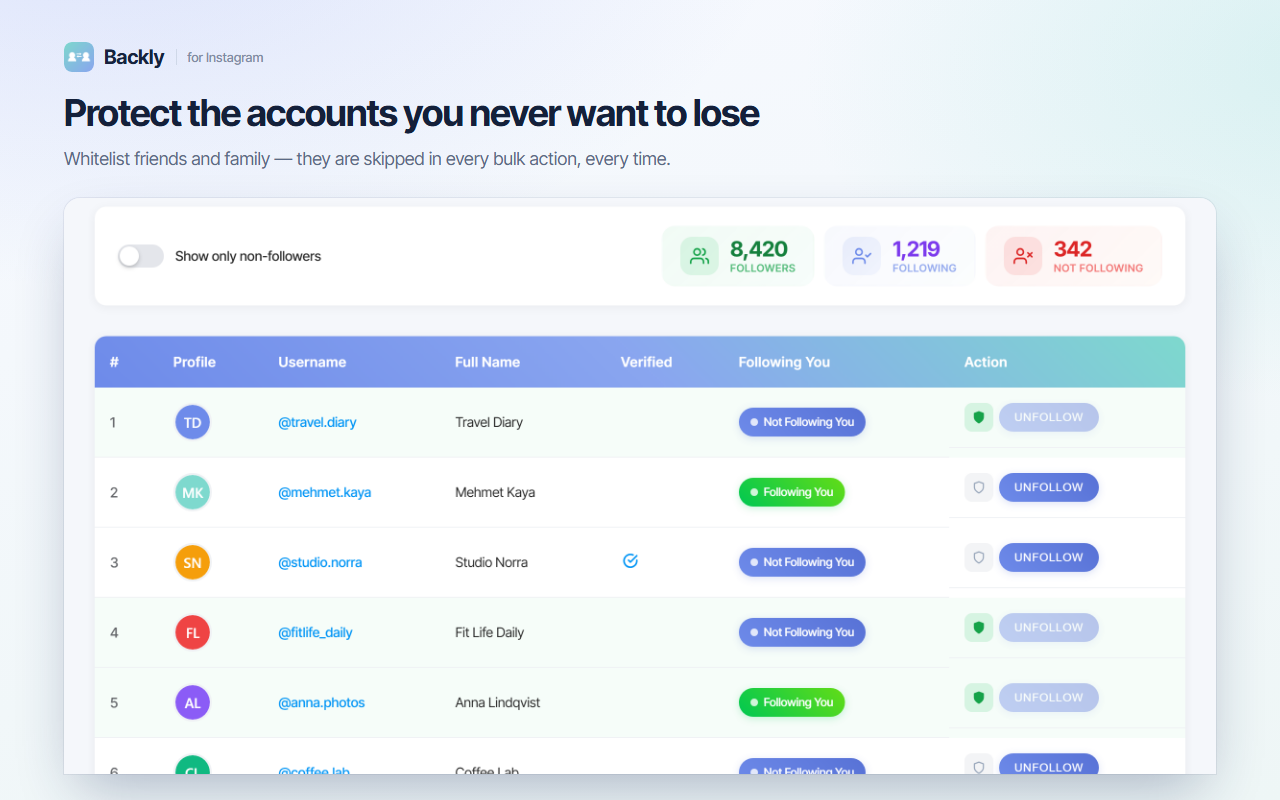
A mass unfollow is only worth running if it can't take your friends with it. Give any account a green shield and it drops out of every bulk action — the Unfollow button greys out for that row, and both Unfollow Non-Followers and Unfollow Everyone walk straight past it, even when the account doesn't follow you back.
No login form and no Instagram password — install, scan, set the pace, unfollow.
Add it to Chrome with one click. It opens automatically and signs you in with Google — never your Instagram password.
Open instagram.com while logged in and hit Analyze. You get your followers, following and not-following counts in one view.
Choose the delay between unfollows and shield anyone you want to keep. Both settings stick for the next run.
Press Unfollow Non-Followers or Unfollow Everyone. Backly works the queue at your pace, and Stop ends it instantly.
A bulk unfollow engine, a free follower tracker and a whitelist in one Chrome extension.
Queue your entire following list and let Backly clear it account by account. It's the Instagram mass unfollow tool the app itself never shipped — no profile-by-profile tapping.
Prefer a surgical clean-up? One button removes just the accounts that don't follow you back and leaves your mutuals exactly where they are.
Set the wait between unfollows from 3 to 300 seconds. Slower runs look more human, and Backly eases off automatically if Instagram resists.
Every scan is compared with the last one, so you can track followers and unfollowers on Instagram over time — free, with no separate follower tracker app.
Shield friends, family and favourite brands and they're skipped by every bulk unfollow — safe with a single tap, permanently.
Sign in with Google, not Instagram. Everything runs in your own browser session; your credentials and follower data never leave your computer.
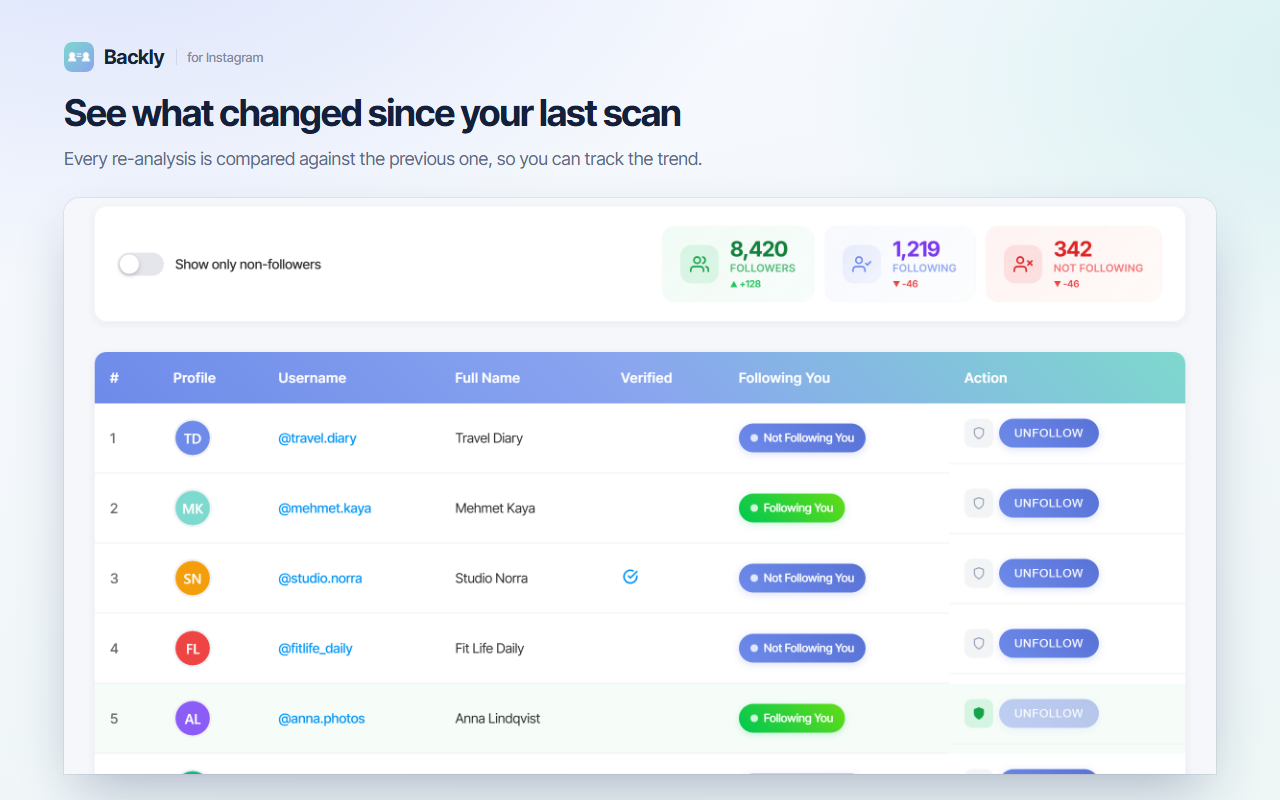
Re-analyze and every counter carries an arrow: followers up, following down, non-followers down. In the example screen it reads +128 followers and −46 following since the previous scan — so you can see what your last bulk unfollow actually did, and who left on their own.
Unfollow Everyone or Unfollow Non-Followers replaces hundreds of taps on individual profiles.
You decide how human the run looks. Longer waits, calmer account — and you can stop any time.
The whitelist shield keeps friends and brands out of every bulk action, permanently.
Google sign-in only. Your Instagram credentials are never requested, stored or uploaded.
Three ways to clear your following list, and what each one costs you.
Install Backly, open instagram.com and run one scan. Then press Unfollow Non-Followers to remove only the accounts that don't follow you back, or Unfollow Everyone to clear your whole following list. Backly works through the queue for you at the delay you set, and you can stop it at any point.
Yes. Unfollow Everyone queues your entire following list and works through it one account at a time. It is deliberately not instant — each unfollow waits for the delay you choose and whitelisted accounts are skipped, so a large cleanup runs quietly in the background instead of in one burst.
Slower is safer. You can set the wait between unfollows anywhere from 3 to 300 seconds — the example screen above uses 120 seconds — and Backly slows itself down or stops if Instagram starts pushing back. For a big cleanup, spread it across several sessions instead of forcing it into one.
Instagram limits how many actions an account can take in a given period and does not publish exact numbers, so nobody can promise you a safe figure. Backly lowers the risk by pacing every unfollow, backing off automatically when it meets resistance, and skipping verified and whitelisted accounts.
Yes, that is the tracker side of the extension. Every re-analysis is compared with the previous one, so the followers, following and not-following counters also show what changed since your last scan — in the example screen, +128 followers and -46 following.
Switch on 'Show only non-followers' and the list is filtered down to the accounts you follow that don't follow you back. Every row is labelled Following You or Not Following You, so you can judge account by account before you unfollow anyone.
Yes. Add any account to your whitelist with one tap. It gets a green shield and is skipped by both Unfollow Non-Followers and Unfollow Everyone, even if it doesn't follow you back.
Backly is free to start and never asks for your Instagram password — you sign in with Google and the scan runs inside your own logged-in session in Chrome. It works in 80+ languages, and you can upgrade later for higher limits.
Install Backly, scan once, and unfollow in bulk at a pace that keeps your account calm.
Add to Chrome — FreeInstagram never built a bulk unfollow button. The only official route is opening each profile and tapping Following, which is fine for ten accounts and hopeless for a thousand. This guide covers how to unfollow everyone on Instagram with a browser extension, how fast is too fast, how to keep the accounts you actually want, and how to track what your cleanup changed.
A mass unfollow — also called a batch or bulk unfollow — is removing many accounts from your following list in one run instead of one at a time. There are two versions people usually want. Unfollow everyone empties the list completely, which suits a fresh start, a repurposed account or a following list that grew out of control. Unfollow non-followers is narrower: it removes only the one-sided follows and leaves your mutuals untouched.
With Backly the run is the same either way. Install the extension, open instagram.com while logged in, and press Analyze — it reads your followers and following lists straight from the page you're already viewing. Set the delay you're comfortable with, shield anything you don't want touched, then press Unfollow Everyone or Unfollow Non-Followers. From there it works the queue on its own; Stop ends it immediately and nothing is lost, because the next scan simply picks up where the list now stands.
This is the part most tools get wrong. Instagram rate-limits actions to stop spam, it doesn't publish the thresholds, and they aren't the same for every account — a profile created last week is treated differently from one that's been active for years. So the honest answer is that no tool can hand you a safe number. What you can control is the pace: a longer delay between unfollows looks less automated, and it's worth knowing what's known about Instagram's unfollow limits before starting a big cleanup. Backly's delay slider goes from 3 to 300 seconds for exactly this reason, and it slows down or halts by itself when Instagram pushes back, which is how you unfollow without getting flagged.
Before a cleanup most people want to know which follows are one-sided. Flip on Show only non-followers and the table filters down to exactly those accounts — in the example screen, 342 of 1,219. Every row carries a Following You or Not Following You badge, so you can check who doesn't follow back on Instagram and find your non-followers without leaving the list. From there it's one button to remove them all, or one shield to keep the ones worth keeping.
A single scan is a snapshot; two scans are a trend. Because Instagram never notifies you about unfollows, comparing scans is the only way to see movement. Each re-analysis puts a delta on every counter — followers, following, not following — so you can tell a bulk unfollow you ran yourself apart from people who left on their own. Running a scan weekly is enough to keep the picture current.
Whether you want to unfollow everyone on Instagram, trim only the accounts that don't follow you back, or simply keep an eye on how your following list moves week to week, it's one free tool. Install Backly — Unfollower Tracker for Instagram and clear the list at your own pace, without your password.

Instagram Unfollow AI detects those who don't follow you back and helps you unfollow them to optimize your account easily.

Manage your X (Twitter) following, detect users who don't follow you back, and unfollow safely with smart filters.

See who doesn't follow you back on TikTok, then bulk unfollow all, everyone or only non-followers. Safe pacing, one click.

Send bulk and automated WhatsApp messages safely and easily with WASendly.

Easily export WhatsApp contacts and group members to Excel, CSV, or vCard.

Save & export ChatGPT, Claude, Gemini, Grok, DeepSeek & Perplexity to PDF, Word, Markdown, HTML, JSON or Image. Private & free.

Find who doesn't follow you back on Instagram. Track unfollowers & mass unfollow non-followers in one click.

Instagram toolkit for desktop. Track unfollowers, upload stories from PC, download media, and manage Instagram.

Export tweets, replies, likes, bookmarks and followers from any Twitter/X account to Excel, CSV or JSON. No API key needed.

Export TikTok follower and following lists, video comments and post stats to CSV or Excel. Resume long exports.

ChatGPT Speed Booster is a free Chrome extension that fixes slow ChatGPT performance in long conversations.

Export Instagram followers, following, likes, and comments to CSV or Excel in one click

Rewrite any AI prompt into a clear, structured version in one click. Press Ctrl+M on ChatGPT, Claude or Gemini. 50+ languages, free.

IGFollow AI is an AI-powered tool to grow your Instagram. Boost engagement and expand your audience effortlessly

Sort Instagram & TikTok feeds by likes, views, comments or date. See post stats at a glance and find viral content fast. Free.

AI-powered Instagram auto follow tool to boost engagement, grow followers, and expand your audience effortlessly.

Fix slow Claude.ai in long conversations. Speed Booster hides older messages to stop lag, freezing & high memory use — instantly.

Bulk delete & archive ChatGPT chats, add message timestamps and navigate conversations fast. Clean up ChatGPT in one click.

Email Extractor helps you find visible email addresses on websites and works locally with no tracking or data collection.

A visual gallery of AI image prompts. Use them instantly in ChatGPT, Gemini, Sora, and Nano Banana.

Audit any page, then crawl the whole site: indexability, duplicate titles, orphan pages, click depth and Core Web Vitals. Your pages are never uploaded.

Secure your WhatsApp Web with smart lock, panic button, and blur mode. Your privacy, your control.

Transform your cursor with stunning click effects & animations. Perfect for streamers, presenters & content creators.

InkShot is a free screenshot Chrome extension that lets you capture full page screenshots, visible viewport, or selected areas

Detechtor AI checks what any website is built with — CMS & WordPress theme detector, frameworks, analytics, CDN, tech stack.

Bulk check which numbers are on WhatsApp. Validate lists, filter by country, spot business accounts, export to Excel or CSV.

Delete all your chats and messages on Instagram in bulk. One click, and the chats you protect stay untouched.

Export IG follower and following lists, likes and comments to CSV, Excel or JSON in one click. Fast, private, no password.

See what a car on Sahibinden is really worth: market value for the exact trim, how damage and repaint move the price, and the engine's known faults. Turkish interface, Turkey market.

Find similar products and compare prices across multiple stores. Make smarter shopping decisions with real-time price research.

Create custom and professional email signatures effortlessly with SignedRise. Perfect for personal and work emails.