PromptJolt — AI Prompt Enhancer for ChatGPT, Claude & Gemini

Stop wrestling with prompt engineering. PromptJolt is a free one-click AI prompt enhancer that rewrites your rough ideas into clear, structured, context-rich prompts — right inside the ChatGPT, Claude, and Gemini composers. Press Ctrl+M and let the AI write better prompts for you.

One Click, One Shortcut
50+ Languages
100% Free
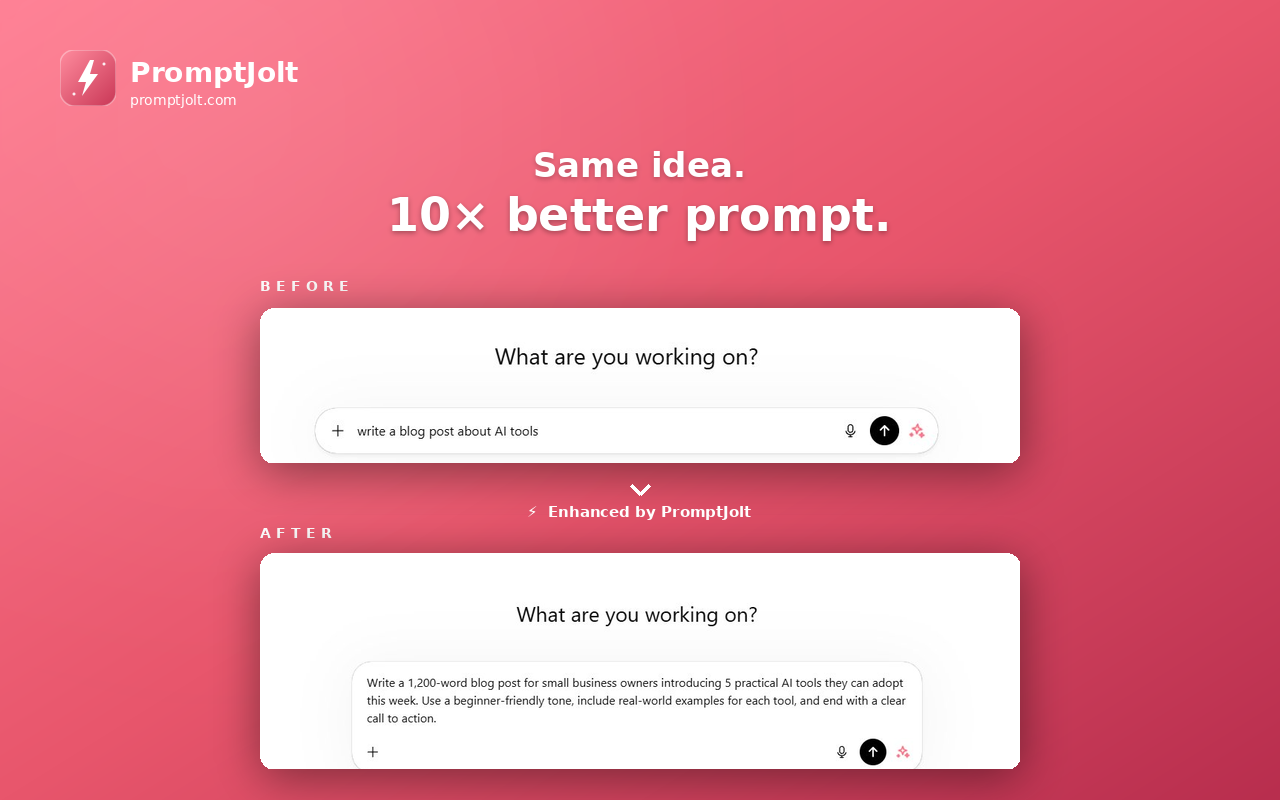
PromptJolt AI prompt enhancer rewriting a ChatGPT prompt with one click
Watch in 60 seconds

See PromptJolt in Action

Watch how a rough one-line prompt becomes an expert-level prompt with one keystroke — live on ChatGPT

3 AI Platforms Supported
4.8 Average Rating
50+ Languages Auto-Detected
2s Average Enhance Time

Why Most AI Answers Disappoint — and How PromptJolt Fixes It

ChatGPT, Claude, and Gemini are only as good as the prompts you give them. Most users type a quick question and get a vague, generic answer back. The fix is prompt engineering: adding role hints, format instructions, length limits, and missing context. But who has time to learn prompt engineering for every question?

That's the gap PromptJolt closes. Type whatever comes to mind, hit Ctrl+M, and PromptJolt rewrites it as a prompt engineer would — in the language you typed, in seconds, right inside the AI composer.

From rough idea to expert-level prompt

PromptJolt's AI prompt rewriter analyzes intent, picks the right role for the task, sets a sensible length cap, formats the output structure, and fills in context gaps with reasonable assumptions. The result: better answers without learning prompt engineering.

Rough prompt

"write a cold email"

Vague. AI guesses.
Enhanced prompt

"Act as a B2B sales copywriter. Write a concise cold email (under 120 words) to a Series A startup founder: personalized opener, one value proposition, one line of social proof, and a low-friction CTA for a 15-minute call. Include a subject line."

Specific. Structured. Better answer.

Everything You Need from a Prompt Enhancer

Built for daily ChatGPT, Claude, and Gemini users — not for prompt engineers

One-Click Enhancement

A single sparkle button next to Send, plus a global Ctrl+M / Cmd+M shortcut. No popups, no extra tabs, no copy-paste.

Works on ChatGPT, Claude, Gemini

Native composer integration on chatgpt.com, claude.ai, and gemini.google.com. The same shortcut, the same UX, everywhere.

50+ Language Auto-Detection

Type Turkish, you get Turkish. Type Korean, you get Korean. PromptJolt detects your language and rewrites in it — no settings to fiddle with.

7-Second Undo

Don't like the rewrite? A floating Undo button appears for 7 seconds in the top-right. One click and your original prompt is back.

Searchable Prompt History

Every enhancement is saved privately to your account. Search, copy, or delete individual prompts from the history page anytime.

Privacy-First Design

Your Google sign-in is the only credential. No OpenAI / Anthropic API key needed. Prompts go straight to our backend — never to third-party trackers.

How to Use the AI Prompt Enhancer

Set up once in under a minute — then forget it's there

1

Install Free from the Chrome Web Store

Click "Add to Chrome" — works on Chrome, Edge, Brave, Opera, and any Chromium browser. No credit card, no signup beyond Google.

2

Sign in with Google

Open the PromptJolt popup from your toolbar, click "Continue with Google". Your daily quota and prompt history attach to your account.

3

Type any prompt in ChatGPT, Claude, or Gemini

Just write naturally — full sentences, fragments, single keywords. The minimum is 10 characters; the maximum is 2,500.

4

Press Ctrl+M and hit Send

The composer text is replaced with an enhanced version. Hit Send. Get a much better answer. Optionally Undo within 7 seconds.

Screenshots & Interface

A clean prompt rewriter built to disappear into your AI workflow

PromptJolt AI prompt enhancer button inside ChatGPT composer toolbar

Enhance button inside ChatGPT

PromptJolt floating undo bubble in the top-right corner of the AI page

7-second undo bubble

PromptJolt prompt history page with original and enhanced versions

Prompt history with search

PromptJolt vs Other Prompt Tools

How a one-click prompt enhancer compares to manual prompt engineering and other Chrome extensions

Feature Manual Prompt Engineering Other Chrome Extensions PromptJolt
One-click rewrite Type it all yourself Yes Ctrl+M
Works on ChatGPT, Claude & Gemini Yes Some only ChatGPT All three
Auto language detection English-only 50+ languages
Undo enhancement N/A Rare 7-sec bubble
Bring your own API key required Often yes No, free quota
Prompt history Manual notes Limited Last 50, searchable
Time to write a quality prompt ~2–5 min ~10–20 sec ~2 sec
Price Free (your time) $5–15/month Free — 20 / day

Frequently Asked Questions

Common questions about PromptJolt, prompt enhancers, and using the Ctrl+M shortcut

What does PromptJolt do exactly?

PromptJolt is a free one-click AI prompt enhancer for ChatGPT, Claude, and Gemini. You type any rough prompt, press Ctrl+M, and it rewrites your text in place into a clearer, structured, context-rich prompt — the kind a prompt engineer would write. Hit Send and you get a much better answer from the AI.

Is PromptJolt really free?

Yes. The free plan gives you 20 prompt enhancements per day across ChatGPT, Claude, and Gemini, with full access to history, undo, the Ctrl+M shortcut, and 50+ language detection. There is no credit card, no trial. A Premium plan with 200/day exists for power users but the free plan covers most users.

How do I get better answers from ChatGPT?

The single most effective change is improving your prompt. Add a role ("Act as a senior engineer…"), set a length cap, specify the output format, and give context. PromptJolt does all four for you automatically. Type a one-line question, press Ctrl+M, and the rewritten prompt will produce a noticeably better ChatGPT response.

Do I need an OpenAI or Anthropic API key?

No. Unlike many "bring your own key" prompt extensions, PromptJolt comes with its own AI rewrite quota (20 enhancements/day on the free plan). You only sign in with Google. The extension calls our hosted backend; you don't need to set up any AI provider account.

Does PromptJolt also work in Edge, Brave, and Opera?

Yes. PromptJolt is a Manifest V3 Chrome extension and runs on any Chromium-based browser: Google Chrome, Microsoft Edge, Brave, Opera, Vivaldi, and Arc. The Ctrl+M shortcut works everywhere.

Can I see what was changed in my prompt?

Yes. The prompt history page shows your original prompt and the enhanced version side by side, so you can see exactly what PromptJolt added (role hints, format, structure, context). You can copy either version with one click and delete individual entries.

Is my data private?

Your prompt is sent only to the PromptJolt backend on addonschrome.com, processed by an AI model, and the rewritten version is returned. We do not share prompts with third parties or use them to train any model. Only your last 50 prompts are stored privately, and you can delete any of them with a single click.

What's the keyboard shortcut?

Ctrl + M on Windows / Linux, Cmd + M on macOS. The shortcut activates whenever you're focused on the ChatGPT, Claude, or Gemini composer with at least 10 characters typed. There's also a sparkle button next to the Send button if you'd rather click.

What is the best free prompt enhancer in 2026?

Among free Chrome extensions, PromptJolt is ranked 4.8/5 by users. Compared to Pretty Prompt, Promptly, Velocity, PromptOptimizr, and Prompt Natus, PromptJolt's edge comes from native support for all three major AI sites in one extension, automatic 50+ language detection, the 7-second Undo bubble, and not requiring you to bring your own API key.

How does PromptJolt compare to Pretty Prompt or Promptly?

All three are one-click prompt enhancers. PromptJolt differentiates with: (1) a real Undo button instead of just a toast, (2) auto-language rewriting in 50+ languages including non-Latin scripts, (3) prompt history with per-item delete, (4) a free quota with no API key, and (5) a clean popup with quota, history, upgrade, and other extension discovery in one place.

Stop Writing Mediocre Prompts

Install PromptJolt and turn every rough idea into an expert-level prompt — in one keystroke. Free forever, 20 enhancements per day on ChatGPT, Claude, and Gemini.

Add to Chrome — Free
No credit card No API key Works in 50+ languages

The Complete Guide to AI Prompt Enhancers (2026)

If you've ever asked ChatGPT, Claude, or Gemini a question and gotten a mediocre answer, the problem usually isn't the AI — it's the prompt. Prompt engineering is a real skill, and writing a great prompt every single time is tedious. An AI prompt enhancer like PromptJolt fixes that by rewriting your raw input into the kind of structured, context-rich prompt that prompt engineers craft by hand. This guide covers what prompt enhancers do, how they work, and how to choose one that actually saves you time.

What Is a Prompt Enhancer?

A prompt enhancer is a tool — usually a Chrome extension — that takes a short or vague prompt and rewrites it into an effective one. Where a prompt template is static (you fill in blanks), a prompt enhancer is dynamic: it understands what you're trying to ask and adds the missing pieces automatically. The most useful prompt enhancers integrate directly with the AI composer (ChatGPT, Claude, Gemini) so you never break flow.

What Makes a Prompt "Better"?

Five things make a prompt produce dramatically better AI answers:

  • Role: Telling the AI to act as a specific expert ("Act as a senior copywriter…") sharpens its tone and depth.
  • Format: Asking for bullet points, a table, or a numbered list eliminates rambling answers.
  • Length: "In under 200 words" or "in three sentences" prevents wall-of-text replies.
  • Context: Background facts ("for a B2B SaaS audience") guide the AI to relevant content.
  • Constraints: "Avoid jargon", "include code examples", or "cite sources" steer the answer.

Manually adding all five for every question is unrealistic. PromptJolt's AI prompt rewriter does it for you in about two seconds.

How a Chrome Prompt Enhancer Works

The best prompt enhancer extensions inject a small button (and a keyboard shortcut) into the AI composer. When triggered, the extension reads your typed text, sends it to a backend AI model with a "rewrite this prompt" instruction, and replaces your text with the improved version — all without leaving the AI page. PromptJolt uses a fast model tuned for prompt rewriting, returning enhanced prompts in roughly two seconds.

ChatGPT Prompt Enhancer vs Claude Prompt Enhancer vs Gemini Prompt Enhancer

Many extensions only support ChatGPT. Some add Claude. Few support Gemini. PromptJolt was built from day one for all three composers (chatgpt.com, claude.ai, gemini.google.com), with the same Ctrl+M shortcut everywhere. If you switch between AI assistants depending on the task, this saves you from learning three different tools.

Free vs Paid Prompt Enhancers

Most paid prompt enhancers charge $5–$15 per month. Many free options require you to bring your own OpenAI or Anthropic API key — which means you're paying per request anyway. PromptJolt's free plan gives you 20 enhancements per day on its own hosted AI, no API key needed. For most users that's enough; the optional Premium plan unlocks 200/day for power users.

Privacy and AI Prompt Enhancers

Privacy matters because your prompts can contain sensitive information — client names, internal product details, code. A trustworthy prompt enhancer:

  • Stores prompts only as needed (history page) and lets you delete individual entries
  • Does not share prompts with third-party trackers or training datasets
  • Uses HTTPS for every backend call
  • Is open about what permissions it requests

PromptJolt requests only the minimum Chrome permissions needed (storage and identity) and only sends data to its own backend. No analytics, no third-party trackers.

Prompt Engineering Without Learning Prompt Engineering

Prompt engineering courses promise to teach you to "think like a prompt engineer". But for most people the real goal is just better answers, not mastery. An AI prompt enhancer is the shortcut. You stay focused on what you want to ask; PromptJolt translates your intent into the language the AI responds best to. After a few days of using Ctrl+M, you'll start noticing the patterns and your manual prompts will improve too — the extension becomes a passive tutor.

Choosing the Best Prompt Enhancer for You

When evaluating an AI prompt rewriter, check for:

  1. Native composer integration — not a separate popup window.
  2. Multi-AI support — ChatGPT, Claude, and Gemini at minimum.
  3. Keyboard shortcut — clicking is slower than a hotkey.
  4. Multilingual — a real auto-detect, not a manual language menu.
  5. Undo — rewrites are not always perfect, you need a fast revert.
  6. Free first — you should be able to try it without entering a card.
  7. No API key required — otherwise it's just a UI on top of your spending.

PromptJolt was designed against this checklist. Install it free from the Chrome Web Store and see how much better your AI conversations get when every prompt is automatically expert-level.

More Free Chrome Extensions from AddonsChrome

Tools to make your daily browsing and social workflows faster

Instagram Unfollow AI - Manage Unfollowers Effortlessly Chrome extension

Instagram Unfollow AI - Manage Unfollowers Effortlessly

Instagram Unfollow AI detects those who don't follow you back and helps you unfollow them to optimize your account easily.

WASendly – WhatsApp Bulk Message Sender Chrome extension

WASendly – WhatsApp Bulk Message Sender

Send bulk and automated WhatsApp messages safely and easily with WASendly.

ChatGPT Speed Booster Chrome extension

ChatGPT Speed Booster

ChatGPT Speed Booster is a free Chrome extension that fixes slow ChatGPT performance in long conversations.

IGFollow AI - Auto Follow Chrome extension

IGFollow AI - Auto Follow

IGFollow AI is an AI-powered tool to grow your Instagram. Boost engagement and expand your audience effortlessly

Extract AI – Email Extractor Chrome extension

Extract AI – Email Extractor

Email Extractor helps you find visible email addresses on websites and works locally with no tracking or data collection.

Instagram Unfollowers Chrome extension

Instagram Unfollowers

Find out in seconds. This free unfollower checker scans your Instagram account and shows you every person who isn't followin

X Unfollow AI – Manage Your Twitter Following List Chrome extension

X Unfollow AI – Manage Your Twitter Following List

Manage your X (Twitter) following, detect users who don't follow you back, and unfollow safely with smart filters.

Instagram Auto Follow Chrome extension

Instagram Auto Follow

AI-powered Instagram auto follow tool to boost engagement, grow followers, and expand your audience effortlessly.

InstaStack – Instagram Toolkit for Desktop Chrome extension

InstaStack – Instagram Toolkit for Desktop

Instagram toolkit for desktop. Track unfollowers, upload stories from PC, download media, and manage Instagram.

Instagram Unfollowers – Who Doesn’t Follow Me Back Chrome extension

Instagram Unfollowers – Who Doesn’t Follow Me Back

Instagram Unfollow AI detects those who don't follow you back and helps you unfollow them to optimize your account easily.

WASendly – WhatsApp Contacts Extractor Chrome extension

WASendly – WhatsApp Contacts Extractor

Easily export WhatsApp contacts and group members to Excel, CSV, or vCard.

Compare Similar - Price Research Chrome extension

Compare Similar - Price Research

Find similar products and compare prices across multiple stores. Make smarter shopping decisions with real-time price research.

InkShot — Webpage Screenshot & Draw Tool Chrome extension

InkShot — Webpage Screenshot & Draw Tool

InkShot is a free screenshot Chrome extension that lets you capture full page screenshots, visible viewport, or selected areas

Instagram Follower Export Tool Chrome extension

Instagram Follower Export Tool

Export Instagram followers, following, likes, and comments to CSV or Excel in one click

SEO Analyzer Pro AI Chrome extension

SEO Analyzer Pro AI

AI-powered SEO analysis tool. Analyze and optimize your website's meta tags, titles, images and links.

SignedRise - Professional Email Signature Chrome extension

SignedRise - Professional Email Signature

Create custom and professional email signatures effortlessly with SignedRise. Perfect for personal and work emails.

Clickaroo - Mouse Effect Designer Chrome extension

Clickaroo - Mouse Effect Designer

Transform your cursor with stunning click effects & animations. Perfect for streamers, presenters & content creators.

Privacy Guard for WhatsApp Web Chrome extension

Privacy Guard for WhatsApp Web

Secure your WhatsApp Web with smart lock, panic button, and blur mode. Your privacy, your control.

Contact Us

contact@addonschrome.com
Melih Tongul

Melih Tongul

Developer

Yasin Muratoğulları

Yasin Muratoğulları

Developer
















