
Bruno Adam
Nice!
Posted on Chrome Web Store
See on Store
Sep 2026 Instagram makes you delete Instagram messages one conversation at a time. Clearbox does the whole inbox for you — chat after chat, at a speed you choose — while every conversation you mark as protected is skipped on every run.
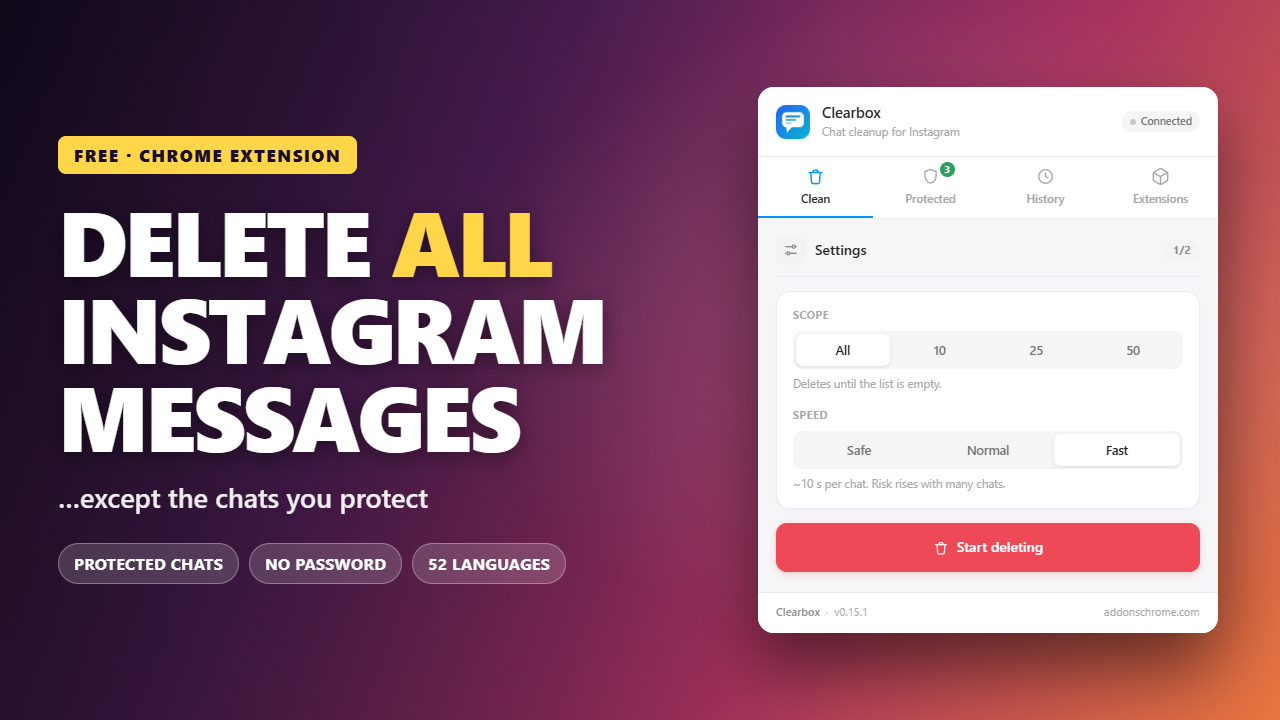
The extension drives Instagram's own interface: the same row menu, the same Delete button, the same confirmation. Nothing unofficial happens.
Go to instagram.com/direct in Chrome and sign in as usual.
The panel opens with your inbox already scanned.
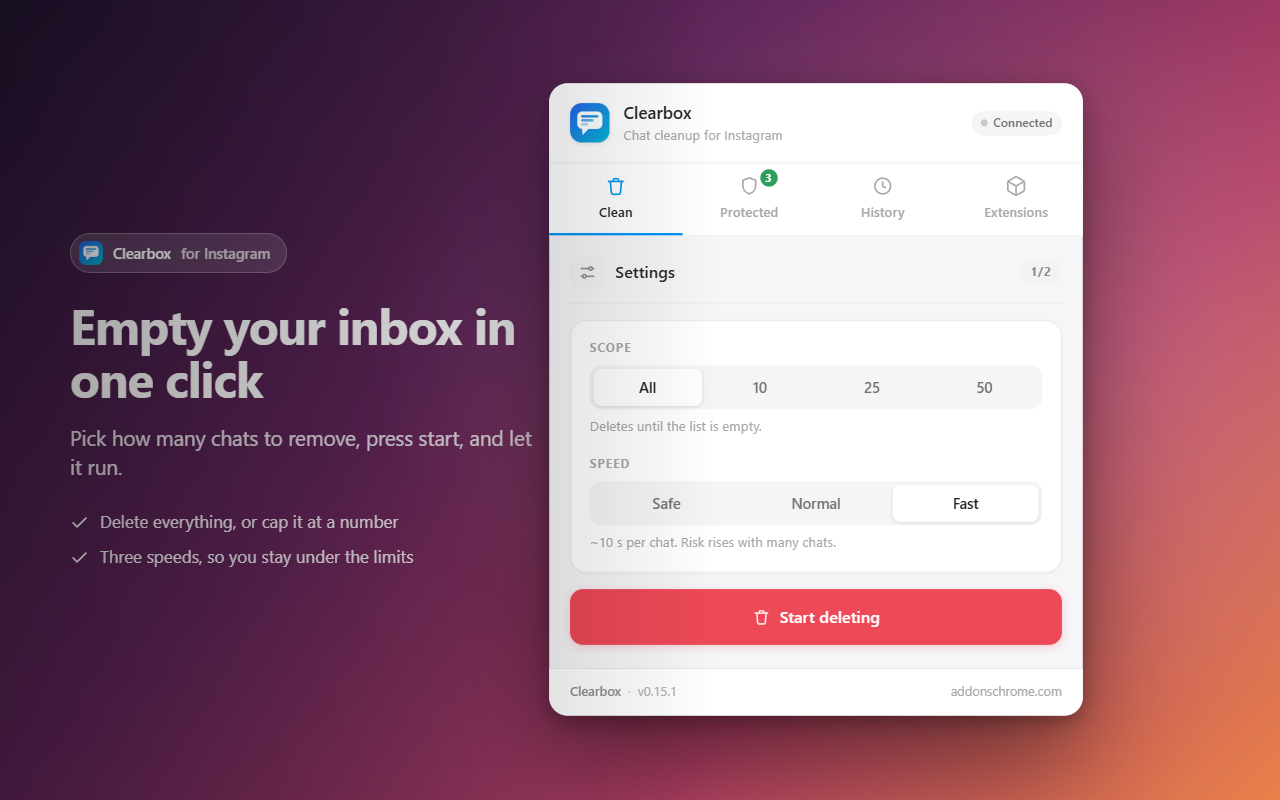
Every chat, or cap it at 10, 25 or 50. Pick one of three speeds.
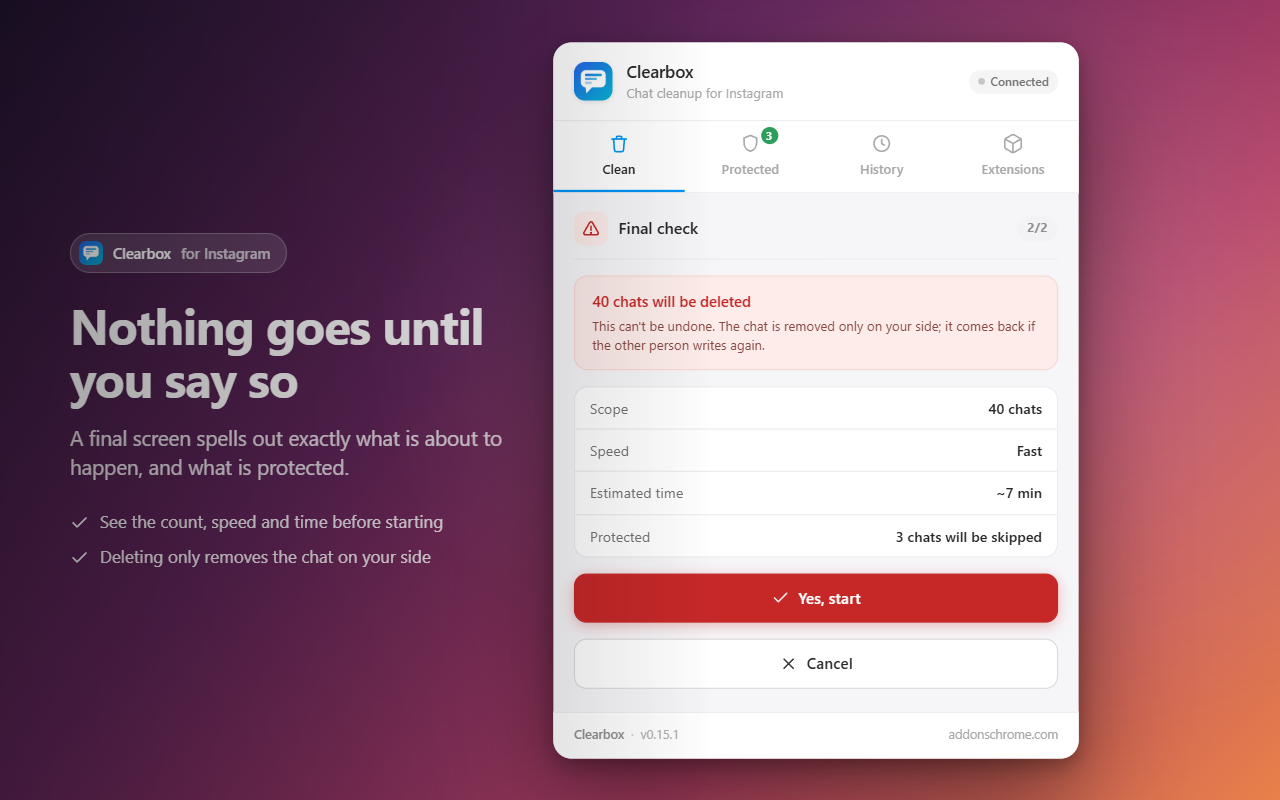
One screen spells out exactly what is about to happen — and what is protected.
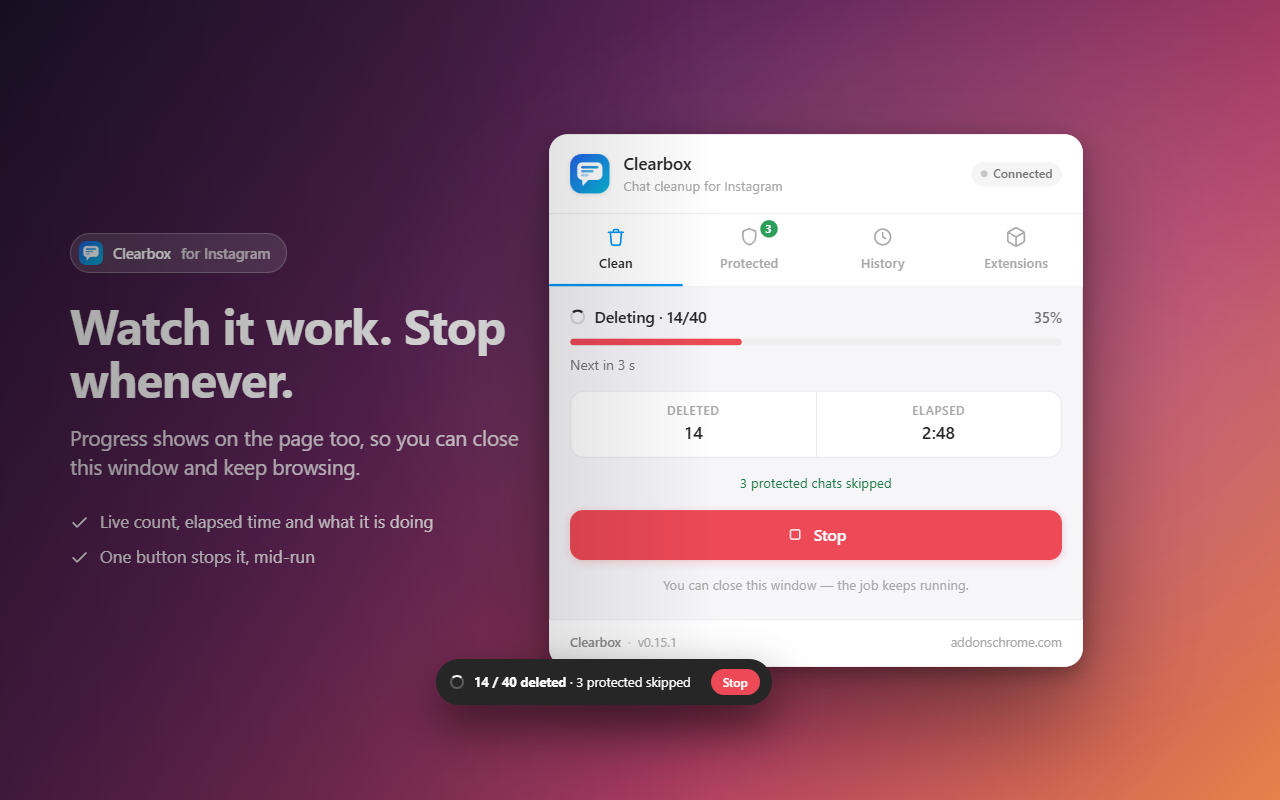
A live badge counts up on the page. Close the popup and keep browsing if you like.
Bulk deletion is easy to regret. One conversation you actually cared about disappears, and there is no undo.
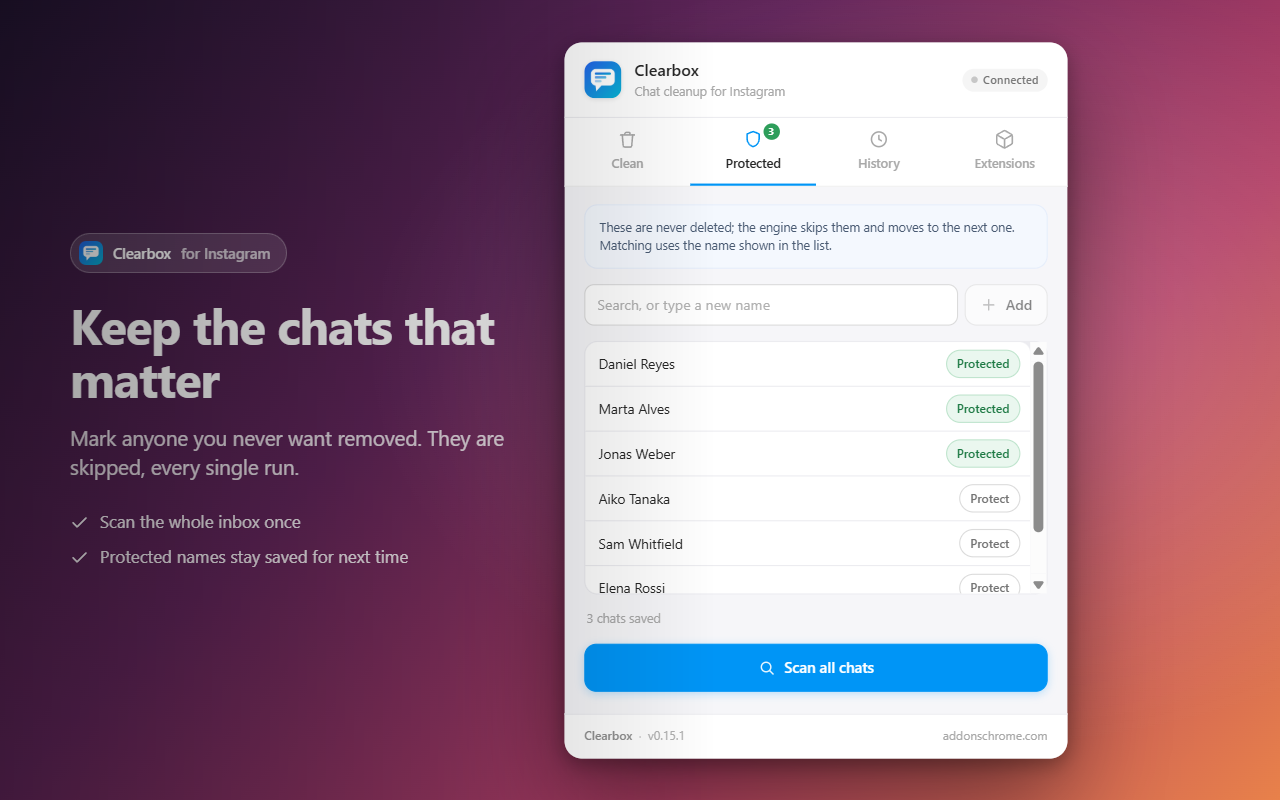
So Clearbox lets you protect conversations. Scan your inbox once, tick the names you want to keep, and they are skipped on every run from then on. The list is saved, so you set it up a single time and stop worrying about it.
Nice!

Exactly what I needed to clean up my Instagram inbox. The ability to bulk delete conversations while keeping selected chats protected is probably my favorite feature.

I like having control over the deletion process. The confirmation step, speed settings, and stop button make it feel much safer than just running an automatic deletion without any control.

This saved me a lot of time. I had a large number of old Instagram conversations and clearing them manually would have taken forever. Clearbox made the process much easier.

Really straightforward to use. The interface is simple, and I like that you can choose how many chats to process and adjust the speed.

The protected chats feature is a great idea. I like that I can select conversations I want to keep and make sure they are not deleted during a bulk cleanup.

Very useful extension for cleaning up my Instagram inbox. Being able to delete multiple chats at once saves a lot of time compared to doing everything manually.
Built for one job: clearing an Instagram inbox without losing what matters.
Mass delete the whole inbox, or cap the run at 10, 25 or 50 conversations.
Marked chats are skipped on every run — not just the current one.
Slow, normal or fast, so you can stay comfortably under Instagram's own limits.
The count runs on the page itself — close the popup and keep browsing.
The Stop button works during a deletion, not only between chats.
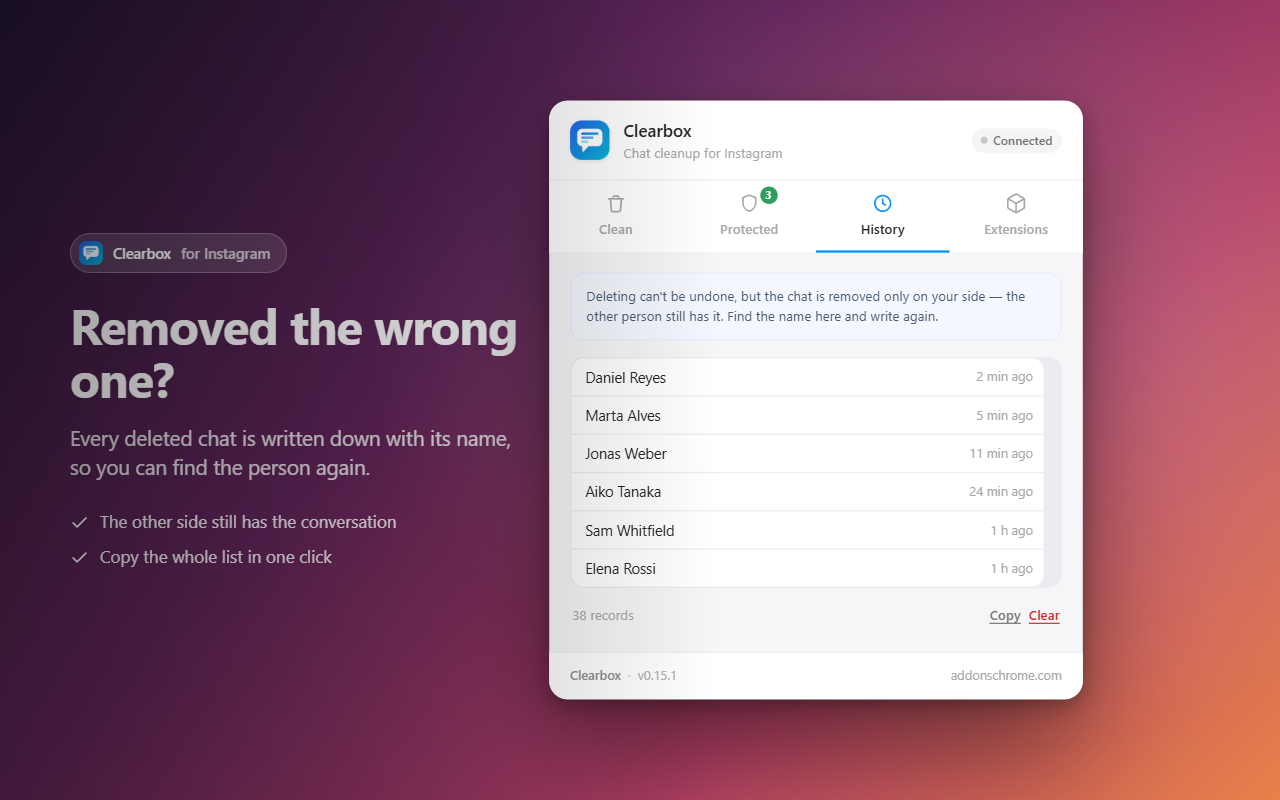
Every deleted conversation is logged by name, so you can find someone again.
Refuses to start when something looks wrong — better than stopping halfway.
The interface follows your browser language automatically.
Nobody deletes hundreds of chats for fun. These are the situations people actually write to us about.
Order questions, size questions, “is this in stock” — a shop account collects hundreds of one-line threads a month. None of them matter after the order ships, but they bury the conversations that do. Protect your suppliers and regulars, then clear the rest in one run.
Selling the device, lending it to family, or letting someone borrow your laptop. An inbox is the most personal part of an account, and scrolling through it deleting threads one by one is exactly how you miss one.
Message requests you accepted and forgot, group chats that died in 2021, brands you asked about once. If you have never cleared your Instagram DMs, the list is longer than you think — and Instagram gives you no way to see how long.
People change jobs, close a side project, end a relationship. Deleting the account is drastic; clearing the inbox is not. The chats you protect stay exactly where they are.
Instagram has no “select all”. This is what the difference actually looks like on a 300-thread inbox.
| By hand, in Instagram | With Clearbox | |
|---|---|---|
| Clicks for 300 chats | ~900 (menu, delete, confirm) | One run |
| Roughly how long | An afternoon | Minutes, unattended |
| Protecting chats you keep | You have to remember every name | Ticked once, skipped forever |
| Accidentally deleting the wrong one | Easy — and there is no undo | Protected list plus a confirmation screen |
| Knowing what you removed | Nothing is recorded | Every name logged in History |
| Stopping halfway | Just close the tab | Stop button works mid-run |
| Password required | You are already signed in | Never asked for |
| Cost | Free | Free |
Clearbox is not doing anything Instagram forbids — it clicks the same buttons you would, in the same order, at a pace you set. It just does not get bored at chat 40.
Worth being clear, because the two get mixed up constantly.
Removes whole conversations from your inbox — the thread disappears from your chat list.
It does not unsend individual messages inside a thread. If you want to retract single messages, you need an unsend tool instead.
One more thing worth knowing: deleting a conversation removes it only on your side. The other person still has it, and the chat reappears in your inbox if they write to you again. That is how Instagram works, not a limit of the extension — and it is exactly why Clearbox keeps a log of the names it removed.
Five screens, no learning curve.
Everything runs inside your browser, using the Instagram session you are already signed into.
Clearbox never sees your credentials. There is nothing to sign up for.
The extension only reads the names shown in your chat list, so it knows which row to act on.
Settings, the protected list and your deletion history stay in your browser and nowhere else.
No analytics, no ads, no third-party scripts.
Install Clearbox, open instagram.com/direct, click the extension icon and choose “all chats”. Confirm on the check screen and it works through your inbox one conversation at a time.
Yes — that is the point of protected chats. Tick the conversations you want to keep and they are skipped on every run, including a full-inbox delete.
No. Deleting a conversation removes it only on your side. The other person keeps their copy, and the chat comes back to your inbox if they message you again.
No. Clearbox removes whole conversations from your inbox. It does not retract individual messages you sent inside a thread — that is a different feature called unsend.
Clearbox uses Instagram's own interface at a speed you control, and offers three speeds so you can stay well under Instagram's limits. Nothing is automated outside what you could do by hand.
Yes. The Stop button works during a deletion, not just between chats.
No — deleting cannot be undone. That is why there is a confirmation screen, why protected chats exist, and why every removed conversation is logged with its name.
Chrome and other Chromium browsers — Edge, Brave and Opera. Keep the Instagram tab in the foreground while it runs; Chrome slows down background tabs.
There is no one-click way to clear all Instagram messages: Instagram has never shipped a “delete all” button for direct messages, and there is no sign it plans to. This is what your options actually are, what each one really does, and the parts people get wrong.
Open instagram.com/direct, hover a row, click the three dots, click
Delete, then confirm. That is the whole flow, and it has not changed in years.
There is no multi-select, no “clear inbox”, no way to filter by date. On mobile
you swipe instead of hovering, but the count is the same: one conversation, three
actions.
For twenty threads that is a minor annoyance. For three hundred it is an afternoon — and the reason most people give up halfway and leave the inbox in a worse state than when they started, half-cleared and impossible to reason about.
No tool can hand Instagram a single instruction that empties your inbox. There is no such button behind the scenes either. What a bulk deleter actually does is automate the clicking: open the row menu, press Delete, confirm, move to the next row, repeat.
That distinction matters, because it tells you what to look for. A tool that claims to wipe your inbox instantly is either exaggerating or doing something unofficial with Instagram's private endpoints — which is exactly the kind of behaviour that gets accounts flagged. Clearbox drives the visible interface, at a pace you choose, and shows you the count as it goes.
This is the single most common misunderstanding, so it is worth stating plainly: when you delete a conversation on Instagram, it disappears from your inbox only. The other person keeps their copy, with every message intact.
It also means a deleted chat can come back. If that person messages you again, the thread reappears in your list — as a new conversation, without the old history. Nothing has gone wrong; that is simply how Instagram models it. It is also why Clearbox keeps a log of the names it removed: a chat may return, but you will still know what was there.
People search for all three interchangeably and end up with the wrong tool.
If what you actually want is to take back something you sent, no bulk chat deleter will help — you need Instagram's own unsend, message by message.
The regret pattern is always the same. Someone clears their inbox in a hurry, and two days later needs the thread with the supplier, the landlord, the person who sent an address. Deletion cannot be undone, and support cannot restore it.
So do the boring step first. Scan the inbox, tick the conversations you never want touched, and only then choose a scope. In Clearbox that list is saved, so it applies to every future run as well — including a full “delete all Instagram DMs”. You set it up once and stop thinking about it.
Instagram does not publish rate limits for deleting conversations, and anyone who tells you an exact number is guessing. What is well established is that unusually fast, repetitive activity from one account is what triggers a temporary block — not the deleting itself.
Clearbox gives you three speeds for that reason. If you are clearing a large inbox, the slow setting is the sensible default: it takes longer in wall-clock time, but you are not sitting there anyway, and it keeps the pattern close to something a person could plausibly do. Keep the tab in the foreground while it runs — Chrome throttles background tabs aggressively, and a job left in the background can take several times longer.
instagram.com/direct in Chrome and make sure you are signed in.If you have never done this before, start with a batch of 10. You will see exactly what happens, on a scale you can check by eye, before committing to the whole inbox.
Two things are worth doing once the run finishes. First, open History — every removed conversation is listed by name, and it is the only record that exists. Screenshot it if any of those threads mattered. Second, check your message requests folder; it is a separate list, and a cleared inbox with a full requests folder still feels cluttered.
Clearing your own inbox is your business — these are your conversations, on your account. Two things are still worth keeping in mind. Deleting a chat does not delete it for the other person, so this is not a way to retract anything you said. And if an account is shared, or belongs to a business with more than one person in it, the inbox is not only yours to clear. Ask first.
Free, no sign-up, and the chats you care about stay exactly where they are.
Add Clearbox to Chrome — FreeClearbox is an independent browser extension. It is not affiliated with, endorsed by, or sponsored by Instagram or Meta. Instagram is a trademark of Meta Platforms, Inc.
Every tool we build is free to install and runs right in your browser.
 Instagram Unfollow AI - Manage Unfollowers Effortlessly
Instagram Unfollow AI detects those who don't follow you back and helps you unfollow them to op
Instagram Unfollow AI - Manage Unfollowers Effortlessly
Instagram Unfollow AI detects those who don't follow you back and helps you unfollow them to op
 X Unfollow AI – Manage Your Twitter Following List
Manage your X (Twitter) following, detect users who don't follow you back, and unfollow safely
X Unfollow AI – Manage Your Twitter Following List
Manage your X (Twitter) following, detect users who don't follow you back, and unfollow safely
 TikTok Unfollow AI - Mass & Auto Unfollow All, Everyone & Non-Followers
See who doesn't follow you back on TikTok, then bulk unfollow all,
everyone or only non-follow
TikTok Unfollow AI - Mass & Auto Unfollow All, Everyone & Non-Followers
See who doesn't follow you back on TikTok, then bulk unfollow all,
everyone or only non-follow
 WASendly – WhatsApp Bulk Message Sender
Send bulk and automated WhatsApp messages safely and easily with WASendly.
WASendly – WhatsApp Bulk Message Sender
Send bulk and automated WhatsApp messages safely and easily with WASendly.
 WASendly – WhatsApp Contacts Extractor
Easily export WhatsApp contacts and group members to Excel, CSV, or vCard.
WASendly – WhatsApp Contacts Extractor
Easily export WhatsApp contacts and group members to Excel, CSV, or vCard.
 ExportPal - Save & Export ChatGPT, Claude, Gemini to PDF & Word
Save & export ChatGPT, Claude, Gemini, Grok, DeepSeek & Perplexity to PDF, Word, Markdown, HTML
ExportPal - Save & Export ChatGPT, Claude, Gemini to PDF & Word
Save & export ChatGPT, Claude, Gemini, Grok, DeepSeek & Perplexity to PDF, Word, Markdown, HTML
 Followgap - Instagram Unfollowers Tracker & Unfollow Non-Followers
Find who doesn't follow you back on Instagram. Track unfollowers & mass unfollow non-followers
Followgap - Instagram Unfollowers Tracker & Unfollow Non-Followers
Find who doesn't follow you back on Instagram. Track unfollowers & mass unfollow non-followers
 FollowStack – Instagram Toolkit for Desktop
Instagram toolkit for desktop. Track unfollowers, upload stories from PC, download media, and m
FollowStack – Instagram Toolkit for Desktop
Instagram toolkit for desktop. Track unfollowers, upload stories from PC, download media, and m
 TeleSendly - Telegram Bulk Sender, Scraper & Member Adder
Send bulk Telegram messages, scrape group members to Excel and add members to groups. Safe spee
TeleSendly - Telegram Bulk Sender, Scraper & Member Adder
Send bulk Telegram messages, scrape group members to Excel and add members to groups. Safe spee
 Rosterbox - IG Follower & Following Export List to CSV, Excel
Export IG follower and following lists, likes and comments to CSV, Excel or JSON in one click.
Rosterbox - IG Follower & Following Export List to CSV, Excel
Export IG follower and following lists, likes and comments to CSV, Excel or JSON in one click.
 Roostbox - Twitter/X Exporter: Tweets, Followers, Bookmarks & Archive
Export tweets, replies, likes, bookmarks and followers from any Twitter/X account to Excel, CSV
Roostbox - Twitter/X Exporter: Tweets, Followers, Bookmarks & Archive
Export tweets, replies, likes, bookmarks and followers from any Twitter/X account to Excel, CSV
 TokExport - TikTok Follower List, Following & Comment Export Tool
Export TikTok follower and following lists, video comments and post stats to CSV or Excel. Resu
TokExport - TikTok Follower List, Following & Comment Export Tool
Export TikTok follower and following lists, video comments and post stats to CSV or Excel. Resu
 ChatGPT Speed Booster
 is a free Chrome extension that fixes slow ChatGPT performance in long co
ChatGPT Speed Booster
ChatGPT Speed Booster is a free Chrome extension that fixes slow ChatGPT performance in long co
 Instagram Follower Export Tool
Export Instagram followers, following, likes, and comments to CSV or Excel in one click
Instagram Follower Export Tool
Export Instagram followers, following, likes, and comments to CSV or Excel in one click
 PromptJolt – AI Prompt Enhancer for ChatGPT, Claude & Gemini
Rewrite any AI prompt into a clear, structured version in one click. Press Ctrl+M on ChatGPT, C
PromptJolt – AI Prompt Enhancer for ChatGPT, Claude & Gemini
Rewrite any AI prompt into a clear, structured version in one click. Press Ctrl+M on ChatGPT, C
 IGFollow AI - Auto Follow
IGFollow AI is an AI-powered tool to grow your Instagram. Boost engagement and expand your audi
IGFollow AI - Auto Follow
IGFollow AI is an AI-powered tool to grow your Instagram. Boost engagement and expand your audi
 Backly — Unfollower Tracker for Instagram
See exactly who doesn’t follow you back on Instagram, protect the accounts you care about, and
Backly — Unfollower Tracker for Instagram
See exactly who doesn’t follow you back on Instagram, protect the accounts you care about, and
 FeedRank – Instagram & TikTok Feed Sorter
Sort Instagram & TikTok feeds by likes, views, comments or date. See post stats at a glance and
FeedRank – Instagram & TikTok Feed Sorter
Sort Instagram & TikTok feeds by likes, views, comments or date. See post stats at a glance and
 Instagram Auto Follow
AI-powered Instagram auto follow tool to boost engagement, grow followers, and expand your audi
Instagram Auto Follow
AI-powered Instagram auto follow tool to boost engagement, grow followers, and expand your audi
 Claude Speed Booster
Fix slow Claude.ai in long conversations. Speed Booster hides older messages to stop lag, freez
Claude Speed Booster
Fix slow Claude.ai in long conversations. Speed Booster hides older messages to stop lag, freez
 ChatPilot – ChatGPT Bulk Delete, Archive & Timestamps
Bulk delete & archive ChatGPT chats, add message timestamps and navigate conversations fast. Cl
ChatPilot – ChatGPT Bulk Delete, Archive & Timestamps
Bulk delete & archive ChatGPT chats, add message timestamps and navigate conversations fast. Cl
 Extract AI – Email Extractor
Email Extractor helps you find visible email addresses on websites and works locally with no tr
Extract AI – Email Extractor
Email Extractor helps you find visible email addresses on websites and works locally with no tr
 Prompt Trove — Visual AI Image Prompts Gallery
A visual gallery of AI image prompts. Use them instantly in ChatGPT, Gemini, Sora, and Nano Ban
Prompt Trove — Visual AI Image Prompts Gallery
A visual gallery of AI image prompts. Use them instantly in ChatGPT, Gemini, Sora, and Nano Ban
 Crawlhive — SEO Audit, Site Crawler & Technical SEO
Audit any page, then crawl the whole site: indexability, duplicate titles, orphan pages, click
Crawlhive — SEO Audit, Site Crawler & Technical SEO
Audit any page, then crawl the whole site: indexability, duplicate titles, orphan pages, click
 Privacy Guard for WhatsApp Web
Secure your WhatsApp Web with smart lock, panic button, and blur mode. Your privacy, your contr
Privacy Guard for WhatsApp Web
Secure your WhatsApp Web with smart lock, panic button, and blur mode. Your privacy, your contr
 Clickaroo - Mouse Effect Designer
Transform your cursor with stunning click effects & animations. Perfect for streamers, presente
Clickaroo - Mouse Effect Designer
Transform your cursor with stunning click effects & animations. Perfect for streamers, presente
 InkShot — Webpage Screenshot & Draw Tool
InkShot is a free screenshot Chrome extension that lets you capture full page screenshots, visi
InkShot — Webpage Screenshot & Draw Tool
InkShot is a free screenshot Chrome extension that lets you capture full page screenshots, visi
 Detechtor AI - Website Technology Checker & Tech Stack Detector
Detechtor AI checks what any website is built with — CMS & WordPress theme detector, frameworks
Detechtor AI - Website Technology Checker & Tech Stack Detector
Detechtor AI checks what any website is built with — CMS & WordPress theme detector, frameworks
 Numsift — Bulk WhatsApp Number Checker & Validator | Export to Excel
Bulk check which numbers are on WhatsApp. Validate lists, filter by country, spot business acco
Numsift — Bulk WhatsApp Number Checker & Validator | Export to Excel
Bulk check which numbers are on WhatsApp. Validate lists, filter by country, spot business acco
 Araç Data Merkezi — Used Car Valuation & Damage Check for Sahibinden
See what a car on Sahibinden is really worth: market value for the exact trim, how damage and r
Araç Data Merkezi — Used Car Valuation & Damage Check for Sahibinden
See what a car on Sahibinden is really worth: market value for the exact trim, how damage and r
 SignedRise - Professional Email Signature
Create custom and professional email signatures effortlessly with SignedRise. Perfect for perso
SignedRise - Professional Email Signature
Create custom and professional email signatures effortlessly with SignedRise. Perfect for perso