
Vincent Delos Reyes
Nice
Posted on Chrome Web Store
See on Store
Oct 2026 Instagram shows you a follower list you have to scroll, a few dozen at a time, and nothing you can count or search. Rosterbox reads the whole list — followers, following, the people who liked a post, the people who commented — and hands it to you as a spreadsheet.

Nice

GOOD

Simple, useful, and easy to set up. It does exactly what I needed without making things complicated.

The extension works as expected and saves me a lot of time. The interface is also clean and simple.

I’ve been looking for something like this for a while. It makes checking follower changes much easier.

I’ve been looking for something like this for a while. It makes checking follower changes much easier.

Really useful extension for keeping track of my Instagram followers. The interface is simple and easy to understand.
Instagram's own panel loads a handful of accounts at a time and forgets them as you scroll. There is no count, no search, no way to compare today's list with last month's. If you want to view your Instagram followings or read a follower list end to end, you are scrolling by hand.
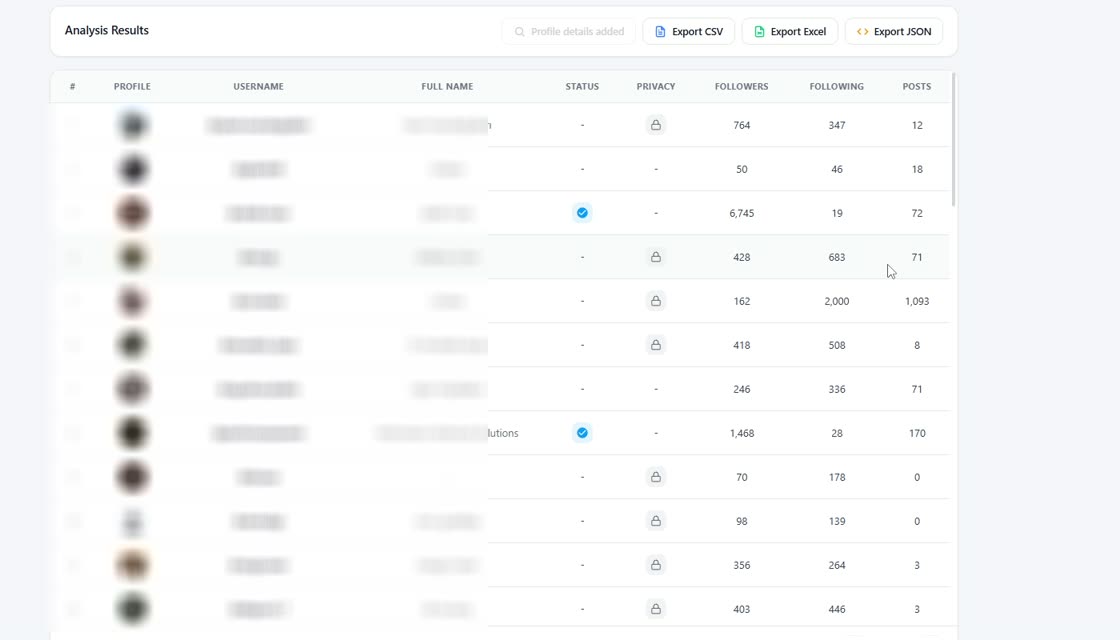
Rosterbox pages through the list the way Instagram expects, collects every account it returns, and fills a table you can sort, search and count. Row 1 is the newest follower. The number at the bottom tells you exactly how many came back, so you always know whether the list is complete.
Open Rosterbox on a profile or on a post and pick what you need.
The follower list of any public Instagram profile — and of your own account, even when it is private.
The accounts a profile follows, in the order Instagram returns them. Useful when you want to see recent following activity.
Everyone Instagram will share for a given post. Paste the post link and Rosterbox collects the list.
The people who left a comment on a post, with their usernames and profile links.
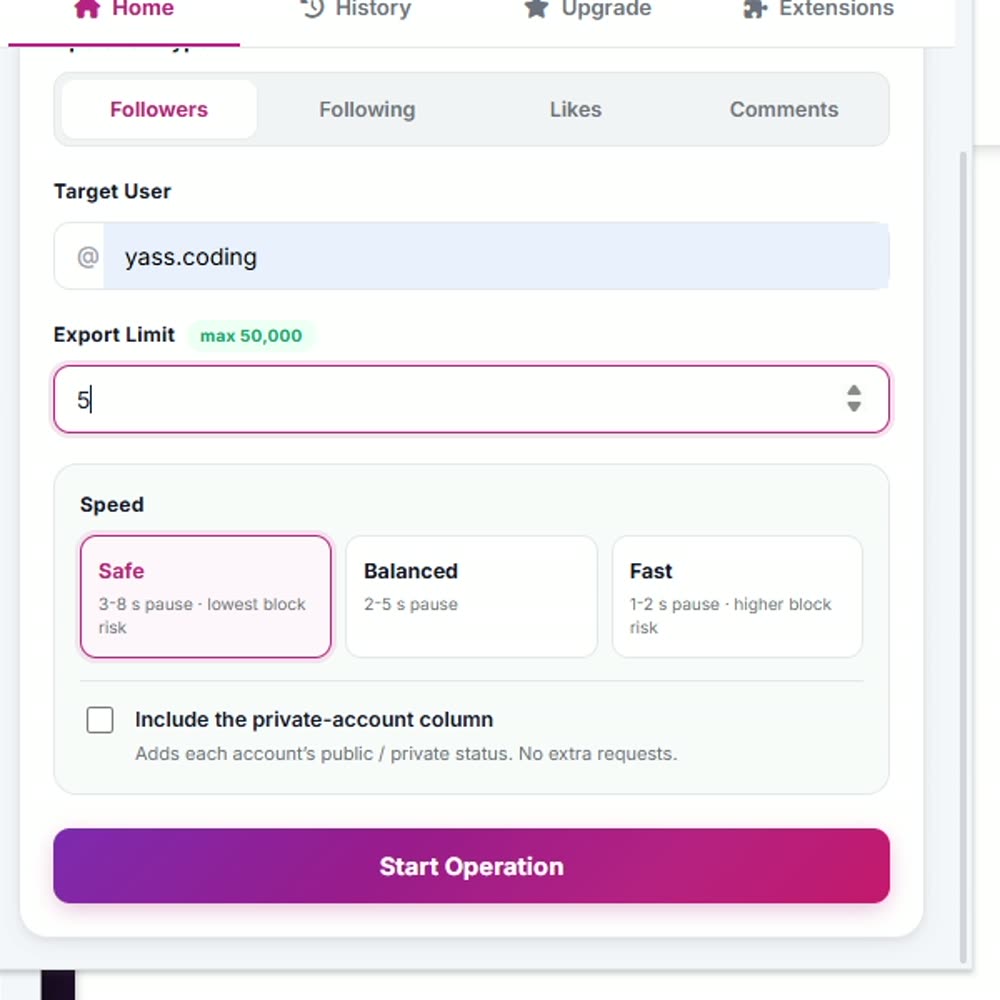
Your own account can be private. Rosterbox works inside the browser session you are already signed in to, so there is nothing to connect and nothing to authorise on Instagram.
Every row is one account. These columns are always there:
Ask for profile details and three more columns are filled in: follower count, following count and post count. Those are fetched only when you ask for them, so an ordinary run stays quick.
One of the most common questions about the follower list is what order it comes back in — and most tools quietly re-sort it before you ever see it.
Instagram returns followers in reverse chronological order: the account that followed you most recently comes back first, and the oldest follower comes back last. The same is true of the following list — the account you followed most recently is at the top.
Rosterbox keeps that order exactly as it arrives and writes it into a row number column. Row 1 is the newest. Once the file is open you can sort by name, by follower count, by anything you like — and the original Instagram order is still there in that column, so you can always get back to it.
Instagram does not publish dates for follows, and neither does Rosterbox. Order is the only chronological signal that exists — anything that claims to show you exact follow dates is guessing.
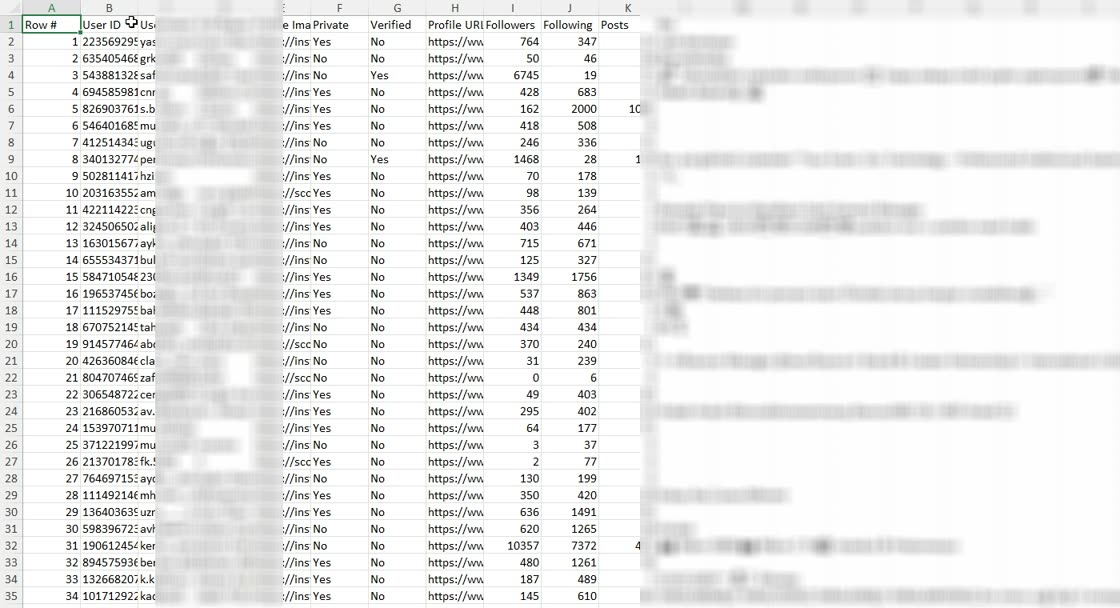
The file opens straight into a spreadsheet with the columns already in place. No copy and paste, no screenshots to retype, nothing to clean up afterwards.
CSV imports cleanly into Google Sheets, Airtable and Notion. JSON is there for when the list is going into a script rather than a spreadsheet.
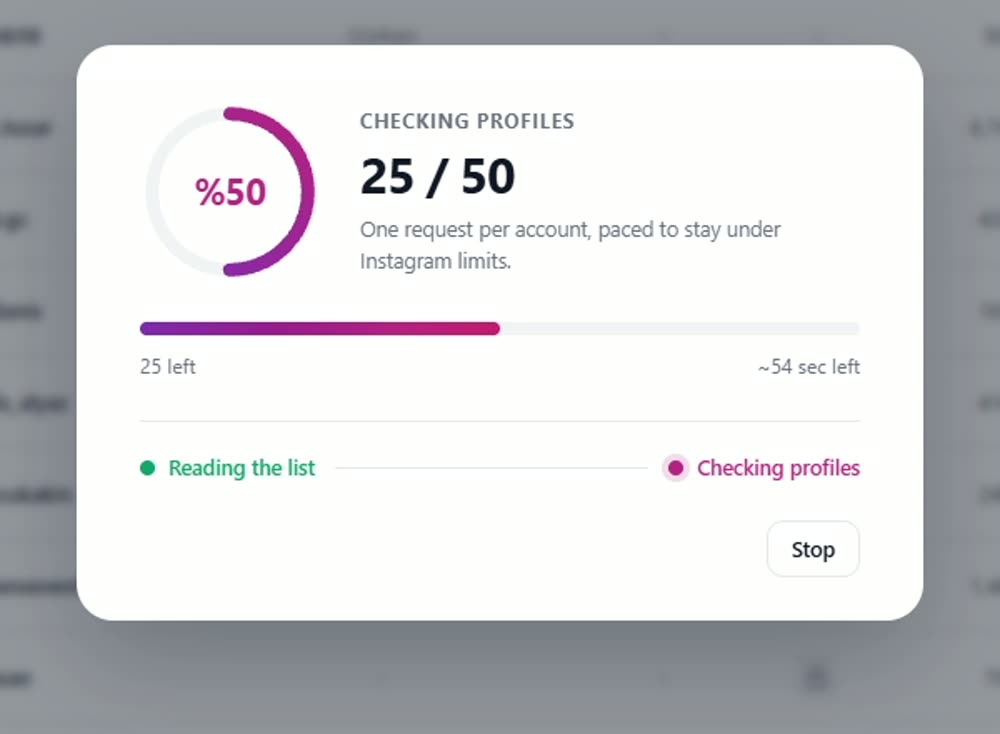
Instagram limits how fast anyone can page through a long list. Rosterbox does not hide that behind a spinner — it gives you three pacing options and tells you what each one costs.
A large list takes time at any speed. Results are written in chunks as the run goes, so if it is interrupted Rosterbox keeps what it already has and picks up where it stopped instead of starting again.
Every tool on this page of the internet runs into the same walls. The difference is whether it tells you, or shows you a progress bar that never fills.
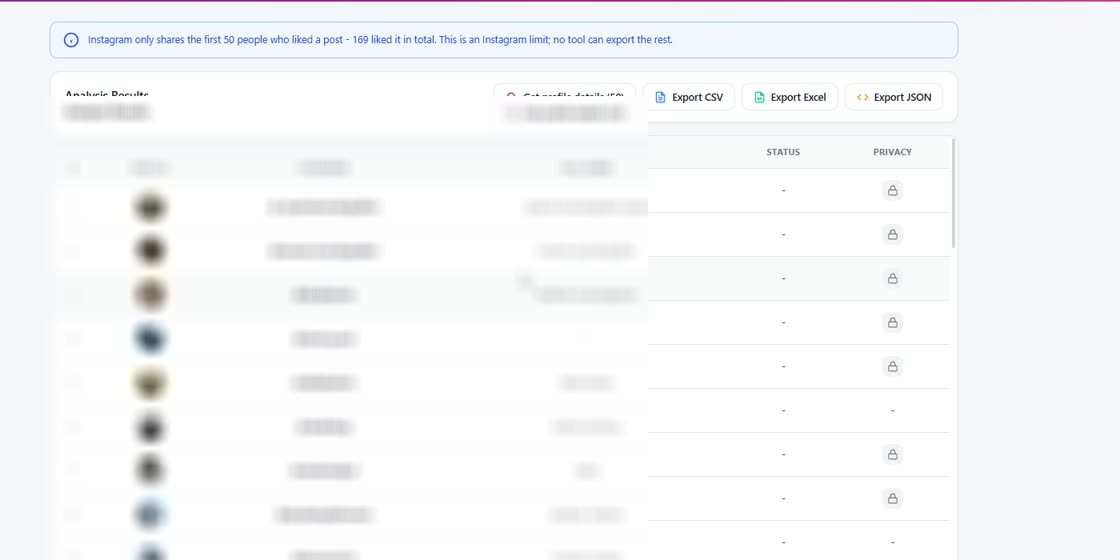
Instagram rarely returns more than roughly 100 likers for one post. Rosterbox shows the real total next to what it could read — "169 liked it in total, Instagram shares only the first 50" — and stops there instead of pretending.
A private account's follower list can only be read if you already follow it, or it is yours. Rosterbox says so rather than returning an empty file.
If Instagram stops returning pages mid-list, Rosterbox compares what it collected against Instagram's own count and warns you. A partial list is never presented as a complete one.
If you came here looking for one of these, save yourself the install.
It does not follow or unfollow anyone, and it will not get you followers. It only reads lists.
It does not watch your account over time or tell you who unfollowed you. Followgap does that job.
It will not tell you who has the most followers on Instagram. It reads the list of one account at a time — the one you choose.
It never asks for your Instagram credentials, posts, likes, comments or sends messages on your behalf.
A list of people is personal data in most jurisdictions. Use it in line with Instagram's terms and the data protection rules where you live.
Everything else we build, in one place.
 Instagram Unfollow AI - Manage Unfollowers Effortlessly
 X Unfollow AI – Manage Your Twitter Following List
 TikTok Unfollow AI - Mass & Auto Unfollow All, Everyone & Non-Followers
 WASendly – WhatsApp Bulk Message Sender
 WASendly – WhatsApp Contacts Extractor
 ExportPal - Save & Export ChatGPT, Claude, Gemini to PDF & Word
 Followgap - Instagram Unfollowers Tracker & Unfollow Non-Followers
 FollowStack – Instagram Toolkit for Desktop
 TeleSendly - Telegram Bulk Sender, Scraper & Member Adder
 Roostbox - Twitter/X Exporter: Tweets, Followers, Bookmarks & Archive
 TokExport - TikTok Follower List, Following & Comment Export Tool
 ChatGPT Speed Booster
 Instagram Follower Export Tool
 PromptJolt – AI Prompt Enhancer for ChatGPT, Claude & Gemini
 IGFollow AI - Auto Follow
 Backgap - Threads Followers Tracker & Mass Unfollow
 Backly — Unfollower Tracker for Instagram
 FeedRank – Instagram & TikTok Feed Sorter
 Instagram Auto Follow
 Claude Speed Booster
 TokSweep - TikTok Repost Remover & Bulk Cleaner
 ChatPilot – ChatGPT Bulk Delete, Archive & Timestamps
 Extract AI – Email Extractor
 Prompt Trove — Visual AI Image Prompts Gallery
 Crawlhive — SEO Audit, Site Crawler & Technical SEO
 Privacy Guard for WhatsApp Web
 Clickaroo - Mouse Effect Designer
 InkShot — Webpage Screenshot & Draw Tool
 Detechtor AI - Website Technology Checker & Tech Stack Detector
 Numsift — Bulk WhatsApp Number Checker & Validator | Export to Excel
 Clearbox — Bulk Chat & Message Deleter for Instagram
 Araç Data Merkezi — Used Car Valuation & Damage Check for Sahibinden
 SignedRise - Professional Email Signature
Instagram returns followers newest first — the most recent follower comes back first, and the oldest last. Rosterbox keeps that order exactly as Instagram gives it and numbers every row, so row 1 is the newest follower. It never silently re-sorts the list. Once the file is open you can sort it however you like; the original order stays in the row number column.
Only if you already follow that account, or it is your own. That is an Instagram rule, not a Rosterbox one. If the account is private and you do not follow it, Rosterbox tells you so instead of handing back an empty file.
Instagram rarely returns more than about 100 likers for a single post, no matter which tool asks. Rosterbox shows you the real number on screen — for example "169 liked it in total, Instagram shares only the first 50" — rather than showing a progress bar that never fills.
No. Rosterbox never asks for your Instagram password and has no way to receive one. It reads the lists through the browser session you are already signed in to.
It stays in your browser's local storage on your own machine. Nothing is uploaded to us. You can clear the history from inside the extension at any time.
You set the limit before the run starts. Large lists take time because Instagram limits how fast anyone can page through them — Rosterbox writes results in chunks as it goes, so if a run is interrupted it resumes from where it stopped instead of starting over.
Yes. Rosterbox runs on any Chromium browser — Chrome, Edge, Brave, Opera and Vivaldi.
Free, works on Chrome, Edge, Brave, Opera and Vivaldi. No password, no API key, no second account.
Add Rosterbox to ChromeRosterbox is an independent tool. It is not affiliated with, endorsed by or sponsored by Instagram or Meta Platforms, Inc. "Instagram" is a trademark of Meta Platforms, Inc. and is used here only to describe the site this extension works on.