Telegram Chrome extension

TeleSendly Telegram bulk sender, group scraper and member adder.

Send a personalised message to hundreds of people, pull a group member list into Excel, and invite those people into your own group — all from your own account, inside Telegram Web. No bot, no API key, nothing to install besides the extension.

  • One message, everyone's own name in it
  • Export Telegram group members to Excel or CSV
  • Human-like delays and a daily limit you set
Wall of love

Loved by real users.

5 · 11 ratings on the Chrome Web Store
Roman Hide
Roman Hide

Hello there! Thank you for good extantion, it's realy one of the best which I use. If you need some maling in TG or collect contacts please use. Best

Posted on Chrome Web Store See on Store
Nov 2026
Nik
Nik

Best extension for telegeam ever, working fast

Posted on Chrome Web Store See on Store
Oct 2026
Warisson Batista
Warisson Batista

I used it and it worked very well—thanks.

Posted on Chrome Web Store See on Store
Oct 2026
Breno
Breno

nice broo ❤️❤️❤️

Posted on Chrome Web Store See on Store
Oct 2026
Yaşar Kurt
Yaşar Kurt

So far, the extension has been easy to set up and use. The interface is simple and the automation saves quite a bit of manual work.

Posted on Chrome Web Store See on Store
Oct 2026
Kadir Toprak
Kadir Toprak

Nice tool if you work with Telegram regularly. Having the scraper, bulk sender and member management features in one extension is convenient.

Posted on Chrome Web Store See on Store
Oct 2026
Kara Kedi
Kara Kedi

The campaign features are well thought out. I like being able to customize messages and see the progress while sending.

Posted on Chrome Web Store See on Store
Oct 2026
Chrome user
Chrome user

I needed a simple way to export Telegram members to Excel, and this does exactly what I needed. Pretty easy to use.

Posted on Chrome Web Store See on Store
Oct 2026
Osman Muratoğulları
Osman Muratoğulları

The member scraper is probably my favorite feature. Exporting group members to Excel is much easier than doing it manually.

Posted on Chrome Web Store See on Store
Oct 2026
Chrome user
Chrome user

Really useful for sending messages to multiple Telegram users. The campaign setup is quite straightforward and saves a lot of time.

Posted on Chrome Web Store See on Store
Oct 2026
0 Languages
0 Speed profiles, slowest by default
0 API keys or bot tokens needed
0 Passwords or login codes asked for
Bulk messaging

Send bulk messages on Telegram without copying and pasting

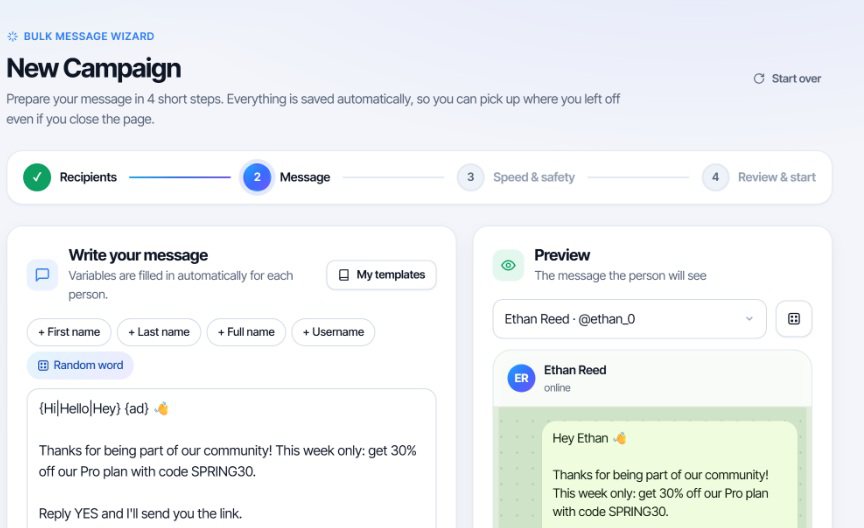
Write the message once. Everyone on your list receives their own copy, with their own name in it, sent from your own account one at a time.

  • Pick recipients from your chats and groups, paste usernames or phone numbers, or use a list you collected.
  • Personalise with {name}, {first name} and {username}; spintax like {Hi|Hello|Hey} makes every message different.
  • Attach photos, videos and files.
  • Preview any recipient's version before a single message leaves.
  • Schedule a campaign, or keep sending inside working hours only.
  • Skip the unreachable. People whose privacy or Premium-only settings block your message are detected first, so nothing is wasted on them.
TeleSendly bulk message wizard: message box with spintax and a {name} variable on the left, live preview of the Telegram chat on the right
Member scraper

Export Telegram group members to Excel in one click

Choose a group you are in, or paste a public group link, and collect the member list — names, usernames, phone numbers where they are visible, and when each person was last seen.

  • All members, or only the active ones who have actually posted recently.
  • Deep scan reaches further in large groups, where Telegram stops returning the full participant list.
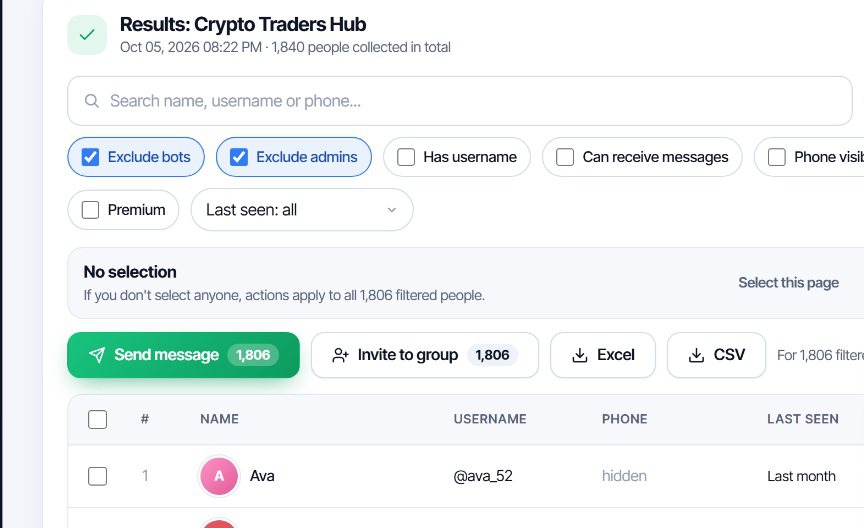
  • Filters for bots, admins, has username, has photo, Premium and last seen.
  • Excel or CSV download, ready for a CRM or a spreadsheet.
  • Act on the result — message or invite the people you just collected without exporting first.
Telegram group scraper results: 1,840 people collected, filters for bots, admins and last seen, with Excel and CSV export buttons
Member adder

Add members to a Telegram group you manage

Take the people you collected — or a list you already have — and invite them into your own group or channel, one by one, at a pace that does not look automated.

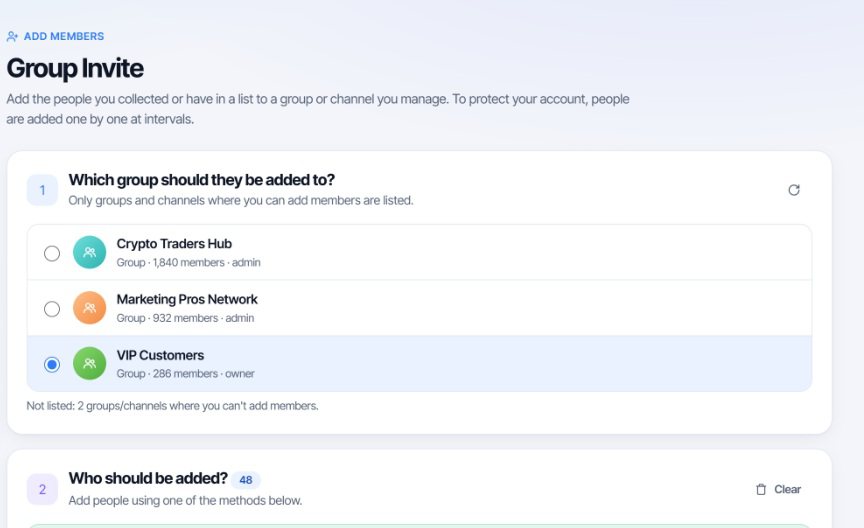
  • Only your own groups. The list shows the groups and channels where you actually have permission to add people.
  • Existing members are skipped automatically, so no invite is wasted.
  • Paced invites with a gap between each one.
  • A clear report of who joined and, for everyone else, the reason it did not work.

Telegram limits this on purpose: there is a ceiling per group and per day, and many people have the privacy setting that stops strangers adding them at all. The report tells you which of the two happened.

TeleSendly group invite screen: choosing which group to add people to, showing only groups where you are admin or owner
Reports

See who read and replied

A campaign is not finished when the last message is sent. Every campaign keeps its own report.

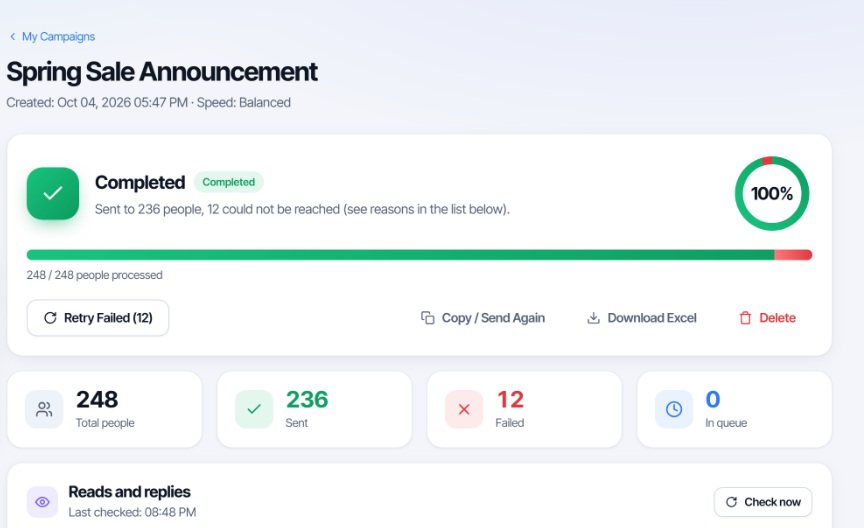
  • Live progress while it runs, and the reason beside anyone who could not be reached.
  • Read and reply tracking, refreshed when you ask for it.
  • Retry the failures in one click, without rebuilding the campaign.
  • Copy and send again to a new list.
  • Download the report as Excel.
Campaign report: 248 people processed, 236 sent, 12 failed, with retry, copy and Excel download
Account safety

Built to keep your account out of trouble

Telegram restricts accounts that send a lot in a short time. Most of the damage people do to themselves is speed, not volume. The default here is the slow setting, on purpose.

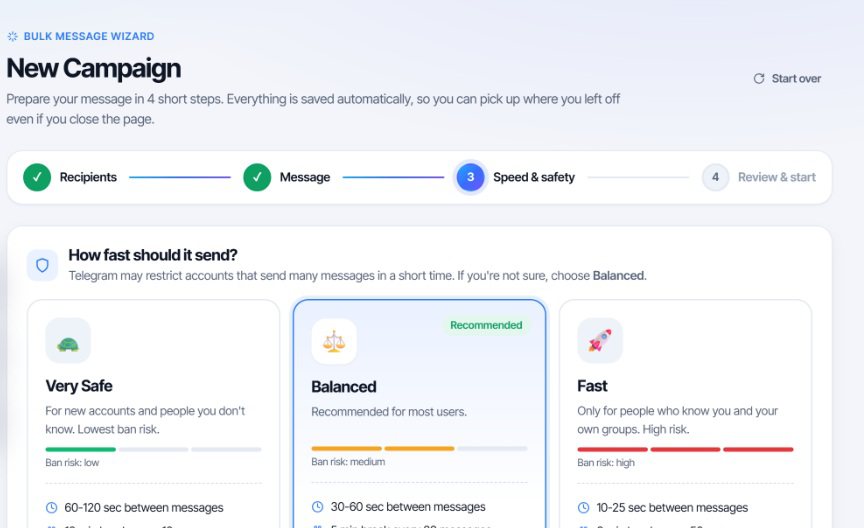
  • Three speed profiles. Very Safe waits 60–120 seconds between messages, Balanced 30–60, Fast 10–25. Each one shows its own risk level, and the delays are randomised so the rhythm is not machine-regular.
  • Batch pauses and a daily limit you choose, so a campaign stops before Telegram does.
  • Account health check through Telegram's own @SpamBot — the official answer on whether your account is currently limited.
  • Automatic stop. If Telegram asks you to slow down, the campaign pauses itself instead of pushing through.

No tool can promise you will never be limited, and one that does is not telling you the truth. Message people who expect to hear from you, start slow with a new account, and follow Telegram's Terms of Service.

Speed and safety step: Very Safe 60-120 seconds, Balanced 30-60 seconds recommended, Fast 10-25 seconds, each with a ban risk indicator
How it works

Three steps, no setup

There is no API ID, no api_hash, no bot token and no separate program to install.

1

Install and sign in

Add TeleSendly to Chrome and sign in with Google so your licence follows you to another computer.

2

Open Telegram Web

Go to web.telegram.org and log in to your own Telegram account the way you always do. The extension never sees your password or login code.

3

Collect, write, send

Scrape a group, write one message, choose a speed and start. Everything runs in your browser while the tab is open.

Privacy first

Your lists stay on your computer.

Messages, contacts and scraped member lists are held on your own machine and are never uploaded to us. TeleSendly works inside the Telegram Web session you opened yourself; it does not ask for your Telegram password, your login code or your two-step verification, and it has no access to your account outside that browser tab. Signing in with Google sends only your account name and email address, so your licence can be recognised. TeleSendly is an independent tool and is not affiliated with, endorsed by, or sponsored by Telegram.

FAQ

Frequently asked questions

How do I send bulk messages on Telegram?

Open Telegram Web, open TeleSendly and build a campaign in four steps: choose who receives it, write one message with variables like {name}, pick a sending speed, then start. Messages go out from your own account, one at a time, with a pause between each one.

How do I export Telegram group members to Excel or CSV?

Pick a group you are in, or paste a public group link, and collect the member list. Filter out bots and admins, or narrow by last seen, username and photo, then download the result as an Excel or CSV file.

Can I add members to a Telegram group automatically?

Yes, into groups and channels you manage. Load people from your scraped results or paste a list, and they are invited one by one at intervals. People who are already members are skipped automatically.

How many messages can I send on Telegram in a day?

Telegram does not publish a figure. Messages to people who already have you in their contacts are not normally restricted. For people who do not know you, a new account should expect something in the region of fifty a day, rising as the account ages and people reply. TeleSendly's speed profiles and daily limit are there to keep you under whatever that ceiling turns out to be.

Do I need a Telegram API key or bot token?

No. There is no API ID, no api_hash, no bot token and nothing to install besides the extension. TeleSendly works inside your own Telegram Web session in the browser.

Does TeleSendly ask for my Telegram password or login code?

No. You log in to Telegram Web yourself, exactly as you normally would. The extension never sees your phone number login code, your password or your two-step verification.

Will my account get banned?

Nobody can promise it will not, and you should not trust a tool that does. What raises the risk is volume, speed and messaging people who did not expect you. TeleSendly spaces messages with random human-like delays, pauses between batches, stops at a daily limit you set, checks your standing with Telegram's own @SpamBot and pauses by itself if Telegram asks you to slow down.

Can it scrape a group where the member list is hidden?

In large groups Telegram stops returning the full participant list. The deep scan also reads who has actually been posting in the chat, which recovers people the plain member list does not show. It cannot reach a private group you are not a member of.

Is this a bot or an SMM panel?

Neither. It is a Chrome extension that works through your own Telegram account in your own browser. There is no bot account, no third-party panel, and no one else's accounts are involved.

Can I personalise each message?

Yes. Variables such as {name}, {first name} and {username} are filled in per person, and spintax like {Hi|Hello|Hey} picks a different wording for each recipient so no two messages are identical. A live preview shows exactly what any individual will receive.

Can I see who read or replied to a campaign?

Yes. Every campaign has a report with live progress, who was reached, who could not be, and read and reply tracking. Failed messages can be retried in one click and the whole report downloads as Excel.

Does it work on Telegram Desktop or on my phone?

No. It is a Chrome extension and runs on web.telegram.org in a desktop browser — Chrome, Edge, Brave, Opera and other Chromium browsers. The Telegram desktop app and mobile apps are not supported.

Where is my data kept?

Your messages, contacts and scraped lists stay on your computer. Signing in with Google sends only your account name and email address, so your licence can be recognised on another machine.

Everything you need to know about TeleSendly

TeleSendly is a Telegram Chrome extension that does three jobs most people currently do with three separate tools: it sends a personalised message to a list of people, it collects the member list of a group into a spreadsheet, and it invites those people into a group you run. All of it happens through your own account, in your own browser, on web.telegram.org.

How to send bulk messages on Telegram

Sending the same message to two hundred people by hand is an afternoon's work and a guaranteed set of mistakes. A campaign in TeleSendly takes four steps. You choose the recipients — from your own chats, from a group, from a pasted list of usernames or phone numbers, or from people you have just collected. You write one message, using {name} or {username} where a person's own details should appear, and spintax such as {Hi|Hello|Hey} so that no two messages come out word-for-word identical. You pick how fast it should go. Then it runs, one message at a time, from your account, with the preview you already saw being what each person actually receives. People whose settings mean they cannot receive a message from a stranger are identified before sending starts, so your attempts are not spent on them.

How to export Telegram group members to Excel

Telegram has no button that hands you a group's member list. A Telegram group scraper fills that gap. Pick a group you belong to or paste a public group link, and the member list is collected into a table: name, username, phone number where the person has made it visible, and when they were last online. From there you can narrow it — exclude bots, exclude admins, keep only people with a username or a photo, keep only those seen in the last week — and download what is left as Excel or CSV. In very large groups Telegram stops returning the full participant list; the deep scan also looks at who has actually been posting in the chat, which recovers people the plain list leaves out. What it cannot do is reach into a private group you are not a member of, and no tool honestly can.

How to add members to a Telegram group

Growing a group by hand means opening the member list of somewhere else, copying names and adding them one at a time. The member adder takes a list — usually the one you just scraped — and invites those people into a group or channel where you are an admin or owner, spacing the invites out so the activity does not look automated. Anyone already in the group is skipped before an invite is spent on them. It is worth being realistic about this feature: Telegram caps how many people can be added to a group and how many one account may add in a day, and a large share of users have the privacy setting that prevents strangers adding them at all. TeleSendly reports which of those two reasons applied to each person rather than quietly counting it as a failure.

Keeping your Telegram account safe

The question behind every one of these tools is whether it will get your account limited. Telegram does not publish its thresholds, but the pattern is well known: new accounts are watched closely, messages to people who have never interacted with you count against you much faster than messages to contacts, and a steady machine-regular rhythm is easier to spot than an irregular one. TeleSendly's answer is not a claim, it is a set of controls. The three speed profiles space messages 60–120, 30–60 or 10–25 seconds apart, with the delay randomised inside that window, and the slowest one is the default. You can set a daily limit and a batch pause. The account health check asks Telegram's own @SpamBot whether your account is currently restricted, which is the only authoritative answer available. And if Telegram tells your account to slow down mid-campaign, sending pauses itself rather than pushing on. None of this is a guarantee, and a tool that offers you one is selling you something.

Why a Chrome extension instead of a desktop program

Most Telegram marketing software is a Windows program that asks for your phone number, sends you a login code and signs into your account on its own. That means handing over full access to your Telegram account to a program you did not write. A browser extension does not need any of that. You log in to Telegram Web yourself, in the normal way, and the extension works inside the session you already opened. There is no API ID or api_hash to create, no bot token, and nothing that can keep using your account after you close the tab.

Who uses it

Community managers who keep a member roster up to date. Online shops announcing a restock to the people who asked to be told. Crypto and trading communities, where Telegram is the main channel rather than a side one. Event organisers sending the venue and time to everyone who signed up. Course creators keeping students in one place. The common thread is an audience that already exists somewhere on Telegram and a message that has to reach it without being pasted two hundred times.

Privacy and fair use

Your messages, your contacts and every list you collect stay on your own computer. Nothing is uploaded to us for processing and there is no server in the middle holding your data. Signing in with Google sends only your account name and email address so your licence can be recognised on another machine. Please use TeleSendly the way you would want a stranger to use it on you: message people who have a reason to expect you, keep the volume sensible, and follow Telegram's Terms of Service. TeleSendly is an independent tool and is not affiliated with, endorsed by, or sponsored by Telegram.

Install TeleSendly

One message to your whole list, a group's members in a spreadsheet, and those people in your own group — from your own account, at a speed you control.

Add TeleSendly to Chrome

Works in Telegram Web No API key or bot 60+ languages Instant install

More tools

Explore our other Chrome extensions

Discover more powerful tools to enhance your browsing experience.

Instagram Unfollow AI - Manage Unfollowers Effortlessly

Instagram Unfollow AI detects those who don't follow you back and helps you unfollow them to optimize your account easily.

X Unfollow AI – Manage Your Twitter Following List

Manage your X (Twitter) following, detect users who don't follow you back, and unfollow safely with smart filters.

TikTok Unfollow AI - Mass & Auto Unfollow All, Everyone & Non-Followers

See who doesn't follow you back on TikTok, then bulk unfollow all, everyone or only non-followers. Safe pacing, one click.

WASendly – WhatsApp Bulk Message Sender

Send bulk and automated WhatsApp messages safely and easily with WASendly.

Contactdock – WhatsApp Contacts Extractor

Easily export WhatsApp contacts and group members to Excel, CSV, or vCard.

Followgap - Instagram Unfollowers Tracker & Unfollow Non-Followers

Find who doesn't follow you back on Instagram. Track unfollowers & mass unfollow non-followers in one click.

FollowStack – Instagram Toolkit for Desktop

Instagram toolkit for desktop. Track unfollowers, upload stories from PC, download media, and manage Instagram.

Rosterbox - IG Follower & Following Export List to CSV, Excel

Export IG follower and following lists, likes and comments to CSV, Excel or JSON in one click. Fast, private, no password.

Roostbox - Twitter/X Exporter: Tweets, Followers, Bookmarks & Archive

Export tweets, replies, likes, bookmarks and followers from any Twitter/X account to Excel, CSV or JSON. No API key needed.

Postwash - Delete Tweets, Likes & Reposts for X

Delete tweets, likes and reposts on X in bulk. Preview first, back up to CSV, and every deletion is verified.

ExportPal - Save & Export ChatGPT, Claude, Gemini to PDF & Word

Save & export ChatGPT, Claude, Gemini, Grok, DeepSeek & Perplexity to PDF, Word, Markdown, HTML, JSON or Image. Private & free.

TokExport - TikTok Follower List, Following & Comment Export Tool

Export TikTok follower and following lists, video comments and post stats to CSV or Excel. Resume long exports.

ChatGPT Speed Booster

ChatGPT Speed Booster is a free Chrome extension that fixes slow ChatGPT performance in long conversations.

Instagram Follower Export Tool

Export Instagram followers, following, likes, and comments to CSV or Excel in one click

TokSweep - TikTok Repost Remover & Bulk Cleaner

Remove TikTok reposts in bulk. See the full list first, pick what goes, and set your own pace. Nothing goes without you.

PromptJolt – AI Prompt Enhancer for ChatGPT, Claude & Gemini

Rewrite any AI prompt into a clear, structured version in one click. Press Ctrl+M on ChatGPT, Claude or Gemini. 50+ languages, free.

IGFollow AI - Auto Follow

IGFollow AI is an AI-powered tool to grow your Instagram. Boost engagement and expand your audience effortlessly

Followprune - Fake Follower Checker for Instagram

Scan your followers or the accounts you follow, spot fake and empty ones, and remove them in bulk. Resumes where it stopped.

Backgap - Threads Followers Tracker & Mass Unfollow

See who doesn't follow you back on Threads, protect the accounts you want to keep, and tidy your following list at your own pace.

Backly — Unfollower Tracker for Instagram

See exactly who doesn’t follow you back on Instagram, protect the accounts you care about, and unfollow the rest at a safe, adjustable pace.

TeleCache - Telegram Video & Media Downloader

Download Telegram videos, photos, audio and files in bulk. Filter by type, date, size or sender. Pause and resume anytime.

FeedRank – Instagram & TikTok Feed Sorter

Sort Instagram & TikTok feeds by likes, views, comments or date. See post stats at a glance and find viral content fast. Free.

Instagram Auto Follow

AI-powered Instagram auto follow tool to boost engagement, grow followers, and expand your audience effortlessly.

Claude Speed Booster

Fix slow Claude.ai in long conversations. Speed Booster hides older messages to stop lag, freezing & high memory use — instantly.

ChatPilot – ChatGPT Bulk Delete, Archive & Timestamps

Bulk delete & archive ChatGPT chats, add message timestamps and navigate conversations fast. Clean up ChatGPT in one click.

Extract AI – Email Extractor

Email Extractor helps you find visible email addresses on websites and works locally with no tracking or data collection.

Prompt Trove — Visual AI Image Prompts Gallery

A visual gallery of AI image prompts. Use them instantly in ChatGPT, Gemini, Sora, and Nano Banana.

Crawlhive — SEO Audit, Site Crawler & Technical SEO

Audit any page, then crawl the whole site: indexability, duplicate titles, orphan pages, click depth and Core Web Vitals. Your pages are never uploaded.

Privacy Guard for WhatsApp Web

Secure your WhatsApp Web with smart lock, panic button, and blur mode. Your privacy, your control.

Clickaroo - Mouse Effect Designer

Transform your cursor with stunning click effects & animations. Perfect for streamers, presenters & content creators.

InkShot — Webpage Screenshot & Draw Tool

InkShot is a free screenshot Chrome extension that lets you capture full page screenshots, visible viewport, or selected areas

Detechtor AI - Website Technology Checker & Tech Stack Detector

Detechtor AI checks what any website is built with — CMS & WordPress theme detector, frameworks, analytics, CDN, tech stack.

Numsift — Bulk WhatsApp Number Checker & Validator | Export to Excel

Bulk check which numbers are on WhatsApp. Validate lists, filter by country, spot business accounts, export to Excel or CSV.

Clearbox — Bulk Chat & Message Deleter for Instagram

Delete all your chats and messages on Instagram in bulk. One click, and the chats you protect stay untouched.

Araç Data Merkezi — Used Car Valuation & Damage Check for Sahibinden

See what a car on Sahibinden is really worth: market value for the exact trim, how damage and repaint move the price, and the engine's known faults. Turkish interface, Turkey market.

Chatalbum - WhatsApp Chat Export to PDF & Excel

Save any WhatsApp Web chat as a readable file with its photos and voice notes. Everything stays in your browser.

TokDraw - TikTok Giveaway Picker & Comment Picker

Pick fair, verifiable winners from TikTok video comments on a big, recordable stage: set your rules, draw, save a proof.

Groupdex - Contacts & Chat Exporter for WhatsApp

Export contacts, group members and chats from WhatsApp Web to Excel or CSV. Pull phone numbers from any group in one click.

Pickmint - Instagram Giveaway & Comment Picker

Instagram giveaway picker: collect a post's comments, set simple rules, pick fair winners and save a proof anyone can check.

SignedRise - Professional Email Signature

Create custom and professional email signatures effortlessly with SignedRise. Perfect for personal and work emails.

Contact Us

contact@addonschrome.com