Nine file types
Export a WhatsApp chat to PDF, Excel, HTML, CSV, TXT, Markdown or JSON, save contacts as vCard, or get everything in one ZIP. The TXT file uses WhatsApp’s own layout.
Chatalbum saves any WhatsApp Web chat as a readable file on your own computer: PDF, Excel, a searchable HTML album, CSV, TXT, Markdown, JSON or a ZIP with every photo, video and voice note. It only reads, it never sends or deletes a message, and your chats are never uploaded.
WhatsApp Web has no export button. To keep a conversation you screenshot it, copy it by hand, or use the phone’s own export, which gives a bare text file without a readable layout, one chat at a time, with no Excel or PDF.
Long chats take hours, photos and voice notes get lost, and the result is hard to search or share.
One run for many chats, in the format you need, with the media next to the text.
Pick what to save, in the format you need, and nothing leaves your browser.
Export a WhatsApp chat to PDF, Excel, HTML, CSV, TXT, Markdown or JSON, save contacts as vCard, or get everything in one ZIP. The TXT file uses WhatsApp’s own layout.
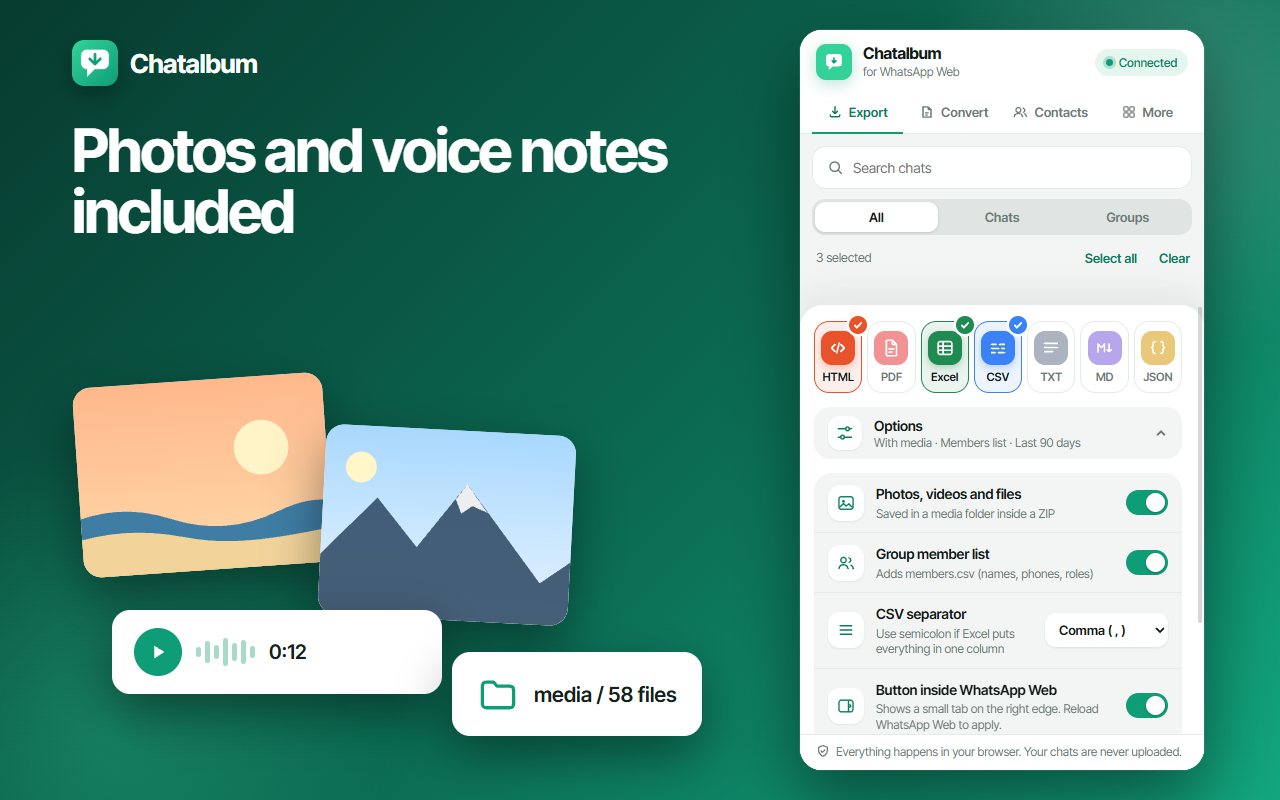
Switch on media and the chat comes with a media folder and an index page. Duplicates are saved once, failed downloads are retried and a report lists anything missing.
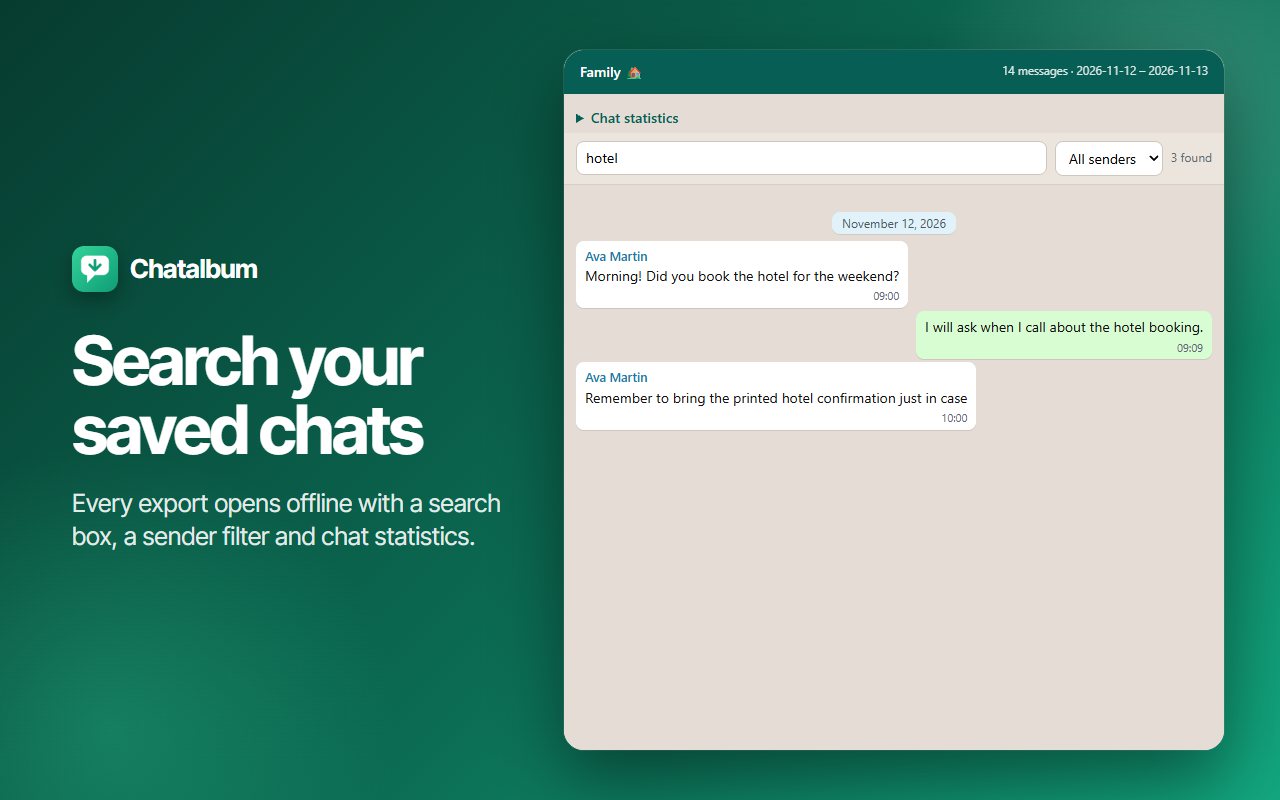
Open the HTML file in any browser: search by word, filter by sender and see message statistics. It is one file you can keep, send or print.
Choose all time or a date range and export one chat, a handful or whole groups in a single run. An empty range is reported instead of writing an empty file.
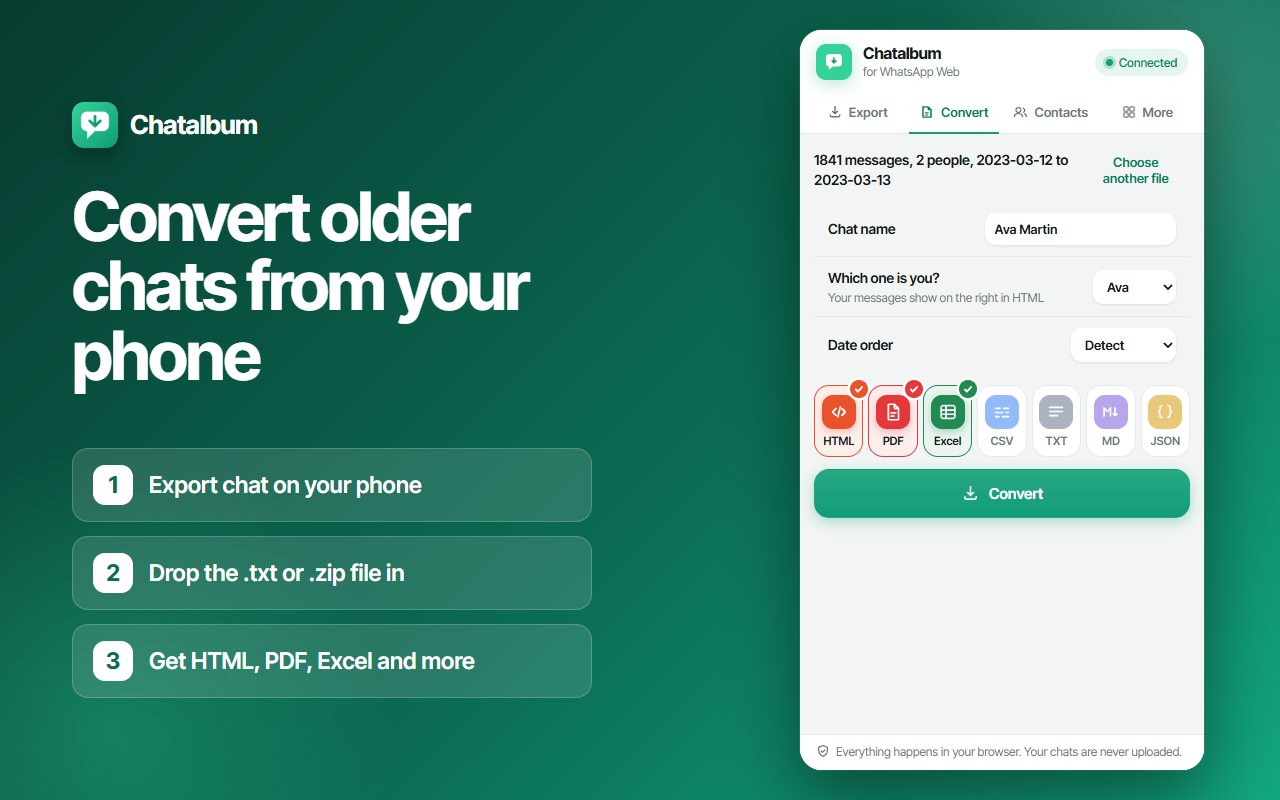
Older history lives on your phone. Drop WhatsApp’s own “Export chat” file (.txt or .zip) into the Convert tab and get PDF, Excel or any other format, even for a 200,000-line chat.
Save your chats’ contacts, your saved contacts or the members of your groups as Excel, CSV or vCard. Need the numbers of group members only? See the WhatsApp contacts extractor.
Long exports show live progress and can be paused, resumed or cancelled at any moment. A report is saved with the files.
Chatalbum never sends, edits or deletes a message. There is no account and no analytics, and your chats are processed in the browser and saved to your Downloads folder.
The same flow for one chat or for fifty.
Go to web.whatsapp.com and wait for your chats to load, then click the Chatalbum icon. The panel opens beside WhatsApp.
Tick one chat, several chats or whole groups. Search the list by name, and see at a glance which ones you chose.
Select PDF, Excel, HTML, CSV, TXT, Markdown, JSON or ZIP. Add photos, videos and voice notes, the group member list or a date range if you want them.
Chatalbum builds the files on your computer and saves them to your Downloads folder. For PDF it opens the print page, where you choose “Save as PDF”.
From the chat list to a finished PDF and Excel file, start to finish.
The chat list, media, the searchable album, the converter and the privacy panel.
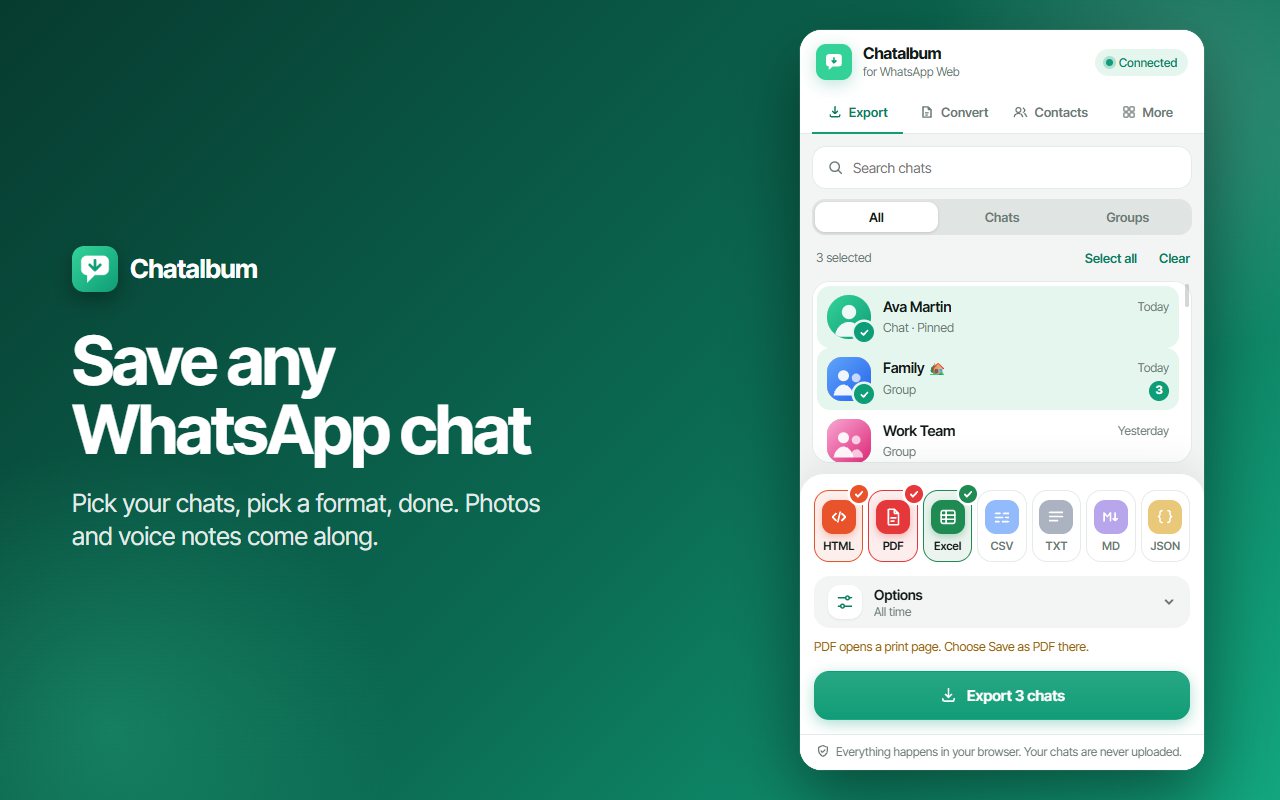

Open WhatsApp Web, click the Chatalbum icon so the side panel opens, tick the chats you want, choose PDF and press Export. Chatalbum builds a readable document with dates, names and messages and opens the print page, where you choose “Save as PDF”. Nothing is uploaded; the document is made on your own computer.
Yes. Choose Excel and Chatalbum writes a spreadsheet with one row per message (date, time, sender, text, media) and a Summary sheet with message counts per person. CSV is there too, with a comma or semicolon separator, so it opens correctly in any regional setting.
Chatalbum reads what WhatsApp Web has on your computer, which is what your phone synced to it, often a few months. For older history, use WhatsApp’s own “Export chat” on your phone and drop the file into the Convert tab: it turns it into PDF, Excel or any other format.
Yes, if you switch media on. The chat is saved as a ZIP with a media folder and an index page, so the files open from the transcript. Duplicates are saved once, failed downloads are retried and a report lists anything that could not be saved.
Yes. Tick as many chats and groups as you like, choose a date range if you only need part of them, and export in one run. The group member list can be added as well. You can pause, resume or cancel while it works.
Yes. The Contacts tab saves your chats’ contacts, your saved contacts or the members of your groups as Excel, CSV or vCard files.
No. It only reads. It never sends a message, edits one or deletes one, and nothing is posted back to WhatsApp.
No. Your messages, media, contacts and phone numbers are processed inside your browser and saved to your Downloads folder. There is no account, no sign-in and no analytics. The only requests the extension makes are listed in its privacy policy.
Exporting chats needs WhatsApp Web open and linked to your phone. The Convert tab does not: it works on a chat file you already have, with no WhatsApp window at all.
No. Chatalbum is an independent extension. It is not affiliated with, endorsed by, or connected to WhatsApp LLC or Meta Platforms, Inc. “WhatsApp” is a trademark of its owner and appears here only to describe what the extension works with.
Install the extension, open WhatsApp Web, and save the chats that matter.
See how Chatalbum worksA WhatsApp conversation can be a receipt, a contract, a family memory or the record of a project. Sooner or later you need it outside the app: as a PDF to attach to a form, as a spreadsheet to count and sort, or simply as a copy that survives a lost phone. Searching for a WhatsApp chat export usually ends in the same answer, the phone’s own “Export chat”, which creates a plain text file for one chat at a time.
WhatsApp Web shows your chats but offers no way to save them. Screenshots miss everything above the visible screen, and copying text drops the dates and the senders. Chatalbum reads the chats you select from the WhatsApp Web page itself and writes the files for you, so the layout, the names and the times are kept.
A PDF is the right choice when the chat has to be read, printed or attached. Chatalbum builds a clean document with each message, its time and its sender, and opens your browser’s print page so you can save it as a PDF. For several chats, export each one as its own document in a single run.
A spreadsheet is the right choice when you need to search, filter, count or share. Excel gets one row per message and a Summary sheet with how much each person wrote. CSV opens in any spreadsheet program, with a comma or semicolon separator. Contacts and group members can be saved the same way, or as a vCard file you can import elsewhere.
A transcript without its attachments is half a conversation. Switch media on and the ZIP contains the chat, a media folder and an index page that links the two. Identical files are saved once, downloads that fail are retried, and a short report states what was saved and what could not be.
Chatalbum exports what WhatsApp Web has on your computer, which is what your phone synced to it. Older history is still on the phone. Use WhatsApp’s “Export chat” there, then drop the file into the Convert tab to turn it into PDF, Excel, HTML or any other format. The conversion runs in your browser, with no upload.
Nothing does. Your messages, media, contacts and phone numbers are processed in the browser and saved to your Downloads folder. Chatalbum has no account and no analytics and cannot send, edit or delete a message. Read the privacy policy for the full list of requests the extension makes. If you also want to hide WhatsApp Web while you work, see Privacy Guard for WhatsApp Web.
Chatalbum is an independent extension. It is not affiliated with, endorsed by, sponsored by, or in any way officially connected to WhatsApp LLC, Meta Platforms, Inc., or any of their subsidiaries or affiliates. “WhatsApp” and related names, marks and logos are trademarks of their respective owners and appear here only to describe what this extension works with.
 Instagram Unfollow AI - Manage Unfollowers Effortlessly
Instagram Unfollow AI detects those who don't follow you back and helps you unfollow them to…
 X Unfollow AI – Manage Your Twitter Following List
Manage your X (Twitter) following, detect users who don't follow you back, and unfollow safely…
 TikTok Unfollow AI - Mass & Auto Unfollow All, Everyone & Non-Followers
See who doesn't follow you back on TikTok, then bulk unfollow all, everyone or only…
 WASendly – WhatsApp Bulk Message Sender
Send bulk and automated WhatsApp messages safely and easily with WASendly.
 WASendly – WhatsApp Contacts Extractor
Easily export WhatsApp contacts and group members to Excel, CSV, or vCard.
 TeleSendly - Telegram Bulk Sender, Scraper & Member Adder
Send bulk Telegram messages, scrape group members to Excel and add members to groups. Safe…
 Followgap - Instagram Unfollowers Tracker & Unfollow Non-Followers
Find who doesn't follow you back on Instagram. Track unfollowers & mass unfollow non-followers…
 FollowStack – Instagram Toolkit for Desktop
Instagram toolkit for desktop. Track unfollowers, upload stories from PC, download media, and…
 Rosterbox - IG Follower & Following Export List to CSV, Excel
Export IG follower and following lists, likes and comments to CSV, Excel or JSON in one click…
 Roostbox - Twitter/X Exporter: Tweets, Followers, Bookmarks & Archive
Export tweets, replies, likes, bookmarks and followers from any Twitter/X account to Excel…
 Postwash - Delete Tweets, Likes & Reposts for X
Delete tweets, likes and reposts on X in bulk. Preview first, back up to CSV, and every…
 ExportPal - Save & Export ChatGPT, Claude, Gemini to PDF & Word
Save & export ChatGPT, Claude, Gemini, Grok, DeepSeek & Perplexity to PDF, Word, Markdown…
 TokExport - TikTok Follower List, Following & Comment Export Tool
Export TikTok follower and following lists, video comments and post stats to CSV or Excel…
 ChatGPT Speed Booster
 is a free Chrome extension that fixes slow ChatGPT performance in long…
 Instagram Follower Export Tool
Export Instagram followers, following, likes, and comments to CSV or Excel in one click
 TokSweep - TikTok Repost Remover & Bulk Cleaner
Remove TikTok reposts in bulk. See the full list first, pick what goes, and set your own pace…
 PromptJolt – AI Prompt Enhancer for ChatGPT, Claude & Gemini
Rewrite any AI prompt into a clear, structured version in one click. Press Ctrl+M on ChatGPT…
 IGFollow AI - Auto Follow
IGFollow AI is an AI-powered tool to grow your Instagram. Boost engagement and expand your…
 Followprune - Fake Follower Checker for Instagram
Scan your followers or the accounts you follow, spot fake and empty ones, and remove them in…
 Backgap - Threads Followers Tracker & Mass Unfollow
See who doesn't follow you back on Threads, protect the accounts you want to keep, and tidy…
 Backly — Unfollower Tracker for Instagram
See exactly who doesn’t follow you back on Instagram, protect the accounts you care about, and…
 TeleCache - Telegram Video & Media Downloader
Download Telegram videos, photos, audio and files in bulk. Filter by type, date, size or…
 FeedRank – Instagram & TikTok Feed Sorter
Sort Instagram & TikTok feeds by likes, views, comments or date. See post stats at a glance…
 Instagram Auto Follow
AI-powered Instagram auto follow tool to boost engagement, grow followers, and expand your…
 Claude Speed Booster
Fix slow Claude.ai in long conversations. Speed Booster hides older messages to stop lag…
 ChatPilot – ChatGPT Bulk Delete, Archive & Timestamps
Bulk delete & archive ChatGPT chats, add message timestamps and navigate conversations fast…
 Extract AI – Email Extractor
Email Extractor helps you find visible email addresses on websites and works locally with no…
 Prompt Trove — Visual AI Image Prompts Gallery
A visual gallery of AI image prompts. Use them instantly in ChatGPT, Gemini, Sora, and Nano…
 Crawlhive — SEO Audit, Site Crawler & Technical SEO
Audit any page, then crawl the whole site: indexability, duplicate titles, orphan pages, click…
 Privacy Guard for WhatsApp Web
Secure your WhatsApp Web with smart lock, panic button, and blur mode. Your privacy, your…
 Clickaroo - Mouse Effect Designer
Transform your cursor with stunning click effects & animations. Perfect for streamers…
 InkShot — Webpage Screenshot & Draw Tool
InkShot is a free screenshot Chrome extension that lets you capture full page screenshots…
 Detechtor AI - Website Technology Checker & Tech Stack Detector
Detechtor AI checks what any website is built with — CMS & WordPress theme detector…
 Numsift — Bulk WhatsApp Number Checker & Validator | Export to Excel
Bulk check which numbers are on WhatsApp. Validate lists, filter by country, spot business…
 Clearbox — Bulk Chat & Message Deleter for Instagram
Delete all your chats and messages on Instagram in bulk. One click, and the chats you protect…
 Araç Data Merkezi — Used Car Valuation & Damage Check for Sahibinden
See what a car on Sahibinden is really worth: market value for the exact trim, how damage and…
 SignedRise - Professional Email Signature
Create custom and professional email signatures effortlessly with SignedRise. Perfect for…