Tweet deleter for X · Chrome extension

Delete all your tweets, likes & reposts — and see proof they’re really gone

Postwash is a bulk tweet deleter that works from the browser you already use. It reads your X (Twitter) account, shows you everything it found, saves a backup, deletes only what you approve, and checks every single deletion with X — without ever asking for your password.

  • Preview before anything is deleted
  • Backup saved first
  • Every deletion verified
  • 50+ languages
Wall of love

Loved by real users.

5 · 8 ratings on the Chrome Web Store
Robert Antonia
Robert Antonia

Straightforward interface and useful features. I appreciate having these tools available directly in Chrome.

Posted on Chrome Web Store See on Store
Nov 2026
Kadir Toprak
Kadir Toprak

A practical extension with features that make managing X activity easier.

Posted on Chrome Web Store See on Store
Nov 2026
Yaşar Kurt
Yaşar Kurt

I like having options to filter the content I want to manage. It makes the cleanup process more organized.

Posted on Chrome Web Store See on Store
Nov 2026
Osman Muratoğulları
Osman Muratoğulları

A useful tool for anyone who wants to organize their old X account activity.

Posted on Chrome Web Store See on Store
Nov 2026
James Mitchell
James Mitchell

Managing old posts manually takes a lot of time. Having tools to handle multiple posts is really convenient.

Posted on Chrome Web Store See on Store
Nov 2026
Kara Kedi
Kara Kedi

I wanted to clean up some of my old likes, and this extension made the process much easier.

Posted on Chrome Web Store See on Store
Nov 2026
Addons Chrome
Addons Chrome

The interface is simple and easy to understand. It makes managing old posts much less complicated.

Posted on Chrome Web Store See on Store
Nov 2026
Chrome user
Chrome user

I was looking for an easier way to clean up my old X posts. The bulk deletion feature is exactly what I needed.

Posted on Chrome Web Store See on Store
Nov 2026
5 lists cleaned: posts, replies, reposts, likes, bookmarks
1 confirmation, and only then does it delete
50+ interface languages
0 X passwords asked for

How to delete all your tweets — and why X makes it so slow

There is no “delete all” button anywhere on X. Clearing an account means opening each post, tapping the menu, confirming, and starting over. Likes and bookmarks have no bulk option at all, and X lists only the latest 3,000 or so posts of a profile, so older ones are hard to even find.

By hand, on X

  1. Scroll to find the post
  2. Open the … menu and choose Delete
  3. Confirm the pop-up
  4. Repeat for the next post, and the one after that

Hundreds or thousands of posts means days of clicking, and nothing tells you whether a deletion really went through.

With Postwash

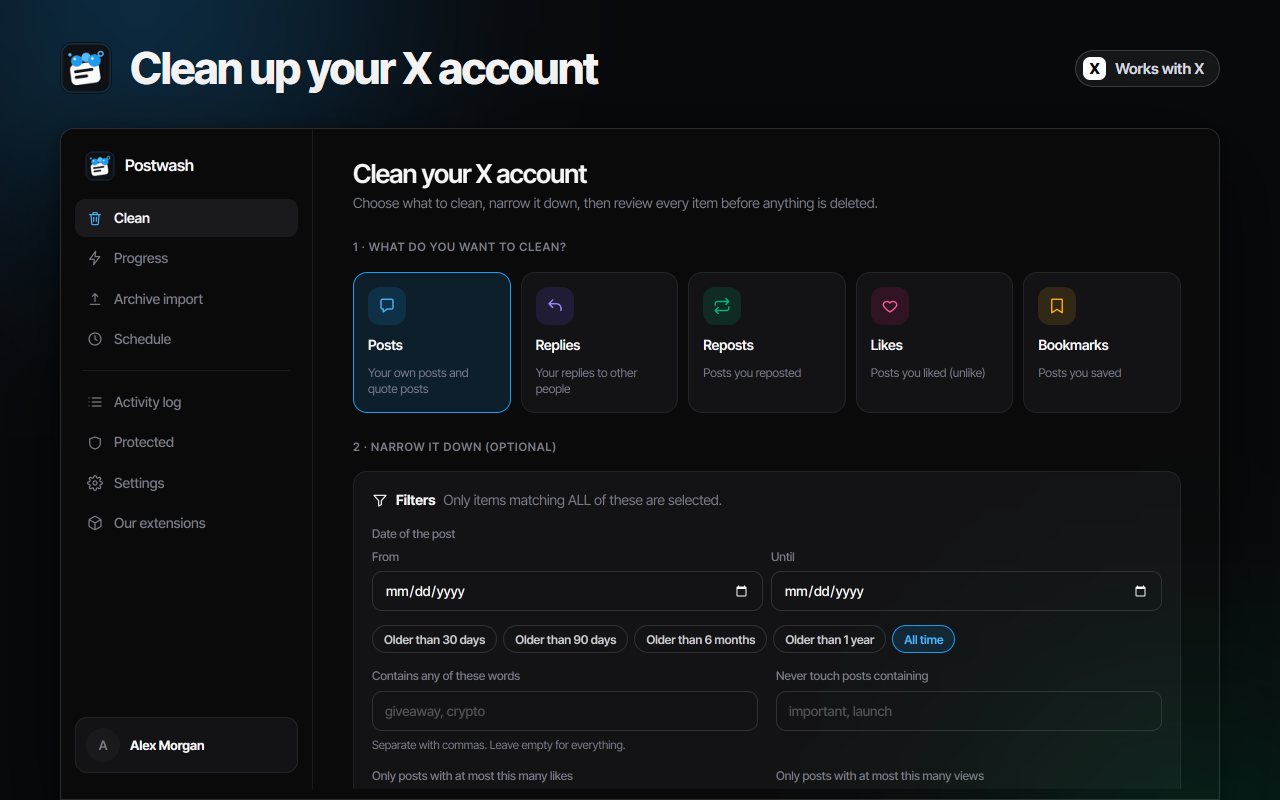
  1. Choose what to clean and add filters
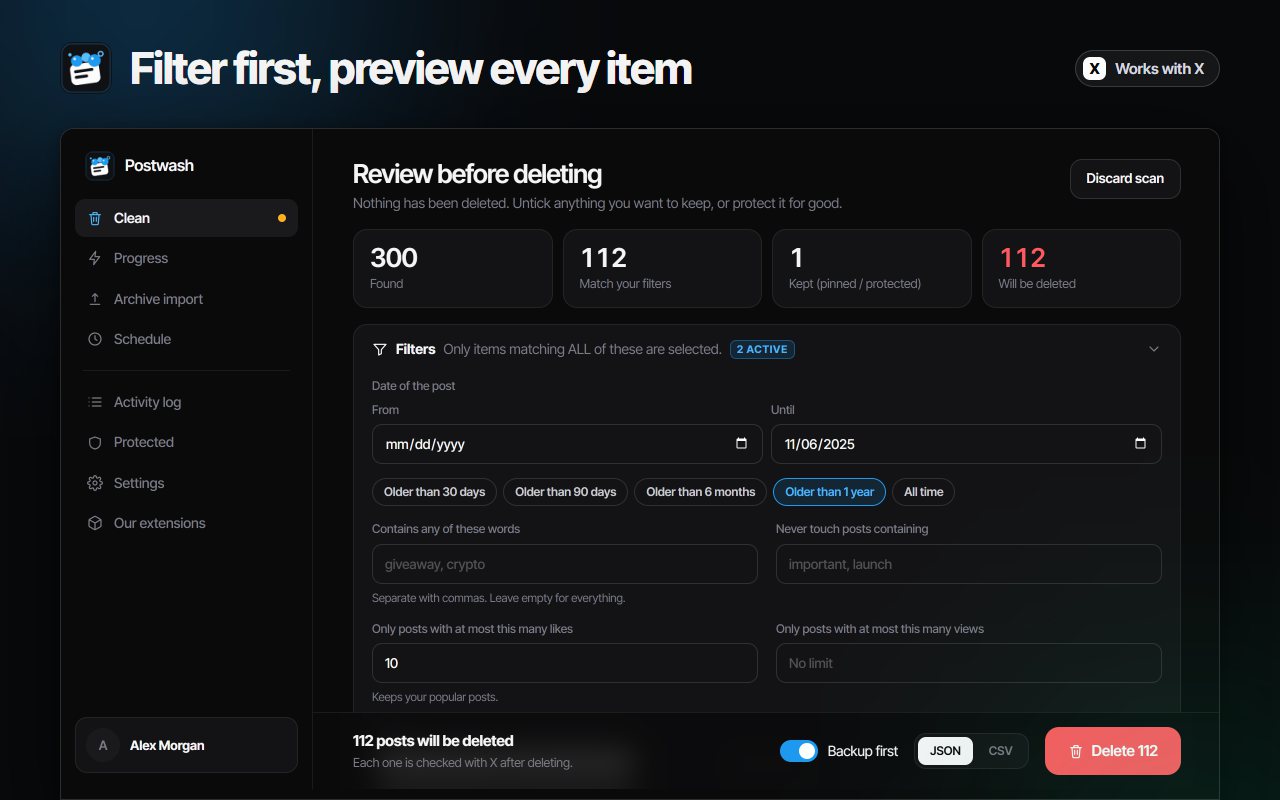
  2. Scan — the whole list appears with date, text and engagement
  3. Untick or protect anything you want to keep
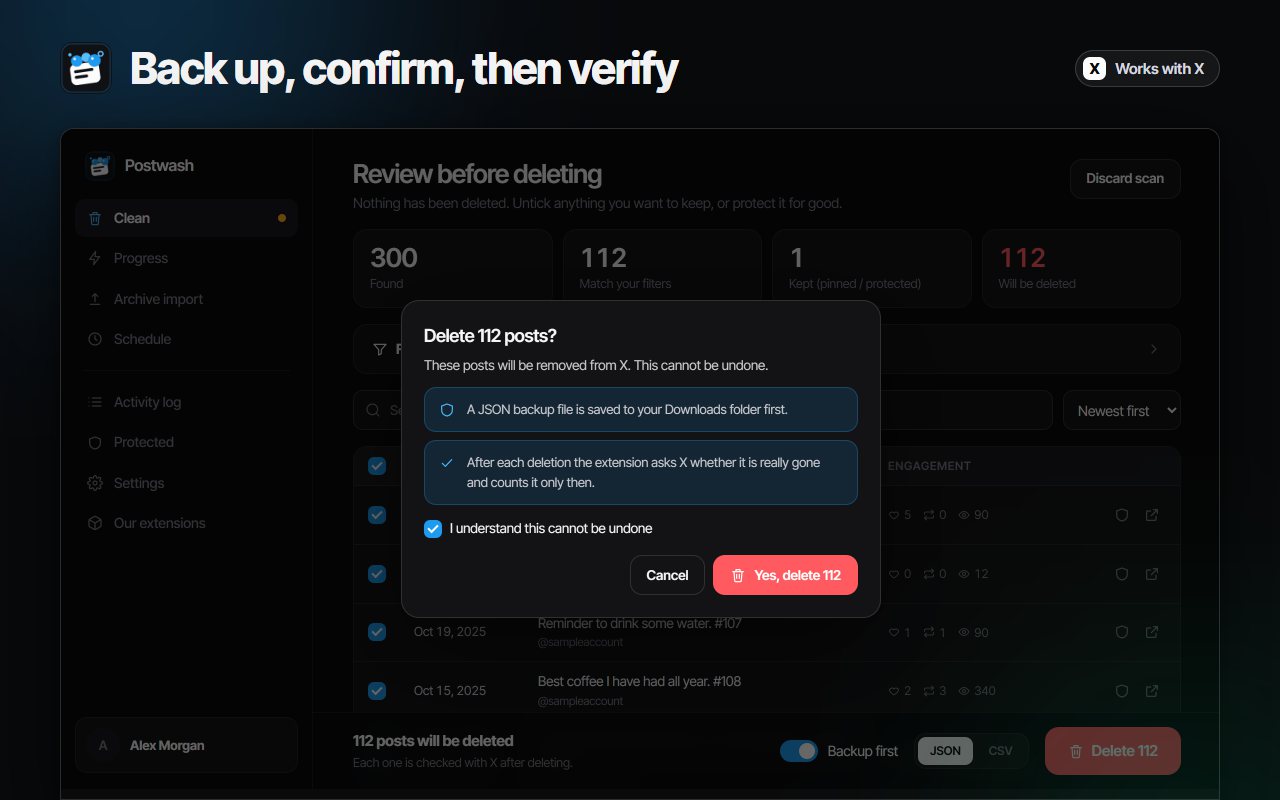
  4. Confirm once: backup first, then deletion checked with X

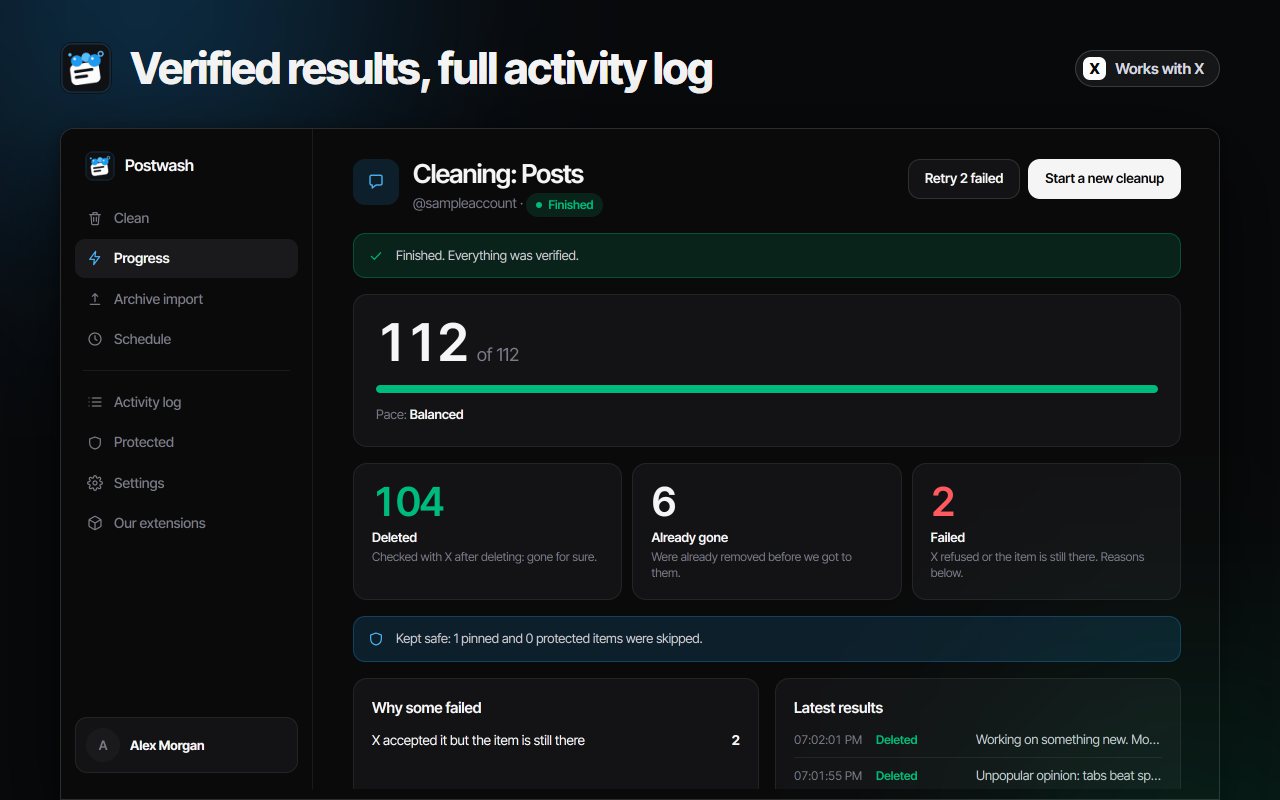
You always know what is about to go, and afterwards you get the real numbers: deleted, already gone, failed.

A tweet deleter that keeps you in control

Nothing is deleted until you confirm, and you decide the pace.

Five lists, one tool

Posts, replies, reposts, likes and bookmarks. Delete tweets in bulk, remove your reposts, clear Twitter likes and empty your saved posts from one dashboard.

Filters that keep what matters

Select by date (older than 30 days, 90 days, 6 months or 1 year, or your own range), by words, by likes or views, and by media. Your pinned post stays untouched.

Backup first, delete second

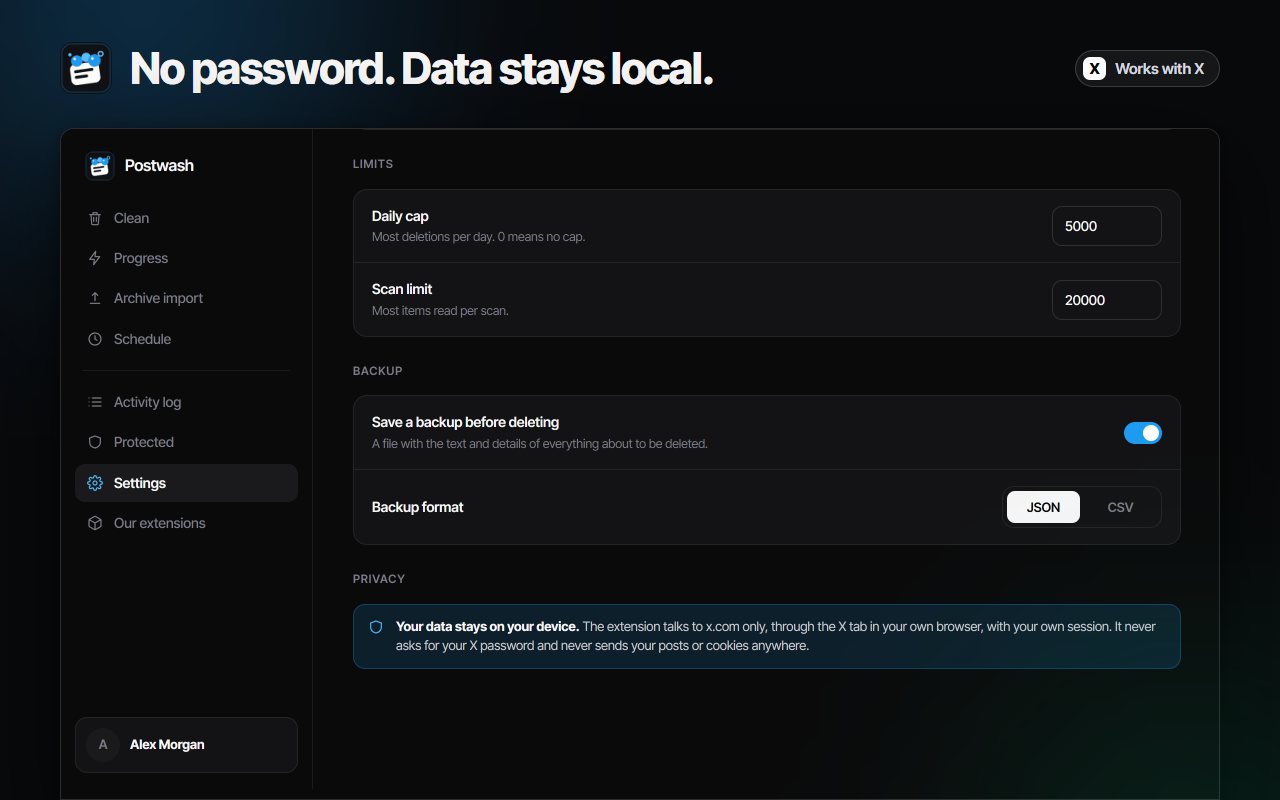
A CSV or JSON file with the text and details of everything about to go is saved to your Downloads folder before the first deletion. If it cannot be saved, nothing is deleted.

Every deletion verified

X can say “success” when something went wrong. Postwash asks X again after each deletion and counts it only when the post is really gone, and keeps an activity log you can export as CSV.

Go past 3,000 posts

Import your X data archive (tweets.js and like.js) and delete by ID without relying on the list X shows. The files are read on your computer and never uploaded.

Delete tweets on a schedule

Set a daily or weekly cleanup, for example posts older than 30 days every week. Every scheduled run saves a backup first and is written to the log.

Your pace, X’s limits

Pick a gentle, balanced or fast pace with random pauses. Postwash watches X’s own rate-limit counter, slows down before it runs out and stops by itself if X pushes back.

Never asks for your password

Postwash works through the X session already open in your browser. Your posts are read on your device and are never sent to a server of ours.

How to delete tweets in bulk in four steps

The same flow whether you are clearing fifty posts or several thousand.

  1. 1

    Open Postwash and sign in

    Log in to x.com, click the Postwash icon in Chrome and sign in with your Google account. Postwash never asks for your X password.

  2. 2

    Choose what to clean and scan

    Pick posts, replies, reposts, likes or bookmarks, add filters if you like, and press Scan. Postwash reads your list in small steps. Nothing is deleted at this stage.

  3. 3

    Review the list

    Every item is shown with its date, its text and its engagement. Untick what you want to keep, or protect it so it is never deleted, whatever the filters say.

  4. 4

    Confirm and let it run

    Postwash saves a backup file first, then deletes at a gentle pace and checks every result with X. Pause, resume or stop at any moment.

Watch Postwash clear an X account

Scan, review, back up, delete and verify — the whole run from start to finish.

Inside Postwash

The lists, the filters, the confirmation, the log and the privacy panel.

Questions about deleting tweets in bulk

How do I delete all my tweets at once?

X has no “delete all” button, so by hand you open every post, tap the menu and confirm, one at a time. Postwash is a tweet deleter that reads your list in the browser, shows you everything it found, and deletes only the items you approve. You confirm once and it works through the list at a gentle pace.

Can I delete old tweets and keep the new ones?

Yes. Use the date filter to select posts older than 30 days, 90 days, 6 months or 1 year, or set a date range of your own. Postwash also keeps your pinned post and lets you protect individual posts that are never deleted, whatever the filters say.

Can it delete my likes, reposts and bookmarks too?

Yes. Postwash cleans five lists: posts, replies, reposts, likes and bookmarks. Removing a repost only removes your repost, and unliking a post leaves the post itself on X. Likes and bookmarks have no bulk option on X at all.

Does it work with my Twitter account, and can it delete Twitter posts?

Yes. X is Twitter under its new name: it is the same account, with the same tweets, replies, reposts and likes. Postwash works on the account you are logged in to on x.com, so it deletes your Twitter posts exactly like it deletes posts on X.

How do I know the tweets are really deleted?

X can answer “success” even when something went wrong, and deleting the same post twice looks identical. After each deletion Postwash asks X again and counts the post only when it is really gone. The result is sorted into deleted (verified), already gone and failed, with the reason for each failure.

Does Postwash need my X password?

No. It never asks for your X password. It works through the X session already open in your browser, and your posts are read on your device and never sent to a server of ours. Signing in with Google only shares your name, email address and profile photo.

I have more than 3,000 posts. Will it reach all of them?

X lists only around the latest 3,000 posts of a profile and limits how fast lists can be read. If your account is older than that, import your X data archive into Postwash (tweets.js and like.js). It then deletes by ID and skips the listing completely. The files are read on your computer and never uploaded.

Is it safe? Could my account be restricted?

Postwash waits a random time between deletions, follows X’s own rate-limit counters and slows down before they run out. If X pushes back, for example with a daily limit or an automation warning, the cleanup stops by itself and tells you why. Nothing can promise an account is never flagged, so start with a small batch and raise the pace only if you want to.

Can I undo a deletion?

No. A deleted post cannot be restored to X. That is why Postwash saves a backup file (CSV or JSON) with the text and details of everything about to be deleted before it removes anything, and why nothing is deleted until you confirm.

Can it delete tweets automatically on a schedule?

Yes. Set a daily or weekly cleanup, for example posts older than 30 days every week. It runs while Chrome is open, saves a backup first, and writes every run to the activity log.

Is Postwash affiliated with X?

No. Postwash is an independent extension. It is not affiliated with, endorsed by, or connected to X Corp. “X”, “Twitter” and “Tweet” are trademarks of their respective owners and appear here only to describe what the extension works with.

Clear your X account the careful way

Install the extension, open X, and let Postwash do the repeating while you stay in charge.

Add Postwash to Chrome

Deleting tweets in bulk: what actually works

Posting on X (formerly Twitter) takes seconds; undoing it takes much longer. Anyone who has tweeted for a few years ends up with thousands of old posts, replies, reposts and likes they would rather not have on their profile — a job change, a rebrand, a bad take from long ago. Searching for how to delete all tweets turns up the same answer everywhere: do it one by one, because that is the only thing X itself offers.

Why there is no “delete all tweets” button on X (Twitter)

X treats every post as an individual item, so its menu only ever acts on one at a time. Likes and bookmarks are worse: there is no bulk option for them at all. On top of that, X shows only around the latest 3,000 posts of a profile and limits how fast a list can be read, so even finding your oldest tweets is a task of its own.

What a good tweet deleter should do

The risky part of any bulk tool is that it acts faster than you can check. A tweet deleter worth installing should show you the full list before anything is removed, let you take items off that list, and save a copy of what it is about to delete. It should move at a pace you chose, stop when X pushes back, and — above all — tell you the truth afterwards. X can answer “success” when a deletion failed, so Postwash asks X again after every deletion and only counts a post once it is really gone.

Delete old tweets and keep the ones that matter

Most people do not want an empty profile; they want the old posts gone. Postwash filters by date (older than 30 days, 90 days, 6 months, 1 year, or a range of your own), by words you want to catch or never touch, by a maximum number of likes or views so your popular posts survive, and by media. Your pinned post is kept, and you can build a protected list of posts that are never deleted, whatever the filters say. If you want a clean-up that never ends, schedule it: a weekly run for posts older than 30 days keeps the account tidy without any effort.

Likes, reposts and bookmarks

Deleting your own posts is only part of a cleanup. Removing a repost takes away only your repost; the original stays with its author. Unliking in bulk leaves the posts themselves on X. Emptying bookmarks clears your saved list in one run. Postwash treats all five lists the same way: scan, preview, back up, confirm, verify.

Beyond 3,000 posts: use your X archive

If your account is older than what X will list, request your data archive from X, then drop tweets.js and like.js into Postwash. It deletes by post ID and skips the listing completely. The files are read on your computer and never uploaded.


Privacy: what leaves your computer

Your posts do not. Postwash never asks for your X password and has no way to receive it; it works through the session you already have open in the browser, the same way the X website does. Your history, the backup files and the activity log stay on your device. Signing in with Google shares only your name, email address and profile photo. If you also manage who you follow, see X Unfollow AI, and for exporting tweets, followers and bookmarks before you delete them, see Roostbox.

Other extensions from AddonsChrome

Instagram Unfollow AI - Manage Unfollowers Effortlessly Instagram Unfollow AI - Manage Unfollowers Effortlessly Instagram Unfollow AI detects those who don't follow you back and helps you unfollow them to… X Unfollow AI – Manage Your Twitter Following List X Unfollow AI – Manage Your Twitter Following List Manage your X (Twitter) following, detect users who don't follow you back, and unfollow safely… TikTok Unfollow AI - Mass & Auto Unfollow All, Everyone & Non-Followers TikTok Unfollow AI - Mass & Auto Unfollow All, Everyone & Non-Followers See who doesn't follow you back on TikTok, then bulk unfollow all, everyone or only… WASendly – WhatsApp Bulk Message Sender WASendly – WhatsApp Bulk Message Sender Send bulk and automated WhatsApp messages safely and easily with WASendly. WASendly – WhatsApp Contacts Extractor WASendly – WhatsApp Contacts Extractor Easily export WhatsApp contacts and group members to Excel, CSV, or vCard. TeleSendly - Telegram Bulk Sender, Scraper & Member Adder TeleSendly - Telegram Bulk Sender, Scraper & Member Adder Send bulk Telegram messages, scrape group members to Excel and add members to groups. Safe… Followgap - Instagram Unfollowers Tracker & Unfollow Non-Followers Followgap - Instagram Unfollowers Tracker & Unfollow Non-Followers Find who doesn't follow you back on Instagram. Track unfollowers & mass unfollow non-followers… FollowStack – Instagram Toolkit for Desktop FollowStack – Instagram Toolkit for Desktop Instagram toolkit for desktop. Track unfollowers, upload stories from PC, download media, and… Rosterbox - IG Follower & Following Export List to CSV, Excel Rosterbox - IG Follower & Following Export List to CSV, Excel Export IG follower and following lists, likes and comments to CSV, Excel or JSON in one click… Roostbox - Twitter/X Exporter: Tweets, Followers, Bookmarks & Archive Roostbox - Twitter/X Exporter: Tweets, Followers, Bookmarks & Archive Export tweets, replies, likes, bookmarks and followers from any Twitter/X account to Excel… ExportPal - Save & Export ChatGPT, Claude, Gemini to PDF & Word ExportPal - Save & Export ChatGPT, Claude, Gemini to PDF & Word Save & export ChatGPT, Claude, Gemini, Grok, DeepSeek & Perplexity to PDF, Word, Markdown… TokExport - TikTok Follower List, Following & Comment Export Tool TokExport - TikTok Follower List, Following & Comment Export Tool Export TikTok follower and following lists, video comments and post stats to CSV or Excel… ChatGPT Speed Booster ChatGPT Speed Booster ChatGPT Speed Booster is a free Chrome extension that fixes slow ChatGPT performance in long… Instagram Follower Export Tool Instagram Follower Export Tool Export Instagram followers, following, likes, and comments to CSV or Excel in one click TokSweep - TikTok Repost Remover & Bulk Cleaner TokSweep - TikTok Repost Remover & Bulk Cleaner Remove TikTok reposts in bulk. See the full list first, pick what goes, and set your own pace… PromptJolt – AI Prompt Enhancer for ChatGPT, Claude & Gemini PromptJolt – AI Prompt Enhancer for ChatGPT, Claude & Gemini Rewrite any AI prompt into a clear, structured version in one click. Press Ctrl+M on ChatGPT… IGFollow AI - Auto Follow IGFollow AI - Auto Follow IGFollow AI is an AI-powered tool to grow your Instagram. Boost engagement and expand your… Backgap - Threads Followers Tracker & Mass Unfollow Backgap - Threads Followers Tracker & Mass Unfollow See who doesn't follow you back on Threads, protect the accounts you want to keep, and tidy… Backly — Unfollower Tracker for Instagram Backly — Unfollower Tracker for Instagram See exactly who doesn’t follow you back on Instagram, protect the accounts you care about, and… FeedRank – Instagram & TikTok Feed Sorter FeedRank – Instagram & TikTok Feed Sorter Sort Instagram & TikTok feeds by likes, views, comments or date. See post stats at a glance… Instagram Auto Follow Instagram Auto Follow AI-powered Instagram auto follow tool to boost engagement, grow followers, and expand your… Claude Speed Booster Claude Speed Booster Fix slow Claude.ai in long conversations. Speed Booster hides older messages to stop lag… ChatPilot – ChatGPT Bulk Delete, Archive & Timestamps ChatPilot – ChatGPT Bulk Delete, Archive & Timestamps Bulk delete & archive ChatGPT chats, add message timestamps and navigate conversations fast… Extract AI – Email Extractor Extract AI – Email Extractor Email Extractor helps you find visible email addresses on websites and works locally with no… Prompt Trove — Visual AI Image Prompts Gallery Prompt Trove — Visual AI Image Prompts Gallery A visual gallery of AI image prompts. Use them instantly in ChatGPT, Gemini, Sora, and Nano… Crawlhive — SEO Audit, Site Crawler & Technical SEO Crawlhive — SEO Audit, Site Crawler & Technical SEO Audit any page, then crawl the whole site: indexability, duplicate titles, orphan pages, click… Privacy Guard for WhatsApp Web Privacy Guard for WhatsApp Web Secure your WhatsApp Web with smart lock, panic button, and blur mode. Your privacy, your… Clickaroo - Mouse Effect Designer Clickaroo - Mouse Effect Designer Transform your cursor with stunning click effects & animations. Perfect for streamers… InkShot — Webpage Screenshot & Draw Tool InkShot — Webpage Screenshot & Draw Tool InkShot is a free screenshot Chrome extension that lets you capture full page screenshots… Detechtor AI - Website Technology Checker & Tech Stack Detector Detechtor AI - Website Technology Checker & Tech Stack Detector Detechtor AI checks what any website is built with — CMS & WordPress theme detector… Numsift — Bulk WhatsApp Number Checker & Validator | Export to Excel Numsift — Bulk WhatsApp Number Checker & Validator | Export to Excel Bulk check which numbers are on WhatsApp. Validate lists, filter by country, spot business… Clearbox — Bulk Chat & Message Deleter for Instagram Clearbox — Bulk Chat & Message Deleter for Instagram Delete all your chats and messages on Instagram in bulk. One click, and the chats you protect… Araç Data Merkezi — Used Car Valuation & Damage Check for Sahibinden Araç Data Merkezi — Used Car Valuation & Damage Check for Sahibinden See what a car on Sahibinden is really worth: market value for the exact trim, how damage and… SignedRise - Professional Email Signature SignedRise - Professional Email Signature Create custom and professional email signatures effortlessly with SignedRise. Perfect for… TeleCache - Telegram Video & Media Downloader TeleCache - Telegram Video & Media Downloader Download Telegram videos, photos, audio and files in bulk. Filter by type, date, size or…

Contact Us

contact@addonschrome.com