




















Roostbox · Chrome extension

Twitter exporter for tweets, bookmarks & followers

Roostbox is a Twitter exporter that saves what you can see on X as a file you can keep: every tweet of a profile, your bookmarks and likes, a search, a list, the replies to a tweet or a whole follower list. Download it as Excel, CSV or JSON, or search and analyze it first in the built-in dashboard.

  • No API key, no X password, no code
  • Likes, retweets, replies, views and media for every tweet
  • Everything stays in your browser
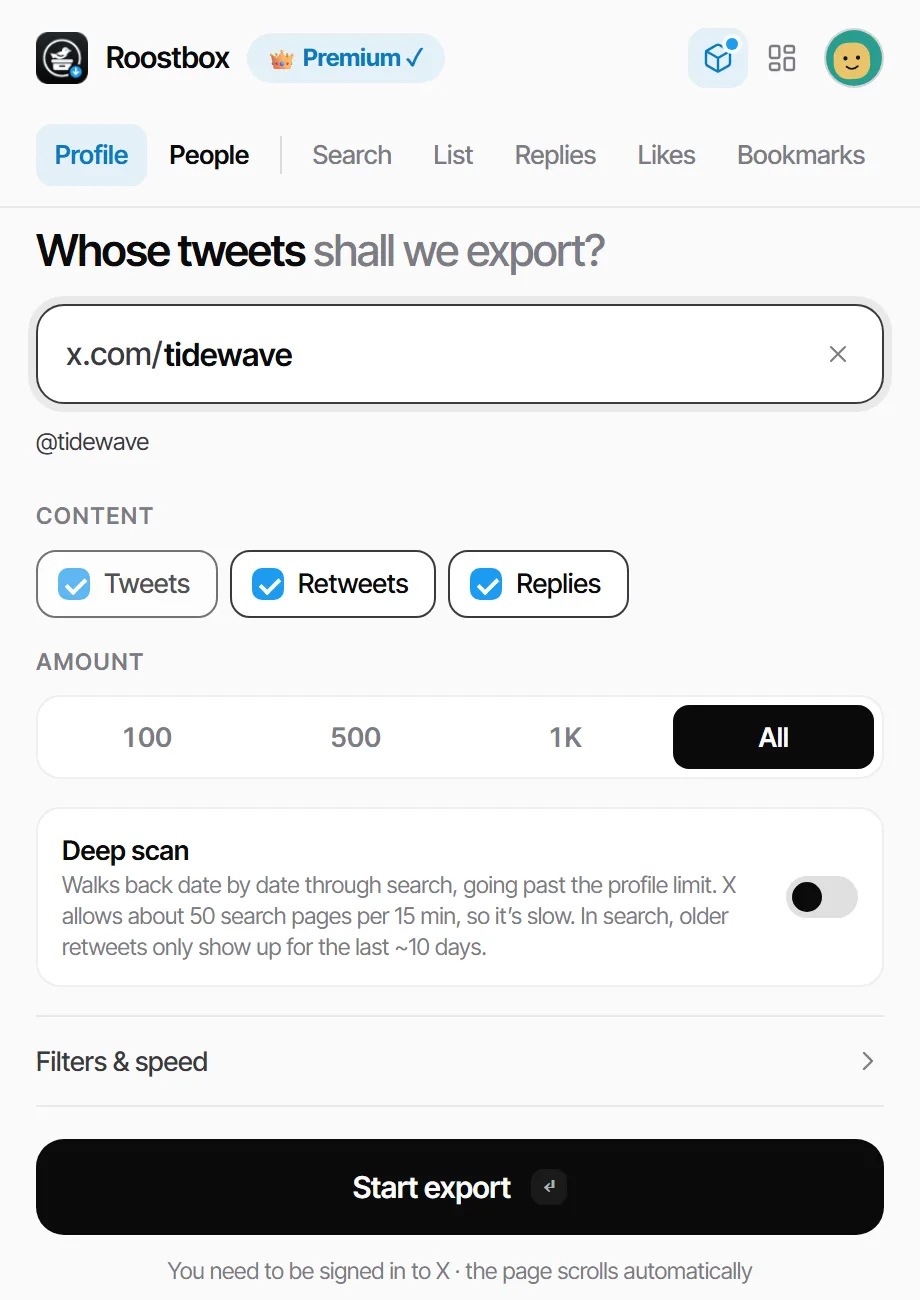
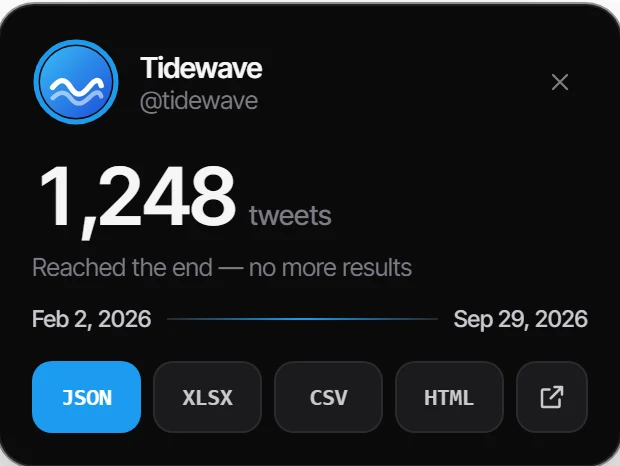
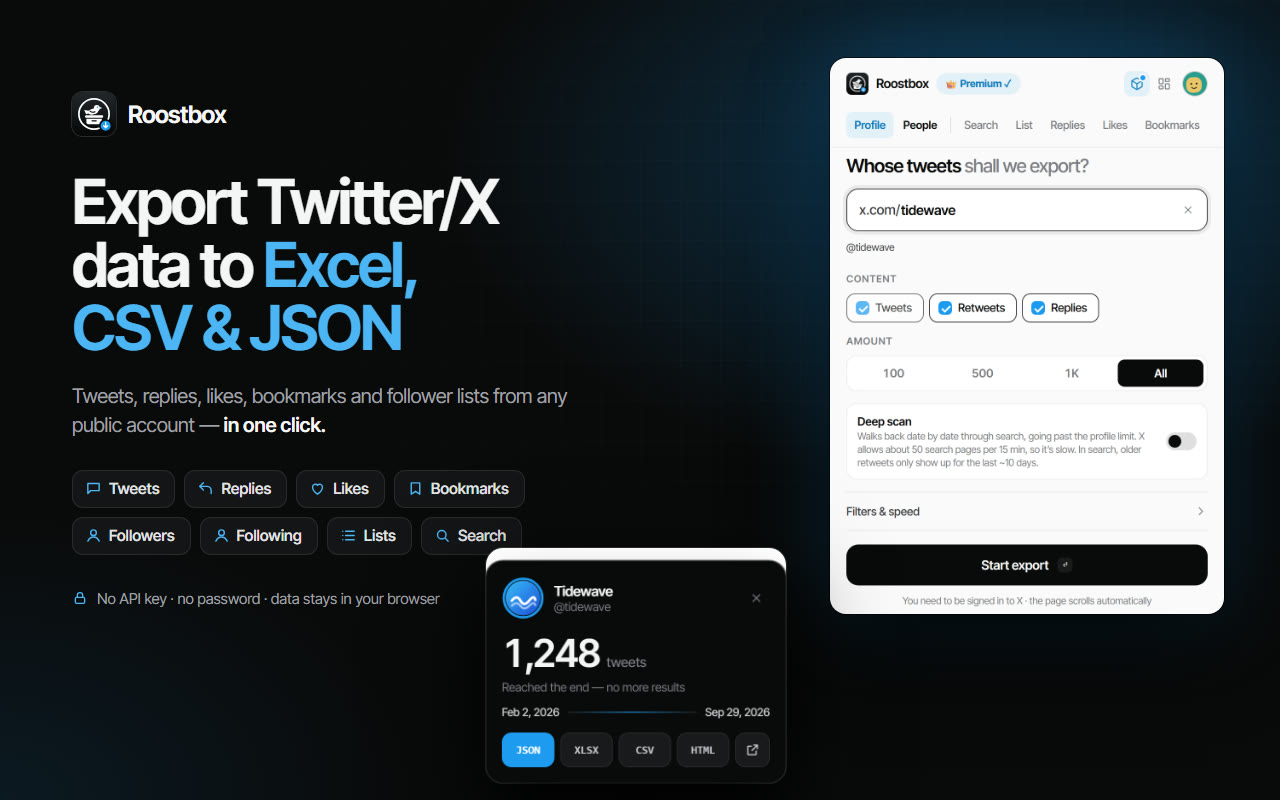
Roostbox popup: export all tweets from a Twitter/X profile Export finished on x.com: 1,248 tweets ready to download as JSON, Excel, CSV or HTML

Everything you can see on X, saved as a file

One extension for every list X shows you. Pick a source, press start, and Roostbox does the scrolling.

A profile's tweets

Every tweet X loads for a public account, with or without its retweets and replies.

Your bookmarks

All of them, or one bookmark folder. The fastest way to back up what you saved.

Your likes

Every tweet you have liked, with its author, date and engagement.

Followers & following

Follower, verified follower and following lists of any public account.

Search results

Any X search, including advanced operators like from:, since: and min_faves:.

Lists

The tweets of an X list, or the accounts that are members of it.

Replies to a tweet

Paste a tweet link and get the whole conversation underneath it.

Several accounts at once

Type a few usernames separated by commas and they run one after another.

How to export tweets in three steps

There is nothing to configure. Roostbox works from the X tab you already use.

1

Add Roostbox to Chrome

Install it from the Chrome Web Store and sign in with Google. Stay signed in to X as usual.

2

Choose what to export

Open the popup and pick a tab: Profile, People, Search, List, Replies, Likes or Bookmarks. Type a username, paste a link, or write a search.

3

Press Start export

Roostbox opens the page and scrolls it for you. A small card on x.com counts the tweets as they arrive; when it ends, download the file.

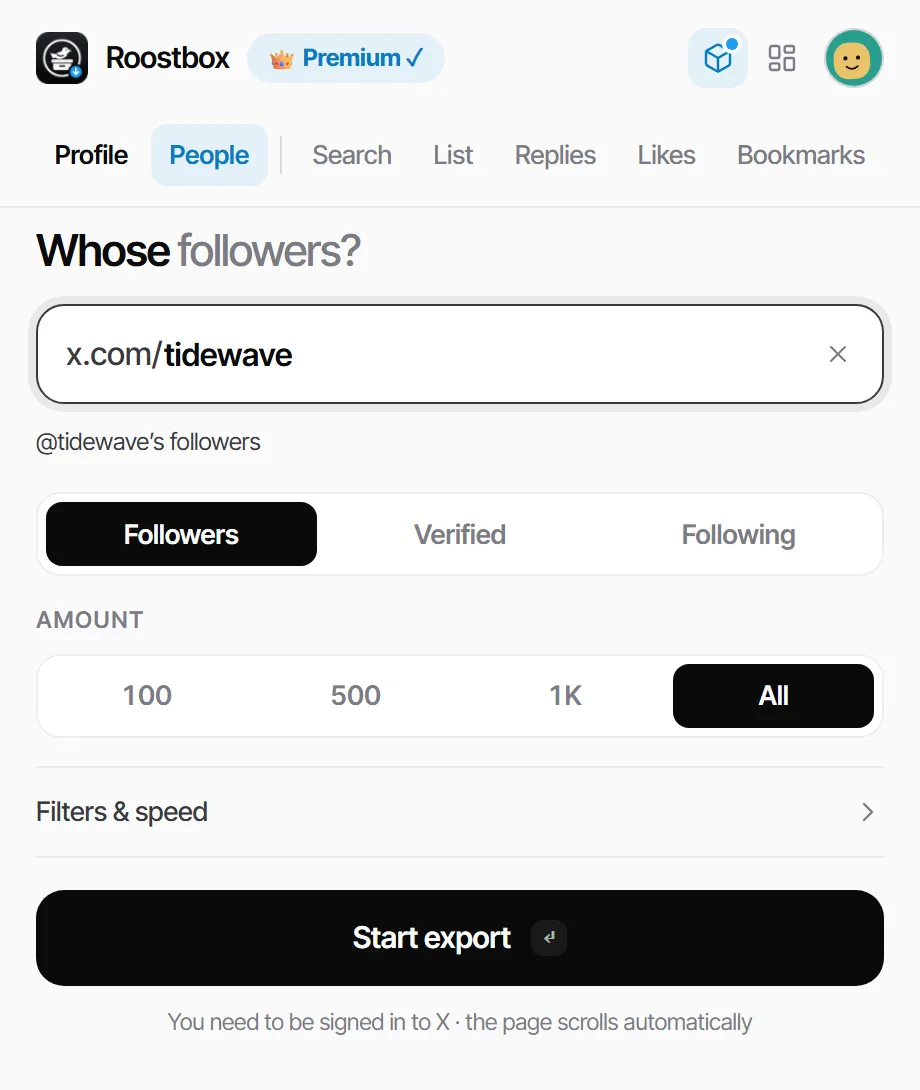
Roostbox popup, People tab: export Twitter followers of an account

What ends up in the file

More than 30 columns for every tweet. Choose the ones you need; your choice is remembered for the next export.

Tweet textDate & timeTweet URL LikesRetweetsReplies QuotesBookmarksViews Photos & videosImage alt textHashtags MentionsLinksLanguage Reply toQuoted tweetRetweeted from PollsConversation IDEdited
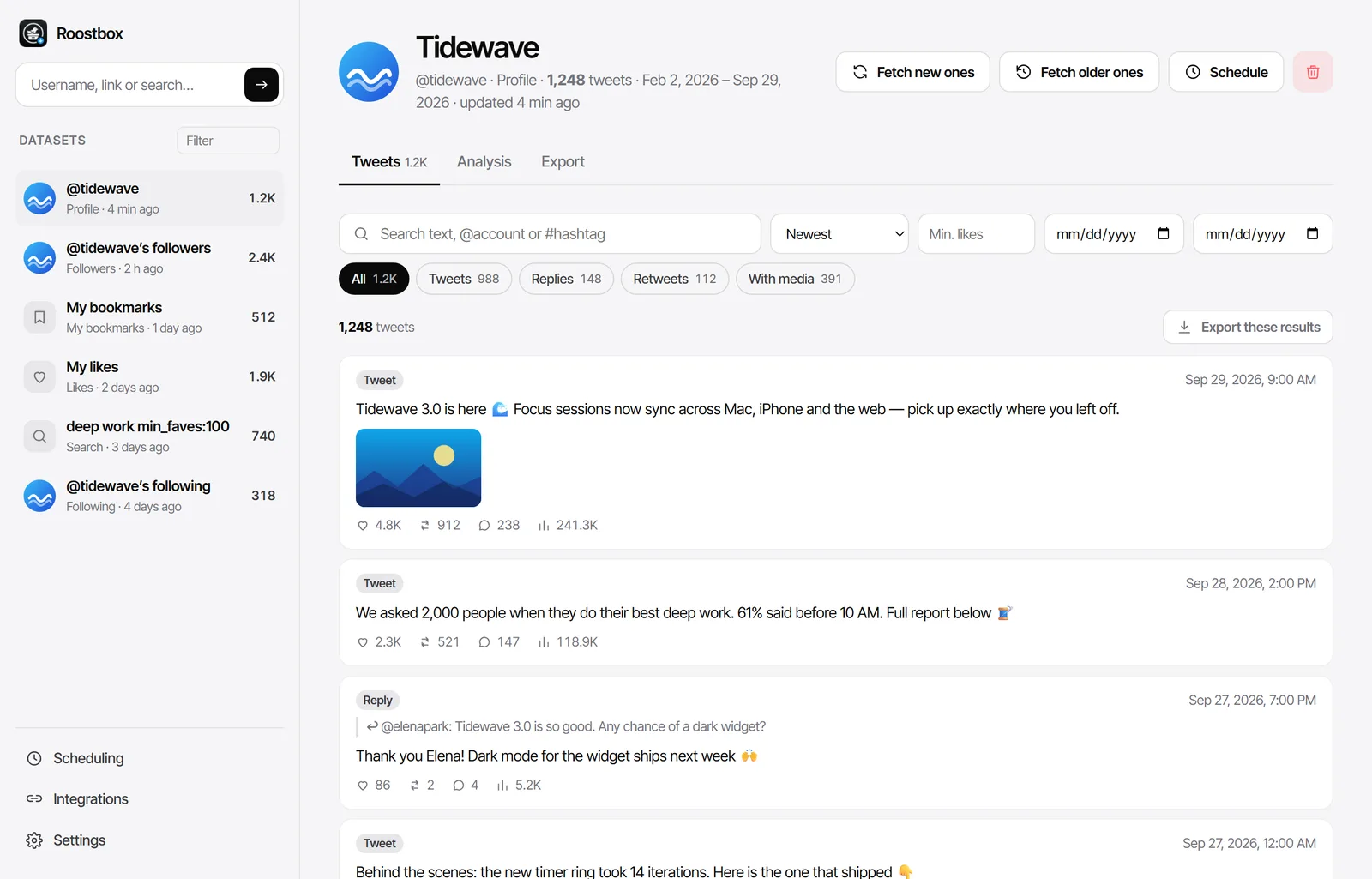
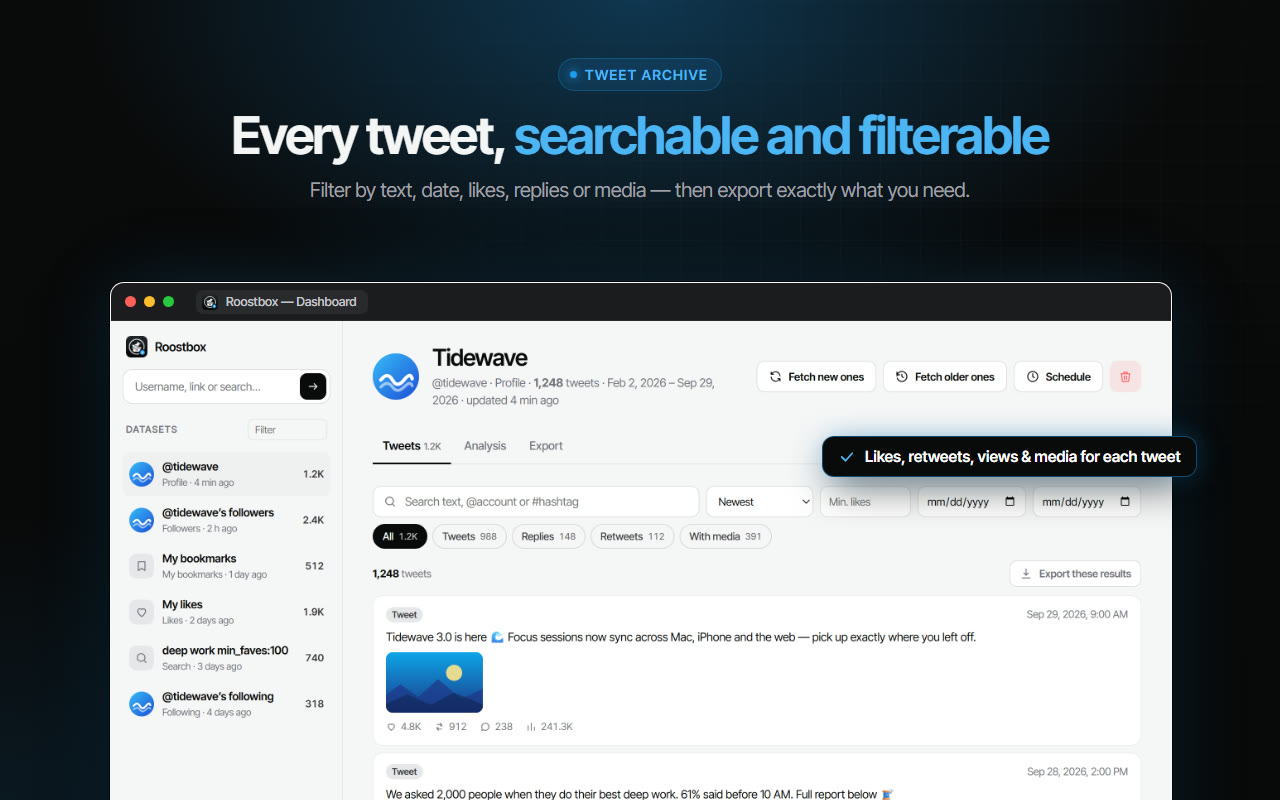
Roostbox dashboard: 1,248 exported tweets with likes, retweets, replies and views, searchable and filterable

Before you download, the dashboard lets you search the text, filter by date, minimum likes, replies, retweets or tweets with media, and sort by the newest, oldest or most liked. Export the whole dataset or only the filtered result.

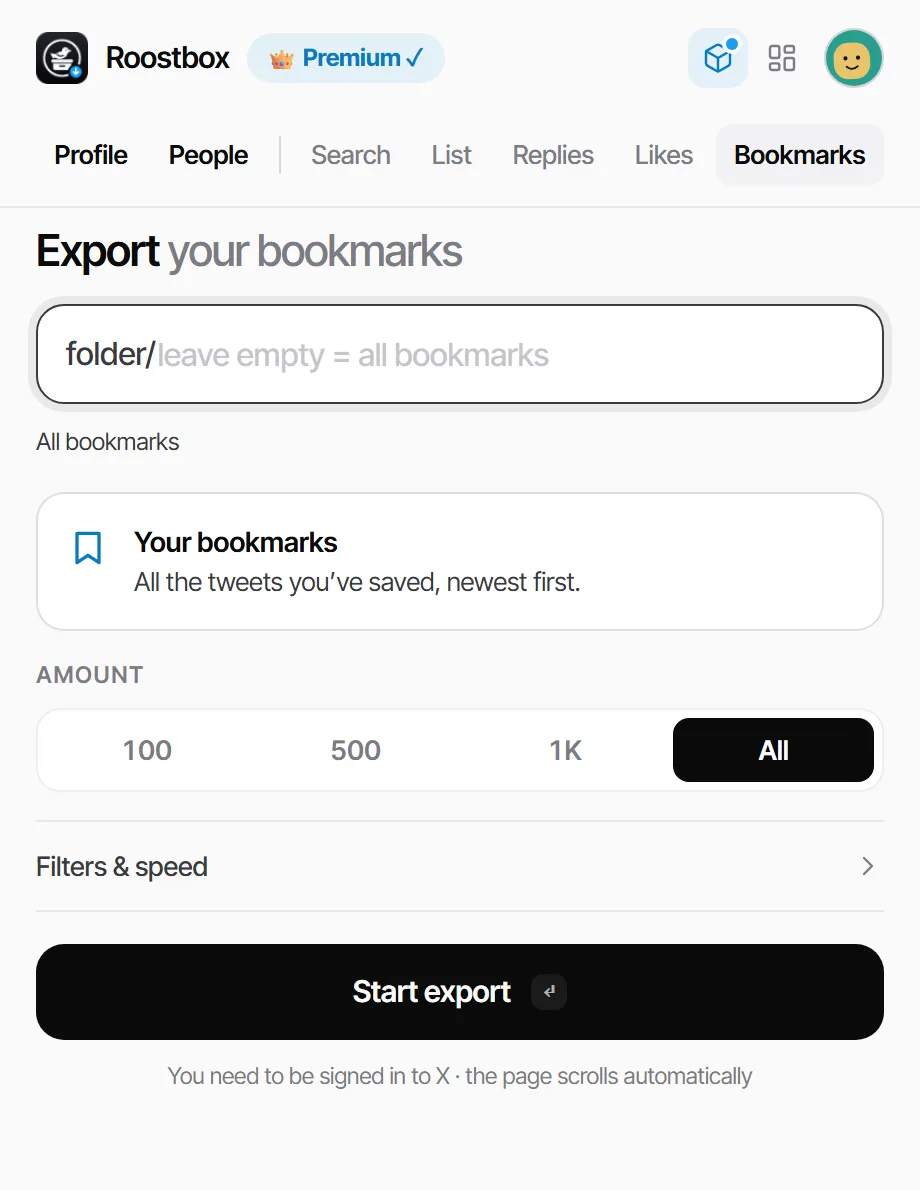
Roostbox popup, Bookmarks tab: export Twitter bookmarks

Export Twitter bookmarks, all of them

X gives bookmarks one long, unsearchable feed. Roostbox works as an X bookmarks exporter: it saves every bookmark with its author, date, text, links and media, so the things you meant to read later are finally in one place you control.

Search your bookmarks

Open the export in the dashboard and search it by word, @account or #hashtag — the bookmark search X never added.

Bookmark folders too

Export a single folder by pasting its link, or the whole collection at once.

Send them to Notion or Markdown

Save bookmarks as a Markdown file, an Obsidian vault with one note per tweet, or send them to a Notion database.

Export Twitter followers to Excel or CSV

The People tab turns a Twitter followers list into a spreadsheet. It works for followers, verified followers and the accounts a profile follows.

What each row contains

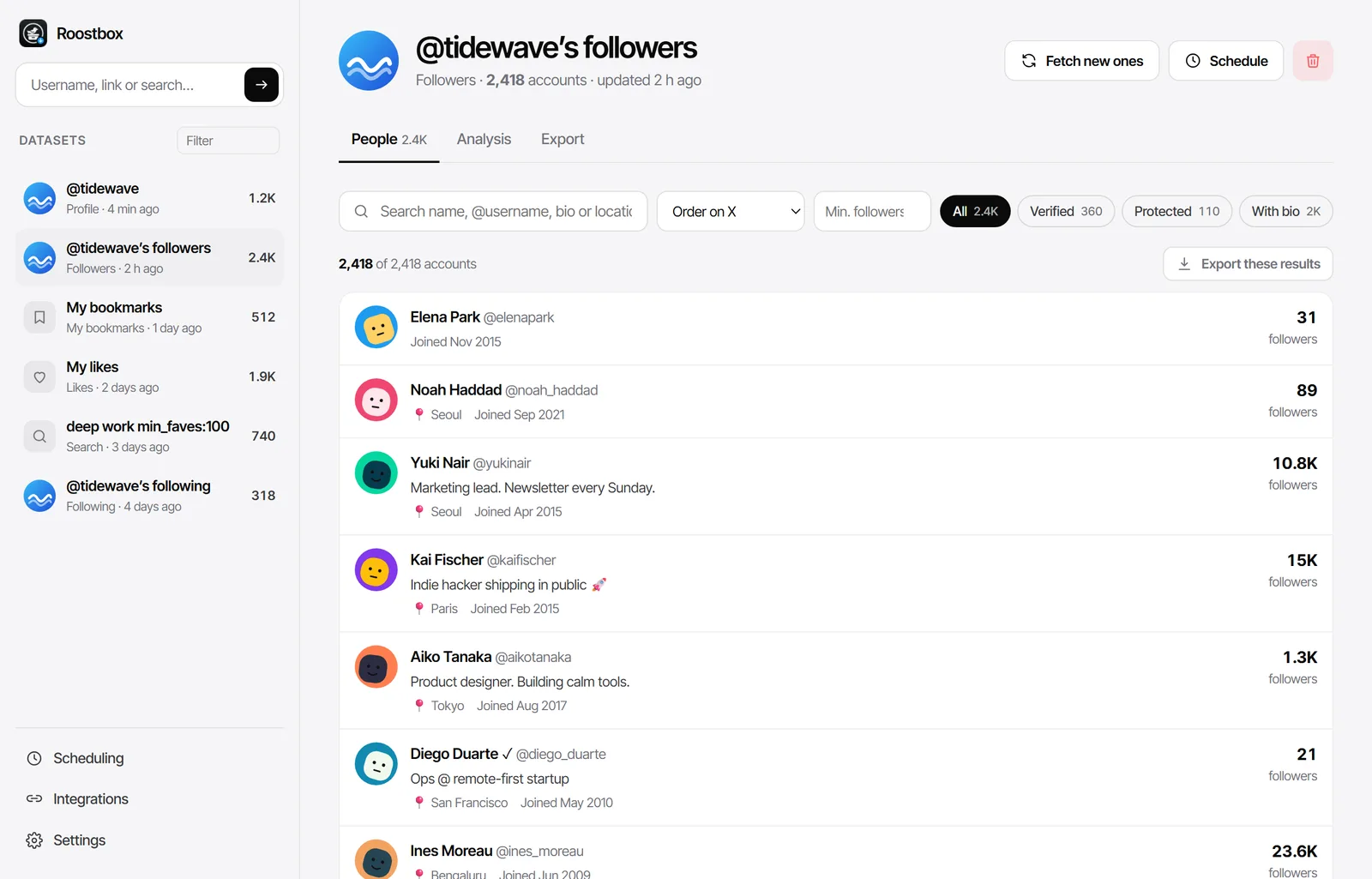
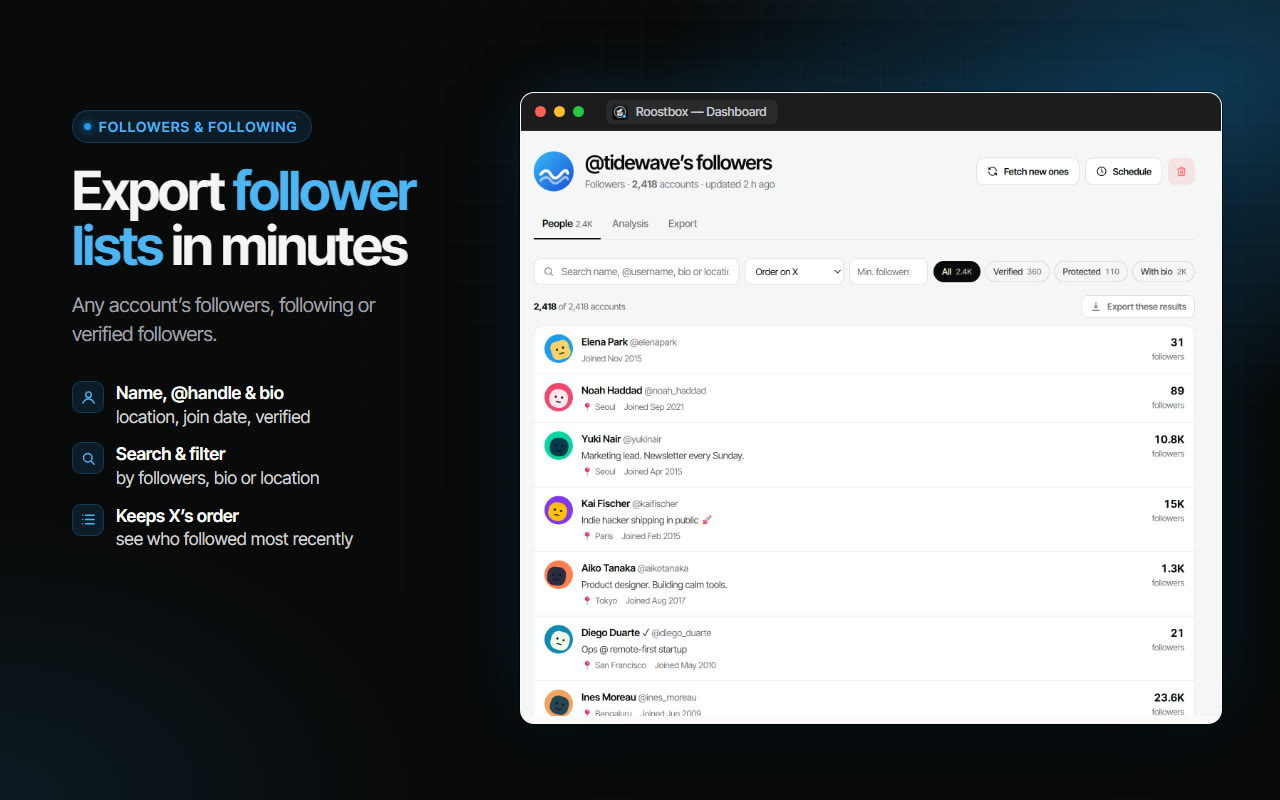
Name, @username, bio, location, website, join date, follower, following and tweet counts, the verified mark and whether the account is protected.

Kept in X's order

Rows arrive in the order X lists them — the most recent follower first — and each one is numbered, so you can always sort back to it.

Filter before you export

Search names, bios and locations, set a minimum follower count, or keep only verified accounts or accounts with a bio.

Exported Twitter followers list with name, bio, location, join date and follower count

A Twitter archive in minutes, not days

The official Download an archive of your data request only covers your own account and can take a day or more. Roostbox is the quick alternative.

Ready as it finishes

No request form and no waiting for an email. The export is ready the moment the scroll ends.

Any public account

Archive your own tweets, a brand you follow, a public figure or a search — not just your own profile.

A Twitter archive viewer built in

The offline HTML archive works as a Twitter archive viewer: it opens in any browser and can be searched and sorted — no JavaScript data files to decode.

Need to go further back than a profile shows? Deep scan walks back through X search date by date and reaches older tweets, all the way to the start of the account.

Built-in Twitter analytics for any account

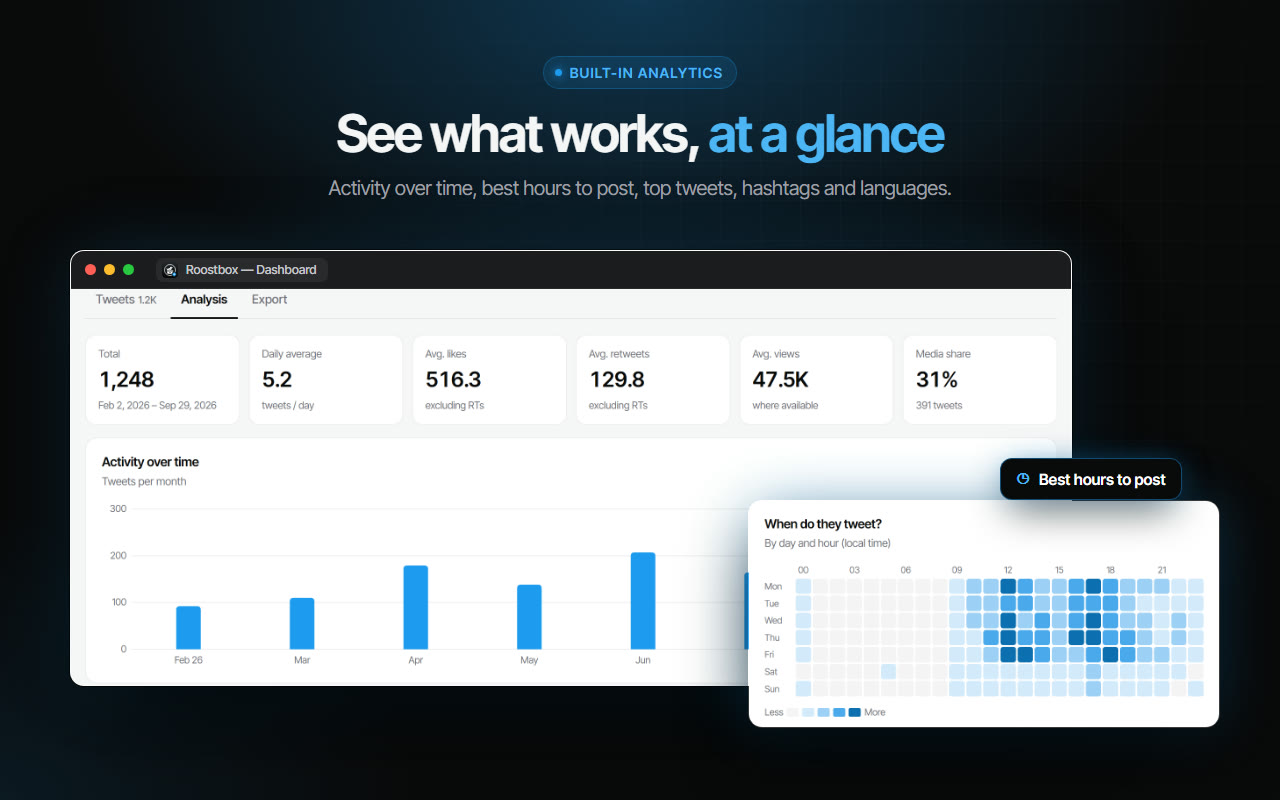
Every export comes with an analysis tab. No spreadsheet formulas, no extra tool.

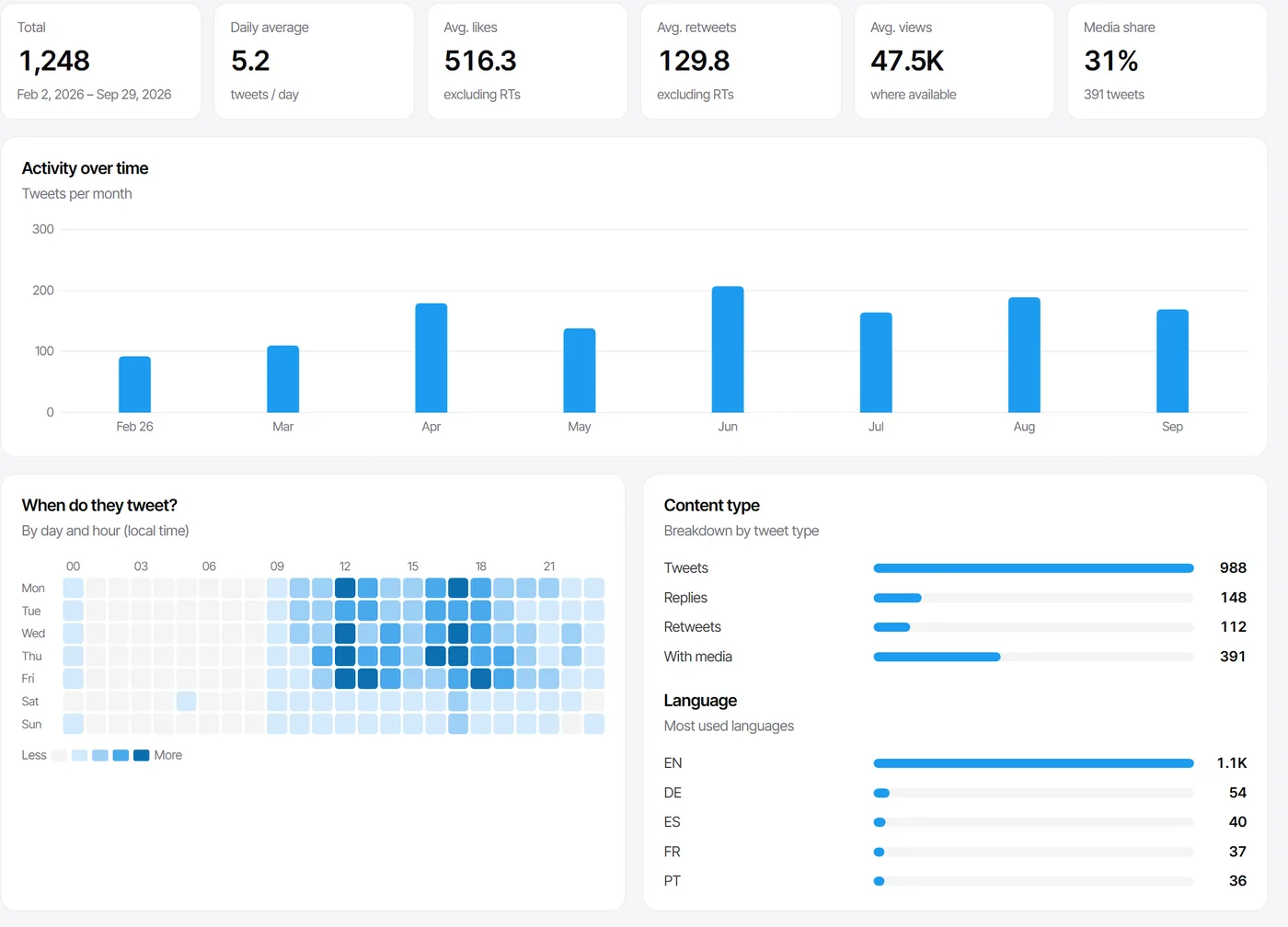
Twitter analytics in Roostbox: tweets per month, average likes and views, best hours to post

Best hours to post

A day-by-hour heatmap of when the account tweets, in your local time.

Top tweets

The most liked, most retweeted and most viewed tweets, one click apart.

Hashtags & languages

Which hashtags and mentions come up most, and which languages the account writes in.

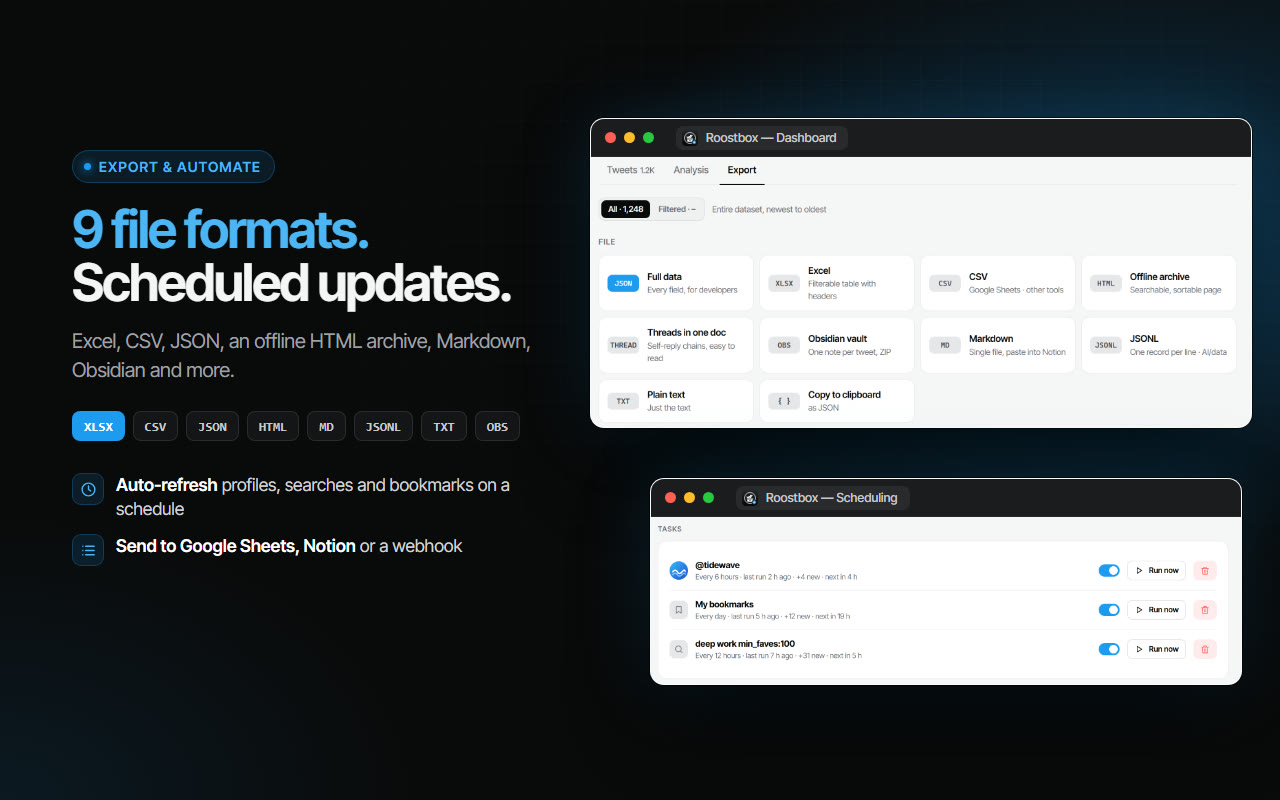
Nine file formats for every job

Tweets to Excel for a report, JSON for code, Markdown for notes. Pick the format when you download.

XLSXExcelA filterable table with headers
CSVCSVGoogle Sheets and any other tool
JSONFull dataEvery field, for developers
HTMLOffline archiveA searchable, sortable page
THREADThreads in one docSelf-reply chains, easy to read
OBSObsidian vaultOne note per tweet, in a ZIP
MDMarkdownOne file, ready to paste into Notion
JSONLJSONLOne record per line, for AI and data work
TXTPlain textJust the words

Need the pictures too? Roostbox downloads the photos and videos of an export in one ZIP, or straight into a folder, each file named after its tweet.

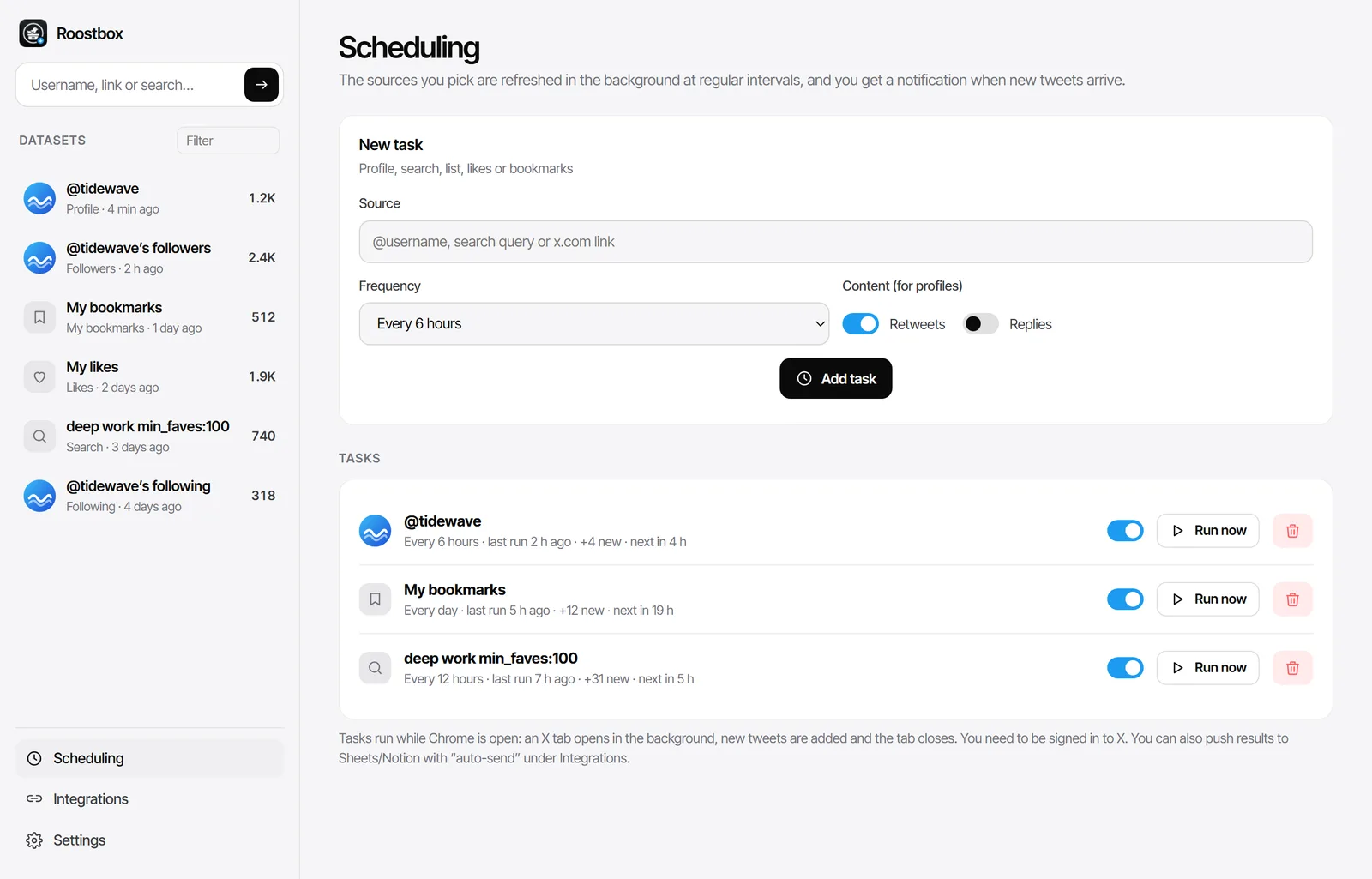
Scheduled Twitter exports in Roostbox: a profile, bookmarks and a search refreshed automatically

Keep an export up to date on its own

An export does not have to be a one-off. Roostbox can keep it current while Chrome is open.

Scheduled refreshes

Refresh a profile, a search, your likes or your bookmarks every hour, every few hours or once a day. Only new tweets are added.

Google Sheets, Notion and webhooks

Send new rows to a Google Sheet, a Notion database or your own webhook automatically after each run.

A notification when something arrives

Get a desktop notification with the number of new tweets, so you do not have to check.

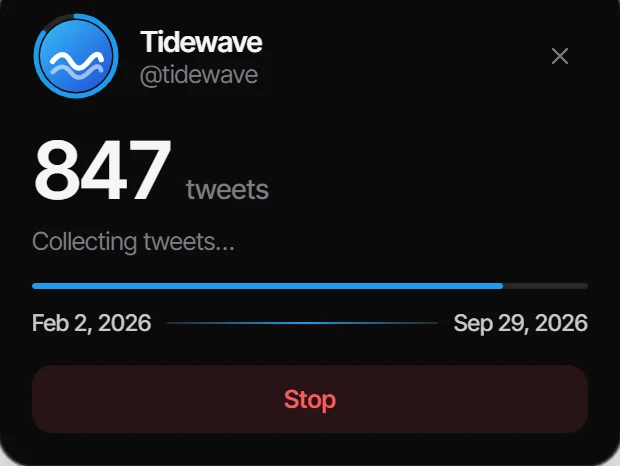
Watch it collect, right on x.com

While an export runs, a small card sits in the corner of the X tab. It shows the account, the number of tweets collected so far and the date range they cover, and it has a Stop button.

Download from the page

When the export ends, the card offers JSON, Excel, CSV and HTML buttons, so you can save the file without leaving X.

Right-click to export

Right-click a profile, list, search or tweet on X and choose Export this page's tweets or Export this link's tweets.

Pick up where you stopped

Fetch new ones adds only the tweets posted since your last export, instead of starting over.

Roostbox progress card on x.com while collecting tweets Roostbox card on x.com when the export is done, with download buttons

Roostbox compared with the other ways

Four common ways to get tweets out of X, side by side.

RoostboxOfficial X archiveCopy & pasteAPI & scraper scripts
Any public account Only yours
Bookmarks & likesLikes onlyBy handVaries
Follower lists
Time to first fileMinutesA day or moreHoursSetup first
Excel, CSV & JSONJS filesWith code
Likes, views & media per tweetPartly
No code or API key
Search, filter & analyticsBuild it yourself

Who uses a Twitter exporter

The same file serves very different jobs.

Researchers & students

Collect the tweets on a topic or from a set of accounts for a study, then code them in Excel, R or Python.

Marketers & agencies

Audit a competitor's posting times and best tweets, or hand a client a clean report of their own account.

Journalists

Keep a dated record of what an account posted, with links back to every original tweet.

Creators

Back up years of your own threads and bookmarks, and reuse your best posts in a newsletter or a book.

Community managers

Export the followers of an account or the members of a list to find the people worth talking to.

Developers & data teams

A no-code Twitter scraper: get JSON or JSONL for a dataset without paying for API access.

Honest about what X will not give you

Roostbox exports what X shows you in the browser. Where X draws a line, so does Roostbox — and it tells you when that happens.

Private accounts stay private

A protected account's tweets and lists are only visible to its approved followers. If you are one, you can export what you see.

Other people's likes are hidden

X only shows likes to the account owner, so the Likes tab exports your own likes.

Partial lists are flagged

X does not always serve another account's full follower list on the web. When a list stops early, Roostbox compares what it got with the number on the profile and says so.

X sets the pace

X limits how many search pages it serves in a 15-minute window. Deep scan waits when it has to instead of failing, so very large archives take longer.

Deleted tweets are gone

If a tweet was deleted before you exported it, X no longer has it to show — and neither does any extension.

What Roostbox is not

So you know before you install.

Not a single-video downloader

It saves whole exports and their media in bulk; it is not a paste-one-link video grabber.

Not a private account viewer

It cannot see anything X does not already show you.

Not a deleted tweet finder

It keeps a copy of what exists when you export — which is exactly why people export early.

Not an unfollow tool

To clean up who you follow, use our bulk Twitter unfollow tool, X Unfollow AI.

Your data stays with you

  • Exports are stored in your browser and downloaded to your own computer.
  • The tweets and lists you export are not uploaded to our servers.
  • No X password and no API key — Roostbox uses the X session already open in Chrome.
  • Data only leaves your computer if you connect Google Sheets, Notion or a webhook yourself.

Works with the rest of your toolkit

Exporting from other networks too? The same idea exists for them:

  • Rosterbox — Instagram follower list to CSV or Excel.
  • TokExport — TikTok follower lists and comments.
  • ExportPal — save ChatGPT, Claude and Gemini chats as PDF or Word.

Screenshots

The real extension — popup, dashboard and the card on x.com.

Our other extensions

Everything else we build, in one place.

See all extensions

Frequently asked questions

Is Roostbox free?

Yes. Installing Roostbox and exporting is free, up to 300 rows per export. An optional Premium plan removes that limit and adds deep scan, scheduled updates, bulk media downloads and the Google Sheets, Notion and webhook integrations. Everything else on this page works on the free plan.

Do I need an X API key or my X password?

No. Roostbox reads the tweets and accounts that X already shows you while the page scrolls, using the X account you are signed in to in Chrome. There is no API key to buy, no developer account and no password field anywhere in the extension.

How do I export all tweets from a user?

Open the Roostbox popup, type the username on the Profile tab, pick All and press Start export. Roostbox opens the profile, scrolls it for you and collects every tweet X loads, with its likes, retweets, replies, views and media. When it finishes, download the result as Excel, CSV or JSON.

Can I export my Twitter bookmarks?

Yes. The Bookmarks tab exports every tweet you have bookmarked, or a single bookmark folder. You can search and filter them in the Roostbox dashboard and save them as Excel, CSV, JSON or Markdown, or send them straight to Notion.

Can I export someone else's followers?

Yes, for any public account. Each row has the name, @username, bio, location, join date, follower and following counts and the verified mark. X does not always serve the full list of another account on the web; when it stops early, Roostbox tells you how many accounts it received compared with the number on the profile.

Is this the same as the official Twitter archive?

No. The official archive is requested from X's settings, only covers your own account and can take a day or more to arrive as a folder of JavaScript files. Roostbox builds an export of any public account, your likes or your bookmarks in minutes, in formats you can open straight away, including a searchable offline HTML archive.

Can Roostbox recover deleted tweets or show private accounts?

No. Roostbox only exports what X shows you. Deleted tweets are gone from X, and a private account's tweets and lists are only visible to the people it has accepted. If you follow a private account, you can export what you can see.

Where is my data stored?

On your computer. Exports are saved in your browser's local storage and downloaded as files to your own disk. The tweets and lists you export are not uploaded to our servers. They only leave your computer if you connect an integration such as Google Sheets or Notion yourself.

Why do I have to sign in with Google?

The Google sign-in creates your Roostbox account so your plan works on every computer you use. Roostbox only reads your name, email address and profile picture from Google. It never asks for your X login.

Does it work on Edge, Brave and Opera?

Yes. Roostbox works on Chrome and on other Chromium browsers, including Microsoft Edge, Brave, Opera and Vivaldi.

The complete guide to exporting Twitter/X data (2026)

Twitter became X, the free API disappeared and the in-app tools stayed thin. Yet the reasons to get data out of X never went away: a report for a client, a research dataset, a backup of years of your own writing, or a saved-for-later pile of bookmarks. This guide covers the practical ways to do each of them in 2026, with and without an extension.

How to export all tweets from a user

X has no export button on a profile, and scrolling by hand stops being realistic after a few hundred tweets. A Twitter exporter like Roostbox automates the scroll: enter the username, choose whether to include retweets and replies, and let it collect everything the profile shows. For accounts with tens of thousands of tweets, the profile timeline eventually stops loading older posts; that is where a deep scan through X search helps, walking back one date range at a time until it reaches the first tweet.

How to download your Twitter archive the official way

For your own account, X offers Settings → Your account → Download an archive of your data. You confirm your password, wait (often a day or more), and receive a ZIP of JavaScript data files plus a basic viewer. It is thorough for your own account, including direct messages, but it cannot export anyone else's tweets, your bookmarks or a follower list, and the data files need converting before a spreadsheet can use them. Many people request the official archive once and use an exporter for everything else.

How to export Twitter bookmarks

Bookmarks are private to you, which is why most online tools cannot reach them. Because Roostbox runs inside your own browser session, it can: open the Bookmarks tab, optionally paste a folder link, and export. Markdown and Notion are the popular destinations for bookmarks, since they turn a feed you never revisit into notes you can actually search.

How to export Twitter followers to CSV

Use the People tab, enter the account and choose followers, verified followers or following. The result is a table with one account per row. Keep in mind that X serves your own follower list in full but may cut another account's list short on the web; a good exporter reports that instead of handing you a quietly incomplete file. If what you really want is to clean up who you follow, an inactive follower check is the better starting point.

Scraping Twitter without code

Searches for "Twitter scraper" usually lead to Python libraries and paid APIs. They are powerful, but they need setup, keys and upkeep every time X changes. A browser extension scrapes the same public data through the page you are already looking at, so there is nothing to host or maintain. JSON and JSONL exports make the result easy to load into pandas, a database or an AI pipeline.

Excel, CSV or JSON — which format to choose

Choose Excel when a person will read the file: it keeps the columns typed and ready to filter. Choose CSV for Google Sheets or for importing into another tool. Choose JSON when code will read it, because it keeps every field, including nested ones like media and quoted tweets. For reading rather than analysing, the offline HTML archive and the Markdown export are easier on the eyes.

Tips for large exports

  • Keep the X tab visible while an export runs; X does not load new tweets in a hidden tab.
  • Use the date filters in X search (since: and until:) to split a huge account into smaller exports.
  • Refresh an existing export with Fetch new ones instead of exporting the whole account again.
  • Mass actions have their own risks on X — read the mistakes that hurt an account before automating anything.

Export your first tweets in the next five minutes

Free to install. Works on Chrome, Edge, Brave, Opera and Vivaldi. No API key, no X password.

Add Roostbox to Chrome

Roostbox is an independent tool. It is not affiliated with, endorsed by or sponsored by X Corp. "X" and "Twitter" are trademarks of X Corp. and are used here only to describe the site this extension works on.

Contact Us

contact@addonschrome.com