The one-entry-per-person option is useful for keeping giveaway entries organized.
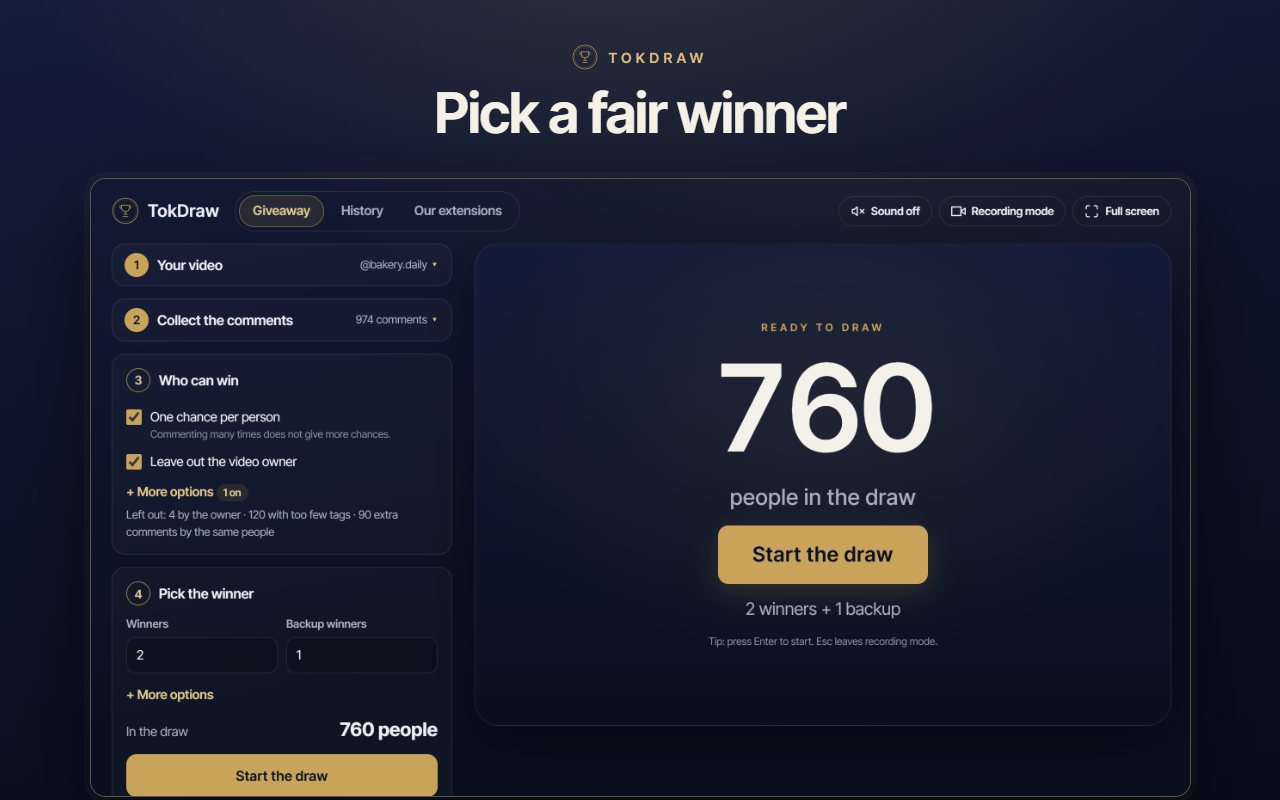
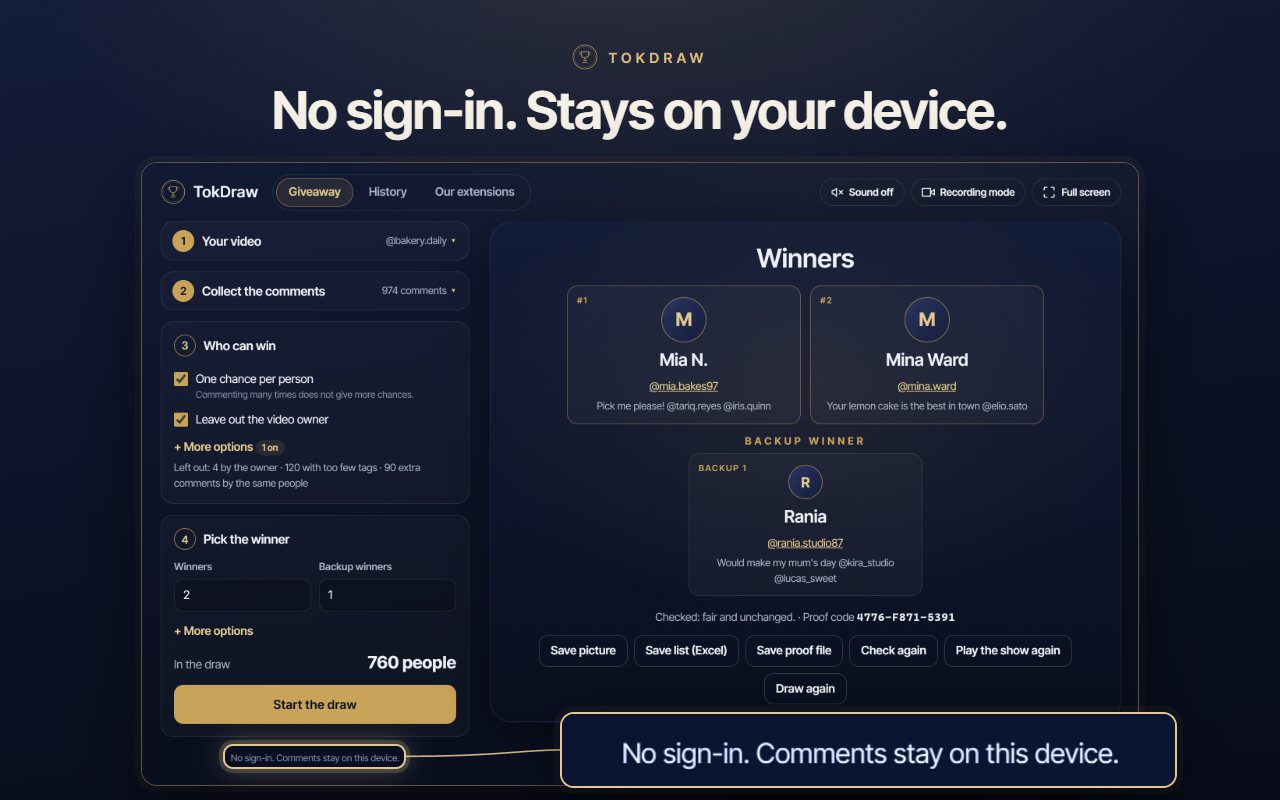
TokDraw is a comment picker that works from the browser you already use. It collects the comments on your video, applies your rules, draws the winner and your backups on a clean stage made for screen recording, and gives every result a proof code anyone can check — with no sign-in.
The one-entry-per-person option is useful for keeping giveaway entries organized.
The different entry rules make it easier to organize giveaways according to specific requirements.
Being able to select multiple winners and backup participants is useful for larger giveaways.
I appreciate being able to use the extension without creating another account or signing in.
The recording mode is a nice addition for creators who want to show the giveaway process to their audience.
Having a proof code for each draw is a useful feature when you want to demonstrate that the result can be verified.
The process is straightforward, from entering the video link to selecting the winner.
I like having a transparent way to choose giveaway winners from TikTok comments.
TikTok has no tool for choosing a winner from the comments under your video. Running a giveaway by hand means scrolling through hundreds of comments, copying names into a list and hoping nobody asks how the winner was chosen.
It takes an evening, it is easy to get wrong, and there is nothing to show if someone asks how the winner was chosen.
You always know how many people are in the draw and how many comments each rule left out, and anyone can check the result.
Fair rules, a result you can prove, and a stage that looks good in a recording.
Paste the link of a single video, or choose a video you already have open in a tab. TokDraw reads the comments TikTok makes available for it.
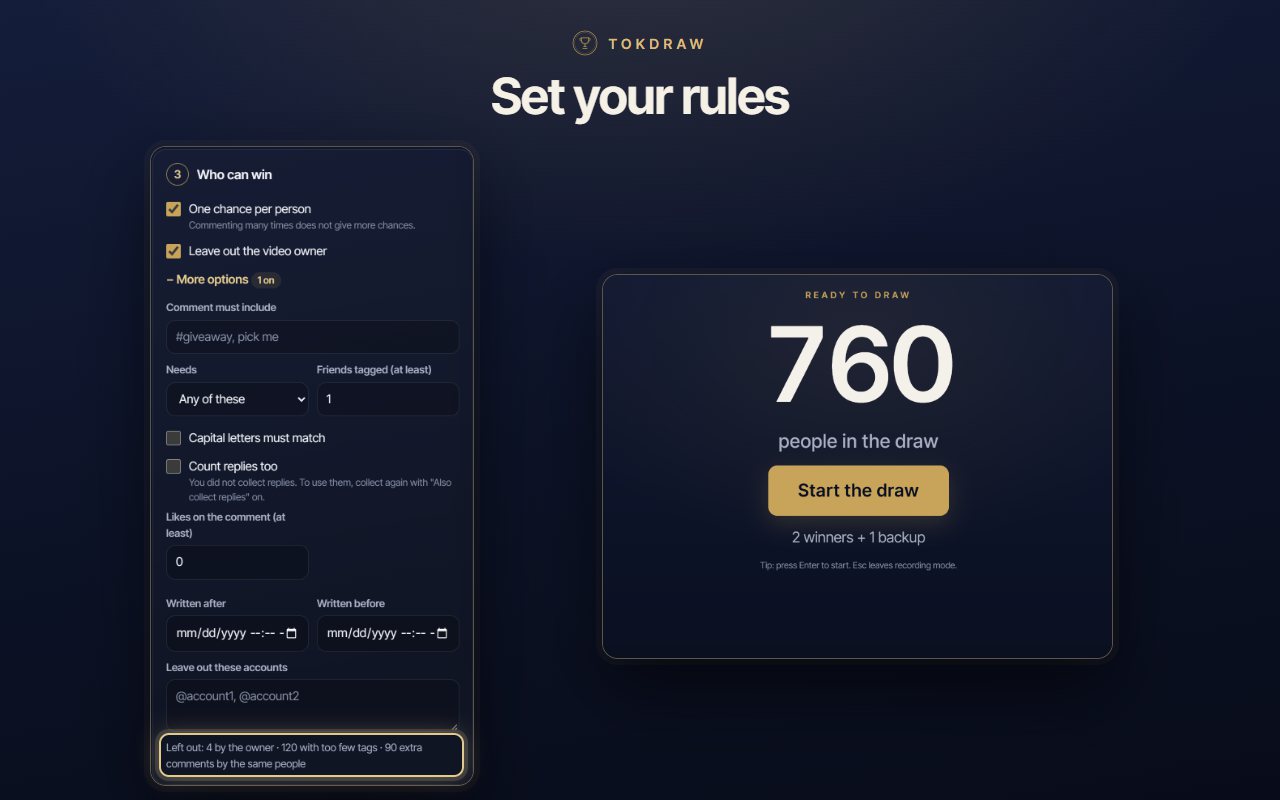
One chance per person, a required word or hashtag, a minimum number of tagged friends or likes, a date range, replies counted or not, the video owner and any accounts you name left out.
Choose a winner or several, and set how many backups you want. If the first winner does not answer, the next person is ready.
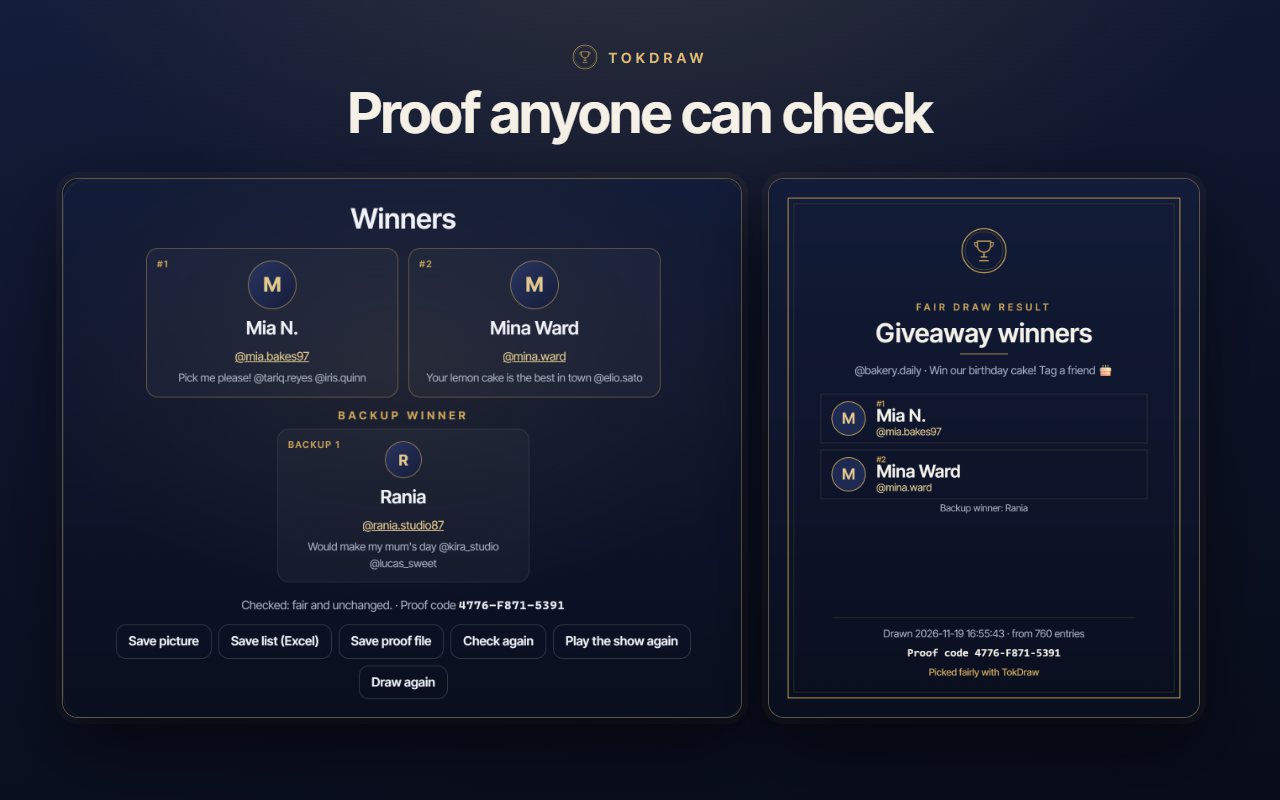
Every draw gets a proof code. Check again re-runs the draw from the saved record and confirms the result is fair and unchanged. Save a proof file so others can check it too.
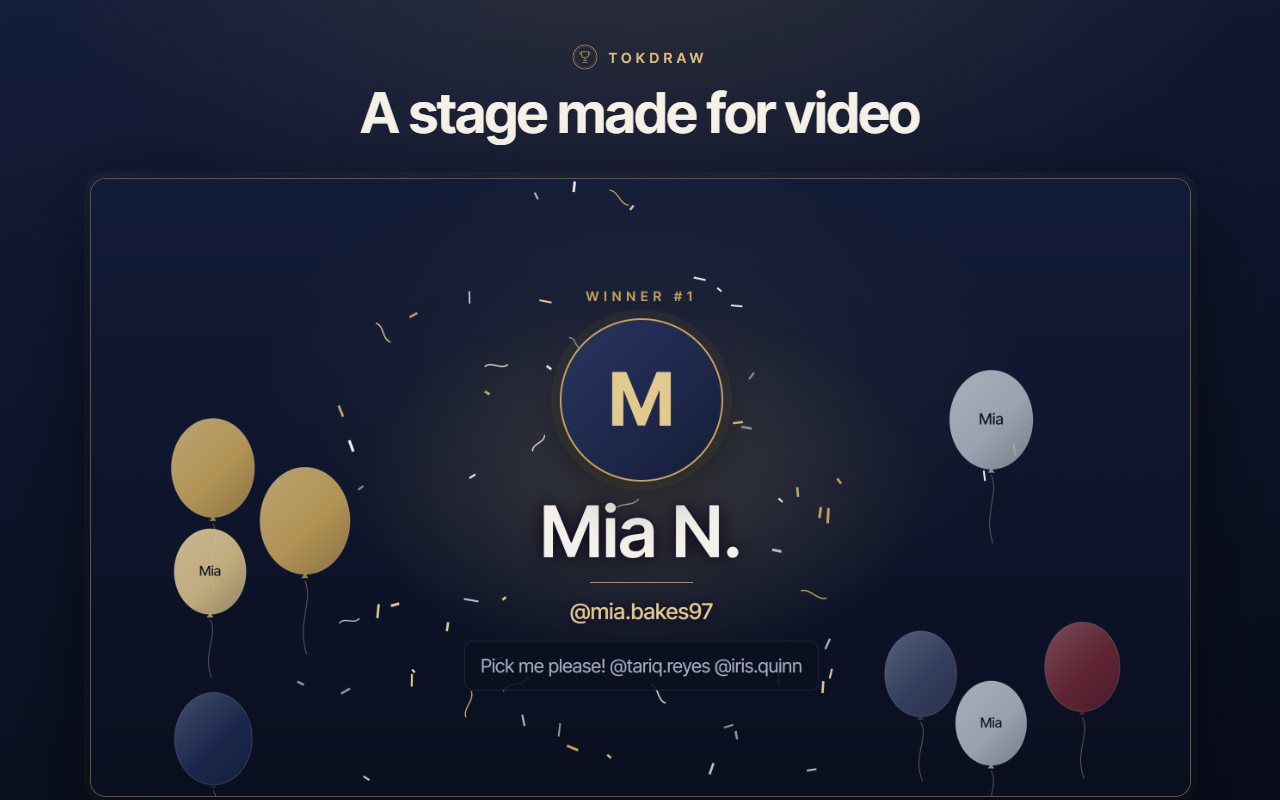
Recording mode hides the controls. Pick the Elegant or the Party style and a quick, normal or big show. Sound starts switched off, and reduced motion is respected.
Save a picture of the winners, a spreadsheet of the winners, or the proof file. Every giveaway stays in History on your device.
Collection is slow on purpose, so TikTok does not block your browser. You see a time estimate before you start and can choose a pace.
There is no sign-in and no TokDraw server. The comments, your rules and your past giveaways stay in your browser and are never sent to us.
Just installed? Click the TokDraw icon in the Chrome toolbar. If you do not see it, open the puzzle-piece menu and pin it.
Paste the link of your video, for example tiktok.com/@name/video/1234, or choose a video you already have open in a tab.
TokDraw reads the comments gradually, at a safe pace, so TikTok does not block you. A counter shows the progress, and big videos simply take a little longer.
Set your rules. TokDraw tells you how many people are in the draw and how many comments each rule left out.
Start the draw. A countdown and a celebration scene reveal the winner and your backups. Save the picture or the proof file, or press Check again to verify the result.
Use a draw that anyone can check. TokDraw saves a random number and a fingerprint of the list of entries for every draw. Press Check again and it repeats the draw from them and must give the same winners. If the list or the winners were changed afterwards, the check fails. You can also save a proof file so someone else can check it too.
Paste the link of your video, or choose a video you already have open in a tab. TokDraw collects the comments, you set who can win, and one press starts the draw. A countdown and a celebration scene reveal the winner and your backups.
No. It never sees or asks for it, and there is no account or sign-in. TokDraw only reads the comments of the video you choose. It never posts, replies, likes or follows on your behalf.
Not by default. “One chance per person” is on, so each person counts once. Switch it off if you want every comment to count.
One chance per person, a required word or hashtag, a minimum number of tagged friends, a minimum number of likes, a date range, replies counted or not, the video owner left out, and any accounts you name left out. TokDraw tells you how many people are in the draw and how many comments each rule left out.
Yes. Choose a winner or several, and set how many backups you want. If the first winner does not answer, the next person is already chosen.
Yes. Recording mode hides the controls and leaves a clean screen for your screen recorder. Choose the Elegant or the Party style and a quick, normal or big show. Sound is available and starts switched off. If your system asks for reduced motion, the animated effects are skipped.
On purpose. Asking TikTok for pages too quickly can get your browser blocked for a while, so TokDraw waits between pages and takes short breaks. You see a time estimate before you start and can choose a pace.
TikTok does not always hand over every comment: some are hidden or filtered. TokDraw shows you both numbers, the one TikTok reports and the one it could collect, so nothing is hidden from you.
On your device, in your browser. There is no TokDraw server, no analytics and no tracking, so the comments, your rules and your past giveaways are never sent to us. Every giveaway stays in History until you clear it.
No. TokDraw is an independent extension. It is not affiliated with, endorsed by, or connected to TikTok Pte. Ltd. or ByteDance Ltd. “TikTok” and related names, marks and logos are trademarks of their respective owners and appear here only to describe what the extension works with.

Install the extension, open your video, and let TokDraw do the counting while you stay in charge.
Add TokDraw to ChromeA giveaway is simple to announce and awkward to finish. The video gets hundreds of comments, some people comment ten times, some tag nobody, and in the end you have to choose one name and be able to explain why it is that one. A good random winner picker takes the guesswork out of that last step.


TikTok shows comments, but it does not give you a way to turn them into a list of entries, apply rules to it and draw from it. So creators copy names by hand, paste them into a wheel or a spreadsheet, and hope the result is believed. TokDraw does the collecting, the counting and the drawing in one browser tab.
Fairness starts with the rules you announced. TokDraw lets you set them before the draw: one chance per person so that commenting many times does not help, a required word or hashtag, a minimum number of tagged friends, a minimum number of likes, a date range, whether replies count, and whether the video owner or any named accounts are left out. It shows how many people are in the draw and how many comments each rule left out, so you can say exactly what happened.
Pick one winner or several, and add backups for the day somebody does not answer. Every draw saves a random number and a fingerprint of the list of entries, and gives the result a proof code. Press Check again and TokDraw repeats the draw from that record: the same winners must come out. If the list or the result was changed afterwards, the check fails. A proof file lets someone else run the same check.
Most creators show the draw on video. Recording mode hides the controls and leaves a clean screen for your screen recorder, with a countdown, a winner reveal, balloons and confetti in the Elegant or the Party style, in a quick, normal or big show. Sound is available and starts switched off, and the animated effects are skipped if your system asks for reduced motion.
Asking TikTok for comments too fast can get your browser blocked for a while, so TokDraw collects them gradually and tells you how long it will take before you start. TikTok does not always hand over every comment; some are hidden or filtered. TokDraw shows both numbers, the one TikTok reports and the one it collected. Keep the TikTok tab open until collection ends. If it was closed, TokDraw continues where it stopped.
Nothing is sent to us. There is no account and no sign-in, and TokDraw never asks for your TikTok password. The comments, your rules and your past giveaways stay in your browser on your device. TokDraw connects only to TikTok to read the comments of the video you choose, to TikTok’s image servers for profile pictures, and to addonschrome.com to show the list of our extensions. If you also want a spreadsheet of the comments themselves, see TokExport, and to clear your old reposts, see TokSweep.
TokDraw is an independent extension. It is not affiliated with, endorsed by, sponsored by, or in any way officially connected to TikTok Pte. Ltd., ByteDance Ltd., or any of their subsidiaries or affiliates. “TikTok” and related names, marks and logos are trademarks of their respective owners and appear here only to describe what this extension works with.