Pickmint · Chrome extension

Instagram giveaway picker pick a fair winner, or download every comment

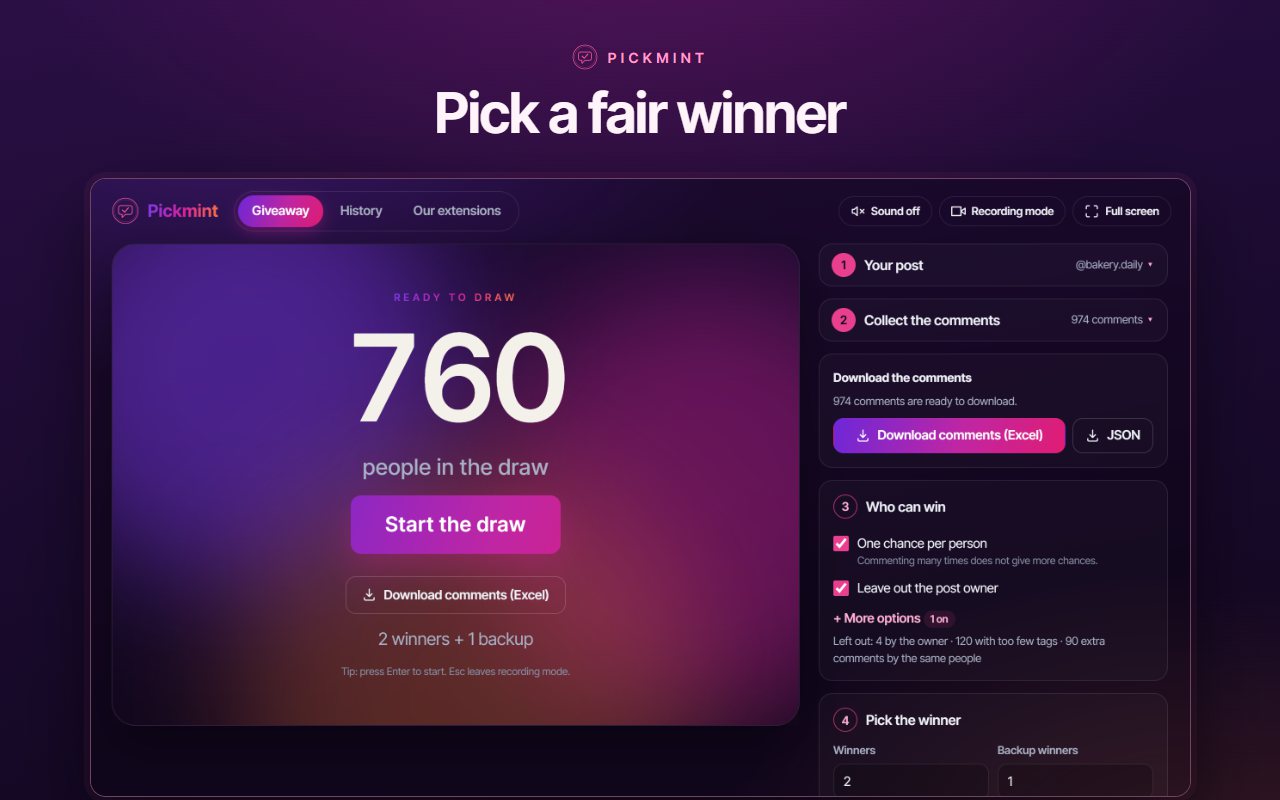
Pickmint is an Instagram giveaway picker and comment picker for Chrome. Paste the link of a post or reel and it collects the comments, applies your rules and draws the winners on a stage made for screen recording, with a proof code anyone can check. Only need the comments? Download every one as an Excel file, no draw required.

  • Proof code for every draw
  • Excel download of every comment
  • Recording mode
  • No sign-in, stays on your device
  • One chance per person
  • Required word or hashtag
  • Tagged friends
  • Minimum likes
  • Date range
  • Replies counted or not
  • Post owner left out
  • Named accounts left out
  • Winners and backups
  • Proof code
  • Recording mode
  • Excel and JSON download
8rules for deciding who can win
1proof code for every draw, and a button that checks it
2ways to save the comments: Excel or JSON
0accounts, sign-ins or passwords needed
The old way

How to pick a giveaway winner on Instagram without the spreadsheet scramble

Instagram has no tool for choosing a winner from the comments under a post. Running a giveaway by hand means scrolling through hundreds of comments, copying names into a list and hoping nobody asks how the winner was chosen.

By hand

  1. Scroll and copy the names, one comment at a time
  2. Remove the person who commented ten times
  3. Check tags and hashtags yourself
  4. Pick a name and hope nobody doubts it

It takes an evening, it is easy to get wrong, and there is nothing to show if someone asks how the winner was chosen.

With Pickmint

  1. Paste the link of your post or reel
  2. Pickmint collects the comments and counts who is in the draw
  3. Set your rules and press Start the draw
  4. Show the winner on screen and keep the proof code, or download all the comments instead

You always know how many people are in the draw and how many entries each rule left out, and anyone can check the result.

Giveaway picker

Instagram comment picker: from every comment to a winner you can prove

Pickmint reads the comments of your post, drops the entries your rules leave out, and picks winners at random. Every draw saves what it needs to be repeated, so the result is something you can show, not just announce.

  • Your rules, counted out loudSee how many people are in the draw and how many entries each rule left out.
  • A proof code on every drawPress Check again and the draw is repeated from the saved record: same winners, or the check fails.
  • A stage ready to recordRecording mode hides the controls: a countdown, the reveal, balloons and confetti.
No draw needed

Instagram comment exporter: download every comment as Excel

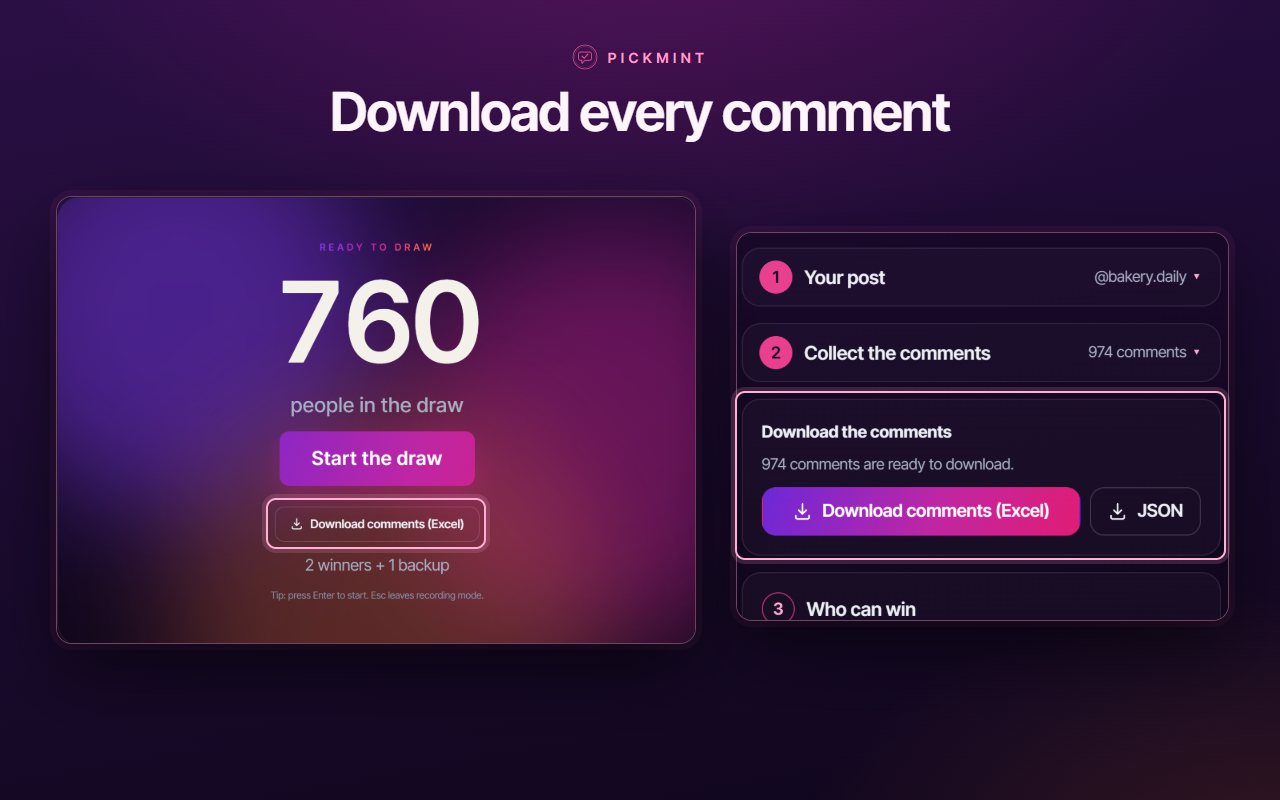
Not every post needs a giveaway. Maybe you want every comment in a spreadsheet to review a campaign, sort the entries or keep a record. Pickmint is an Instagram comment downloader as well as a picker: collect the comments of a post or reel, then press Download comments (Excel).

Export Instagram comments to Excel in three clicks

  1. Paste the link of the post or reel
  2. Let Pickmint collect the comments
  3. Press Download comments (Excel)
  • Username
  • Comment text
  • Likes
  • Replies
  • Date and time
  • Profile link
  • User ID

The file opens straight in Excel, Numbers or Google Sheets. Prefer JSON for your own tools? It is one button away.

Features

A giveaway picker and comment downloader in one extension

Fair rules, a result you can prove, a stage that looks good in a recording, and every comment ready to take away.

Excel + JSON

Download all comments (Excel)

Collect a post or reel, then save every comment as a spreadsheet that opens in Excel, with the username, text, likes, replies and date. Prefer data for developers? Save the same list as JSON. You never have to run a draw.

8 rules for a fair giveaway

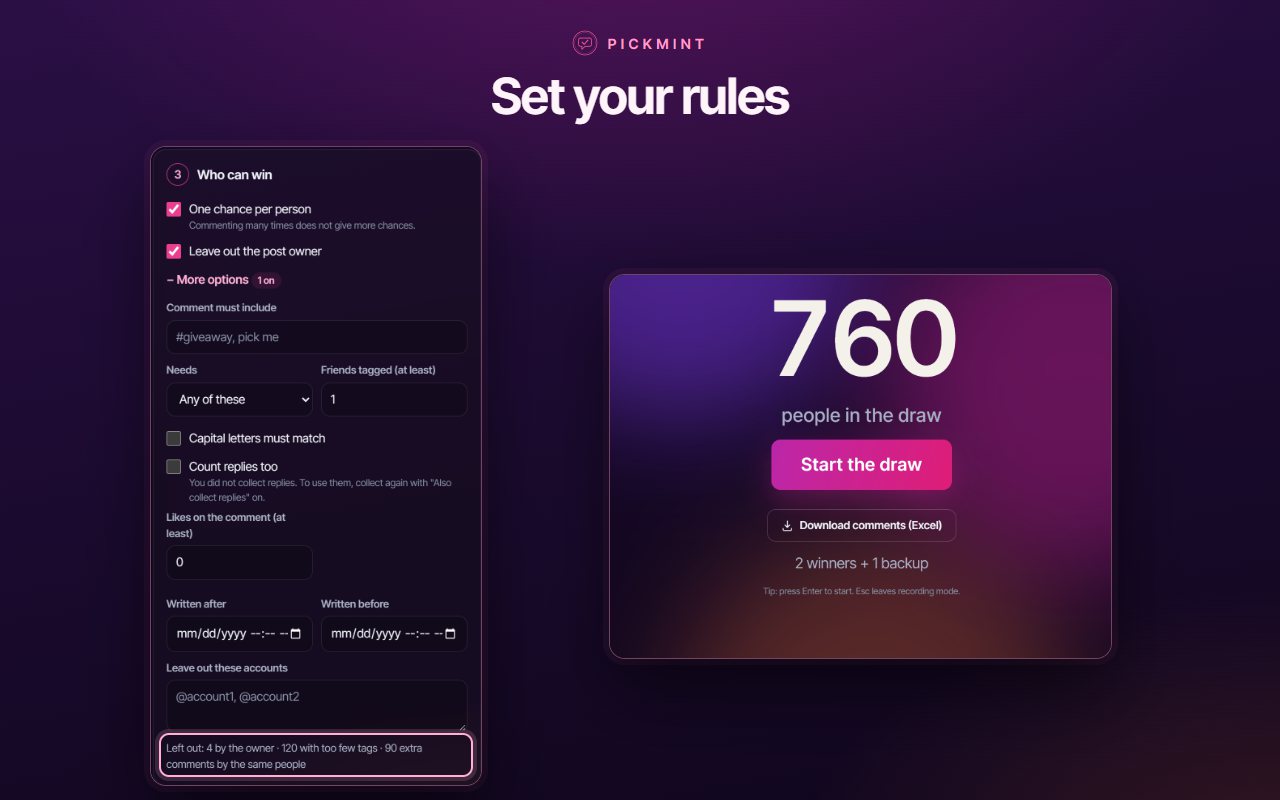
One chance per person, a required word or hashtag, tagged friends, likes, a date range, replies counted or not, the post owner and any accounts you name left out.

Winners and backups

Choose a winner or several, and set how many backups you want. If the first winner does not answer, the next person is ready.

Proof anyone can check

Every draw gets a proof code. Check again re-runs the draw from the saved record and confirms the result is fair and unchanged.

A stage made for recording

Recording mode hides the controls. Pick the Aurora or the Party style and a quick, normal or big show. Sound starts switched off.

Any post or reel

Paste the link of a single post or reel, or choose one you already have open in a tab. A time estimate shows before you start.

Stays on your device

There is no sign-in and no Pickmint server. The comments, your rules and your past giveaways stay in your browser and are never sent to us.

How it works

How to pick an Instagram giveaway winner in four steps

Just installed? Click the Pickmint icon in the Chrome toolbar. If you do not see it, open the puzzle-piece menu and pin it.

  1. 1

    Your post

    Paste the link of a post or reel, for example the address you copy from the share menu, or choose a post you already have open in a tab.

  2. 2

    Collect the comments

    Pickmint reads the comments gradually, at a steady pace. A counter shows the progress, and big posts simply take a little longer. Here you can already download the comments.

  3. 3

    Who can win

    Set your rules. Pickmint tells you how many people are in the draw and how many entries each rule left out.

  4. 4

    Pick the winner

    Start the draw. A countdown and a celebration scene reveal the winner and your backups. Save the picture or the proof file, or press Check again.

Only need the comments? Stop after step 2 and press Download comments (Excel). The draw is optional.

Watch Pickmint pick a winner and export the comments

From the post link to the winner reveal, the proof code and the Excel file.

Screenshots

Inside Pickmint

The draw, the comment download, the rules, the stage and the proof.

Questions

Instagram giveaway picker questions

Picking a winner, exporting comments to Excel, proof and privacy.

Add to Chrome
How do I pick a giveaway winner on Instagram fairly?

Use a draw that anyone can check. Pickmint saves a random number and a fingerprint of the list of entries for every draw. Press Check again and it repeats the draw from them and must give the same winners. If the list or the winners were changed afterwards, the check fails. You can also save a proof file so someone else can check it too.

How do I pick a winner from Instagram comments?

Click the Pickmint icon, paste the link of your post or reel, or choose a post you already have open in a tab. Pickmint collects the comments, you set who can win, and one press starts the draw. A countdown and a celebration scene reveal the winner and your backups.

How do I export Instagram comments to Excel?

Paste the link of the post or reel, let Pickmint collect the comments, then press Download comments (Excel). You get a spreadsheet file that opens in Excel, Numbers or Google Sheets, with one row per comment. You do not have to run a draw first.

Can I download all the comments from an Instagram post without picking a winner?

Yes. The comment download works on its own. Collect the comments of any post or reel you can see, then save them as an Excel file, or as a JSON file if you work with developers. The draw is optional.

What is in the downloaded comment file?

One row for every comment, with the username, display name, user ID, comment text, number of likes, number of replies, who a reply answers, the date and time in UTC and in your local time, and a link to the profile. Replies are included when you switch on Also collect replies under More options before you collect.

Does Pickmint ask for my Instagram password?

No. It never sees or asks for it, and there is no account or sign-in for Pickmint. It uses your existing browser session to read a post you can see, and it only reads: it never posts, replies, likes or follows on your behalf.

Does a person who commented many times get more chances?

Not by default. “One chance per person” is on, so each person counts once. Switch it off if you want every comment to count.

Which rules can I set for who can win?

One chance per person, a required word or hashtag, a minimum number of tagged friends, a minimum number of likes, a date range, replies counted or not, the post owner left out, and any accounts you name left out. Pickmint tells you how many people are in the draw and how many entries each rule left out.

Can I pick more than one winner, and backups?

Yes. Choose a winner or several, and set how many backups you want. If the first winner does not answer, the next person is already chosen.

Can I record the draw for my video?

Yes. Recording mode hides the controls and leaves a clean screen for your screen recorder. Choose the Aurora or the Party style and a quick, normal or big show. Sound is available and starts switched off. If your system asks for reduced motion, the animated effects are skipped.

Why does collecting the comments take a few minutes?

A post gives out its comments in small pages, so a post with thousands of them needs many requests. Pickmint waits between pages and takes short breaks, which keeps your session safe. You see a time estimate before you start and can choose a pace. Keep the tab open until collection ends; if it was closed, click Try again and Pickmint continues where it stopped.

Why is the number of comments lower than on my post?

Not every comment is handed over: some are hidden, filtered or deleted, and the count shown on a post includes replies. Pickmint shows you both numbers, the one the post reports and the one it could collect, so nothing is hidden from you.

Where are my comments and giveaways stored?

On your device, in your browser. The comments, your rules and your past giveaways are never sent to us, and there is no analytics and no tracking. Every giveaway stays in History until you clear it.

Is Pickmint affiliated with Instagram?

No. Pickmint is an independent extension. It is not affiliated with, endorsed by, or connected to Meta Platforms, Inc. “Instagram” and related names, marks and logos are trademarks of their respective owners and appear here only to describe what the extension works with.

Run your next giveaway the fair way

Install the extension, open your post, and let Pickmint do the counting while you stay in charge. Or just take the comments with you.

Add to Chrome

Choosing a giveaway winner from Instagram comments: what makes it fair

A giveaway is simple to announce and awkward to finish. The post gets hundreds of comments, some people comment ten times, some tag nobody, and in the end you have to choose one name and be able to explain why it is that one. A good random winner picker takes the guesswork out of that last step.

Why Instagram has no comment picker of its own

Instagram shows comments, but it does not give you a way to turn them into a list of entries, apply rules to it and draw from it. So people copy names by hand, paste them into a wheel or a spreadsheet, and hope the result is believed. Pickmint does the collecting, the counting and the drawing in one browser tab.

Rules first, then the draw

Fairness starts with the rules you announced. Pickmint lets you set them before the draw: one chance per person so that commenting many times does not help, a required word or hashtag, a minimum number of tagged friends, a minimum number of likes, a date range, whether replies count, and whether the post owner or any named accounts are left out. It shows how many people are in the draw and how many entries each rule left out, so you can say exactly what happened.

Winners, backups and a proof you can show

Pick one winner or several, and add backups for the day somebody does not answer. Every draw saves a random number and a fingerprint of the list of entries, and gives the result a proof code. Press Check again and Pickmint repeats the draw from that record: the same winners must come out. If the list or the result was changed afterwards, the check fails. A proof file lets someone else run the same check.

A stage that is ready to record

Most people show the draw on video. Recording mode hides the controls and leaves a clean screen for your screen recorder, with a countdown, a winner reveal, balloons and confetti in the Aurora or the Party style, in a quick, normal or big show. Sound is available and starts switched off, and the animated effects are skipped if your system asks for reduced motion.

Downloading the comments without a draw

Sometimes the comments are the whole point. Once Pickmint has collected a post, one button saves every comment as a spreadsheet file that opens in Excel, with the username, the text, the likes, the replies, the date and a link to the profile. The same list can be saved as JSON. People use it to review a campaign, sort entries, check who tagged whom or keep a record, and none of it needs a giveaway.

Collecting comments at a steady pace

Asking Instagram for comments too fast can slow your session down, so Pickmint collects them gradually and tells you how long it will take before you start. Not every comment is handed over; some are hidden, filtered or deleted, and the number on a post includes replies. Pickmint shows both numbers, the one the post reports and the one it collected. Keep the tab open until collection ends. If it was closed, Pickmint continues where it stopped.

Privacy: what leaves your computer

Nothing is sent to us. There is no account and no sign-in, and Pickmint never asks for your Instagram password. The comments, your rules and your past giveaways stay in your browser on your device. Pickmint connects only to the post page to read its comments, to the image servers for profile pictures, and to addonschrome.com to show the list of our extensions. Running giveaways on TikTok too? See TokDraw. Cleaning up your own Instagram account? Have a look at Followprune and Instagram Unfollow AI.

Other extensions from AddonsChrome

Instagram Unfollow AI - Manage Unfollowers Effortlessly Instagram Unfollow AI - Manage Unfollowers Effortlessly Instagram Unfollow AI detects those who don't follow you back and helps you unfollow them to… X Unfollow AI – Manage Your Twitter Following List X Unfollow AI – Manage Your Twitter Following List Manage your X (Twitter) following, detect users who don't follow you back, and unfollow safely… TikTok Unfollow AI - Mass & Auto Unfollow All, Everyone & Non-Followers TikTok Unfollow AI - Mass & Auto Unfollow All, Everyone & Non-Followers See who doesn't follow you back on TikTok, then bulk unfollow all, everyone or only… WASendly – WhatsApp Bulk Message Sender WASendly – WhatsApp Bulk Message Sender Send bulk and automated WhatsApp messages safely and easily with WASendly. Contactdock – WhatsApp Contacts Extractor Contactdock – WhatsApp Contacts Extractor Easily export WhatsApp contacts and group members to Excel, CSV, or vCard. TeleSendly - Telegram Bulk Sender, Scraper & Member Adder TeleSendly - Telegram Bulk Sender, Scraper & Member Adder Send bulk Telegram messages, scrape group members to Excel and add members to groups. Safe… Followgap - Instagram Unfollowers Tracker & Unfollow Non-Followers Followgap - Instagram Unfollowers Tracker & Unfollow Non-Followers Find who doesn't follow you back on Instagram. Track unfollowers & mass unfollow non-followers… FollowStack – Instagram Toolkit for Desktop FollowStack – Instagram Toolkit for Desktop Instagram toolkit for desktop. Track unfollowers, upload stories from PC, download media, and… Rosterbox - IG Follower & Following Export List to CSV, Excel Rosterbox - IG Follower & Following Export List to CSV, Excel Export IG follower and following lists, likes and comments to CSV, Excel or JSON in one click… Roostbox - Twitter/X Exporter: Tweets, Followers, Bookmarks & Archive Roostbox - Twitter/X Exporter: Tweets, Followers, Bookmarks & Archive Export tweets, replies, likes, bookmarks and followers from any Twitter/X account to Excel… Postwash - Delete Tweets, Likes & Reposts for X Postwash - Delete Tweets, Likes & Reposts for X Delete tweets, likes and reposts on X in bulk. Preview first, back up to CSV, and every… ExportPal - Save & Export ChatGPT, Claude, Gemini to PDF & Word ExportPal - Save & Export ChatGPT, Claude, Gemini to PDF & Word Save & export ChatGPT, Claude, Gemini, Grok, DeepSeek & Perplexity to PDF, Word, Markdown… TokExport - TikTok Follower List, Following & Comment Export Tool TokExport - TikTok Follower List, Following & Comment Export Tool Export TikTok follower and following lists, video comments and post stats to CSV or Excel… ChatGPT Speed Booster ChatGPT Speed Booster ChatGPT Speed Booster is a free Chrome extension that fixes slow ChatGPT performance in long… Instagram Follower Export Tool Instagram Follower Export Tool Export Instagram followers, following, likes, and comments to CSV or Excel in one click TokSweep - TikTok Repost Remover & Bulk Cleaner TokSweep - TikTok Repost Remover & Bulk Cleaner Remove TikTok reposts in bulk. See the full list first, pick what goes, and set your own pace… PromptJolt – AI Prompt Enhancer for ChatGPT, Claude & Gemini PromptJolt – AI Prompt Enhancer for ChatGPT, Claude & Gemini Rewrite any AI prompt into a clear, structured version in one click. Press Ctrl+M on ChatGPT… IGFollow AI - Auto Follow IGFollow AI - Auto Follow IGFollow AI is an AI-powered tool to grow your Instagram. Boost engagement and expand your… Followprune - Fake Follower Checker for Instagram Followprune - Fake Follower Checker for Instagram Scan your followers or the accounts you follow, spot fake and empty ones, and remove them in… Backgap - Threads Followers Tracker & Mass Unfollow Backgap - Threads Followers Tracker & Mass Unfollow See who doesn't follow you back on Threads, protect the accounts you want to keep, and tidy… Backly — Unfollower Tracker for Instagram Backly — Unfollower Tracker for Instagram See exactly who doesn’t follow you back on Instagram, protect the accounts you care about, and… TeleCache - Telegram Video & Media Downloader TeleCache - Telegram Video & Media Downloader Download Telegram videos, photos, audio and files in bulk. Filter by type, date, size or… FeedRank – Instagram & TikTok Feed Sorter FeedRank – Instagram & TikTok Feed Sorter Sort Instagram & TikTok feeds by likes, views, comments or date. See post stats at a glance… Instagram Auto Follow Instagram Auto Follow AI-powered Instagram auto follow tool to boost engagement, grow followers, and expand your… Claude Speed Booster Claude Speed Booster Fix slow Claude.ai in long conversations. Speed Booster hides older messages to stop lag… ChatPilot – ChatGPT Bulk Delete, Archive & Timestamps ChatPilot – ChatGPT Bulk Delete, Archive & Timestamps Bulk delete & archive ChatGPT chats, add message timestamps and navigate conversations fast… Extract AI – Email Extractor Extract AI – Email Extractor Email Extractor helps you find visible email addresses on websites and works locally with no… Prompt Trove — Visual AI Image Prompts Gallery Prompt Trove — Visual AI Image Prompts Gallery A visual gallery of AI image prompts. Use them instantly in ChatGPT, Gemini, Sora, and Nano… Crawlhive — SEO Audit, Site Crawler & Technical SEO Crawlhive — SEO Audit, Site Crawler & Technical SEO Audit any page, then crawl the whole site: indexability, duplicate titles, orphan pages, click… Privacy Guard for WhatsApp Web Privacy Guard for WhatsApp Web Secure your WhatsApp Web with smart lock, panic button, and blur mode. Your privacy, your… Clickaroo - Mouse Effect Designer Clickaroo - Mouse Effect Designer Transform your cursor with stunning click effects & animations. Perfect for streamers… InkShot — Webpage Screenshot & Draw Tool InkShot — Webpage Screenshot & Draw Tool InkShot is a free screenshot Chrome extension that lets you capture full page screenshots… Detechtor AI - Website Technology Checker & Tech Stack Detector Detechtor AI - Website Technology Checker & Tech Stack Detector Detechtor AI checks what any website is built with — CMS & WordPress theme detector… Numsift — Bulk WhatsApp Number Checker & Validator | Export to Excel Numsift — Bulk WhatsApp Number Checker & Validator | Export to Excel Bulk check which numbers are on WhatsApp. Validate lists, filter by country, spot business… Clearbox — Bulk Chat & Message Deleter for Instagram Clearbox — Bulk Chat & Message Deleter for Instagram Delete all your chats and messages on Instagram in bulk. One click, and the chats you protect… Araç Data Merkezi — Used Car Valuation & Damage Check for Sahibinden Araç Data Merkezi — Used Car Valuation & Damage Check for Sahibinden See what a car on Sahibinden is really worth: market value for the exact trim, how damage and… Chatalbum - WhatsApp Chat Export to PDF & Excel Chatalbum - WhatsApp Chat Export to PDF & Excel Save any WhatsApp Web chat as a readable file with its photos and voice notes. Everything… TokDraw - TikTok Giveaway Picker & Comment Picker TokDraw - TikTok Giveaway Picker & Comment Picker Pick fair, verifiable winners from TikTok video comments on a big, recordable stage: set your… Groupdex - Contacts & Chat Exporter for WhatsApp Groupdex - Contacts & Chat Exporter for WhatsApp Export contacts, group members and chats from WhatsApp Web to Excel or CSV. Pull phone numbers… SignedRise - Professional Email Signature SignedRise - Professional Email Signature Create custom and professional email signatures effortlessly with SignedRise. Perfect for…



Contact Us

contact@addonschrome.com