Bulk validation
Check a whole list in one run and get a clear on-WhatsApp / not-registered answer for every number.
Paste or upload your list, run one check, and see which phone numbers are registered on WhatsApp. Filter by country, spot business accounts, and export every reachable number to Excel or CSV — without saving a single contact.
The whole thing takes about a minute. You only do step 1 once.
Go to web.whatsapp.com and link it with your phone the usual way. Numsift works through this session, so keep the tab open while a check is running.
Click the Numsift icon and paste your list. Comma, line break, or a whole column copied out of a spreadsheet all work. Prefer a file? Switch to Upload file and drop a CSV, XLSX or TXT. Duplicates are dropped for you.
Pick a speed — Balanced suits most lists — and press start. Watch the live progress or close the popup and let it run. When it finishes, export the numbers that are on WhatsApp to Excel or CSV.
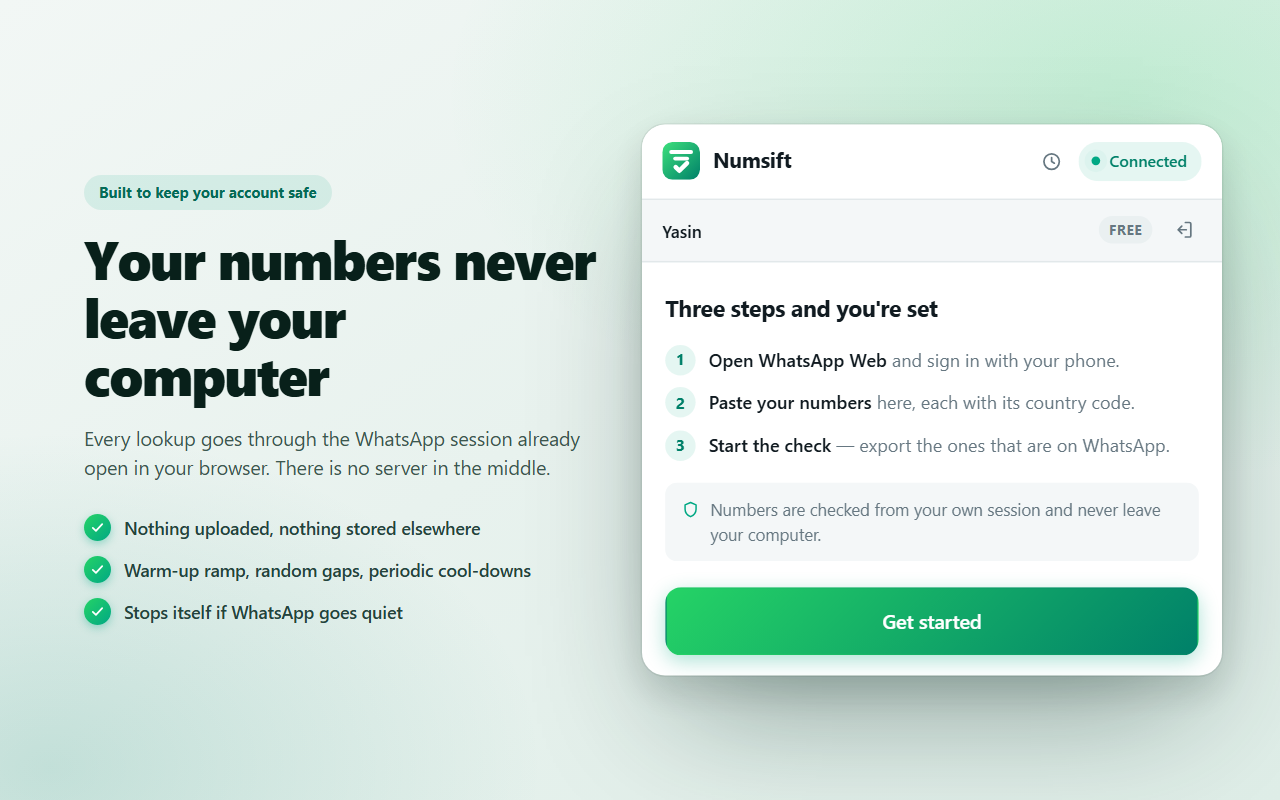
Every lookup goes through the WhatsApp session already open in your browser. Nothing is uploaded and nothing is stored on our side.
To check numbers in bulk, install a WhatsApp number checker that works inside your own WhatsApp Web session, paste or upload your list with country codes, and run a single check. Each number comes back as on WhatsApp, not registered, or could not be checked, and you can export the reachable ones to Excel or CSV. Checking this way means you never save the numbers as contacts and never hand your list to a third-party server.
Doing it manually — saving each number, opening WhatsApp, looking for a profile — takes roughly 20 to 30 seconds per number and pollutes your address book. For a list of 2,000 numbers that is more than a full working day. Numsift does the same job from one screen and leaves your contacts untouched.
Three screens, no setup, no API keys, no spreadsheet formulas.
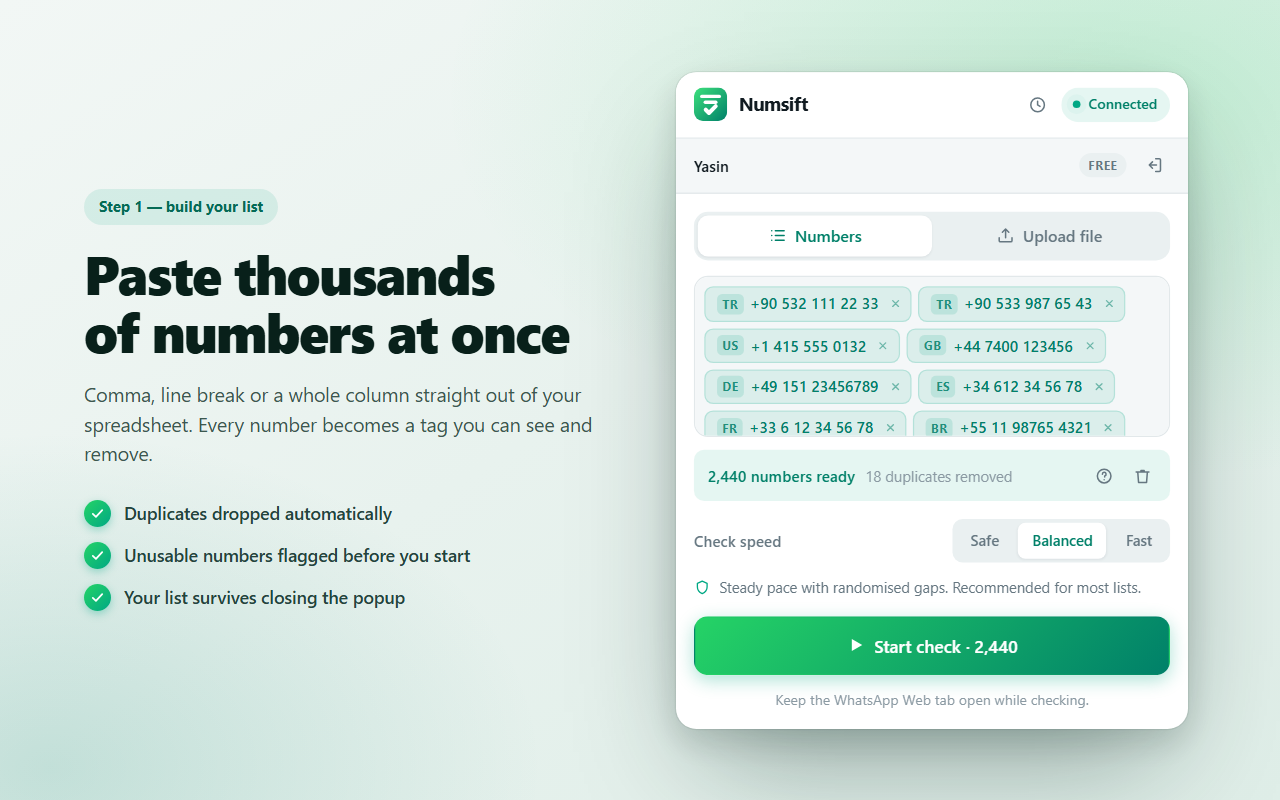
Comma, line break, or a whole column straight out of your spreadsheet. Every number becomes a tag you can see and remove. Numsift drops duplicates automatically and flags anything unusable — a missing country code, a landline, a typo — before the check starts, so you never burn a lookup on a number that could never work.
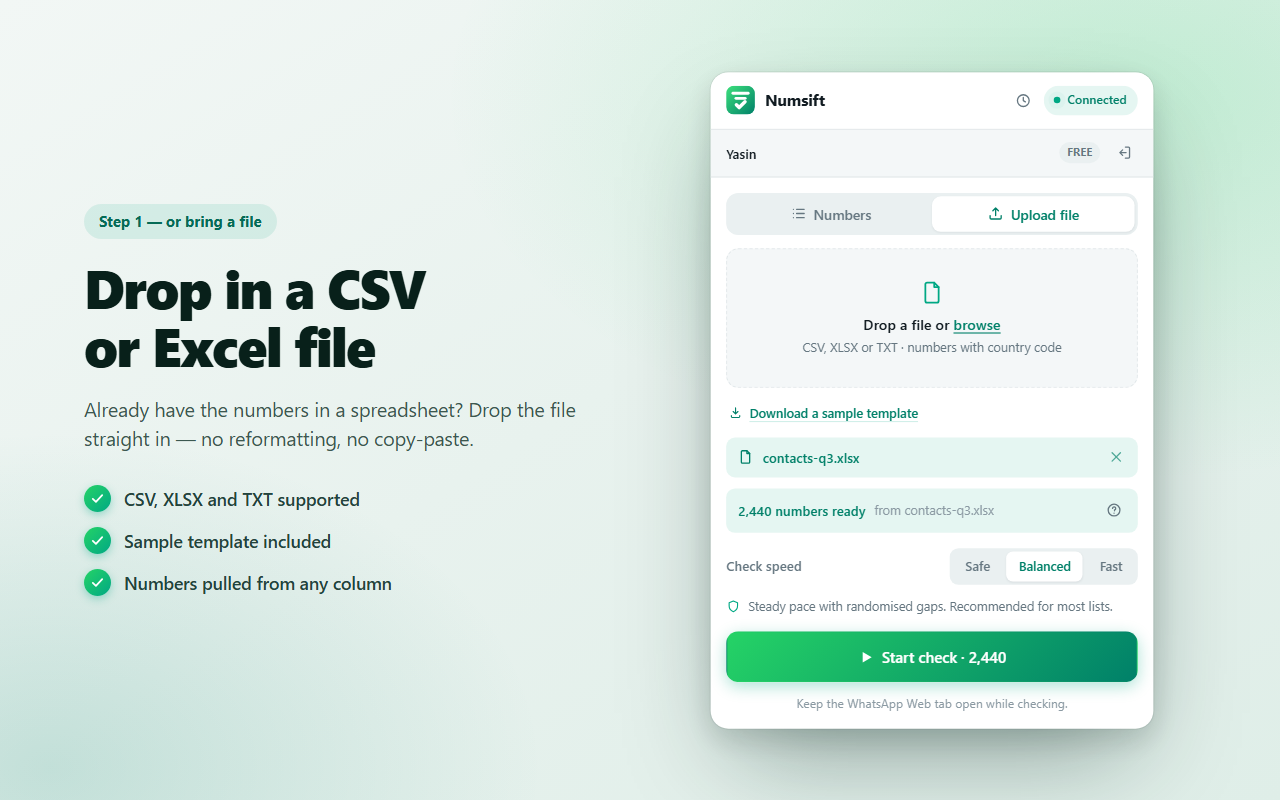
Exported a list from your CRM, a lead tool or an old campaign? Drag the file straight in. Numsift finds the phone column for you, applies the same duplicate and validity checks, and hands you a ready list. There is a sample template in the extension if you want to see the expected shape first.
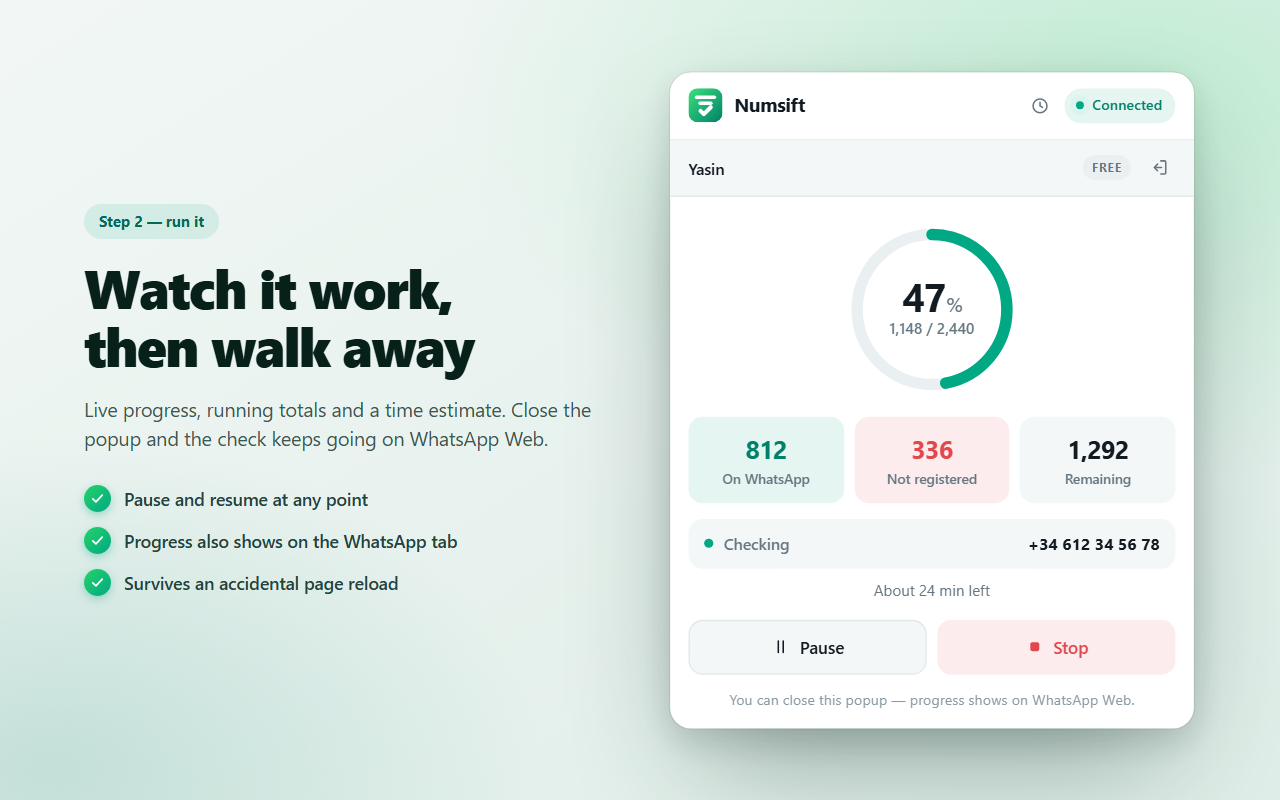
A live counter, running totals and a time estimate. Close the popup and the check keeps going — progress also appears on the WhatsApp Web tab. Pause when you need the browser for something else and resume exactly where you stopped. An accidental page reload will not lose your run.
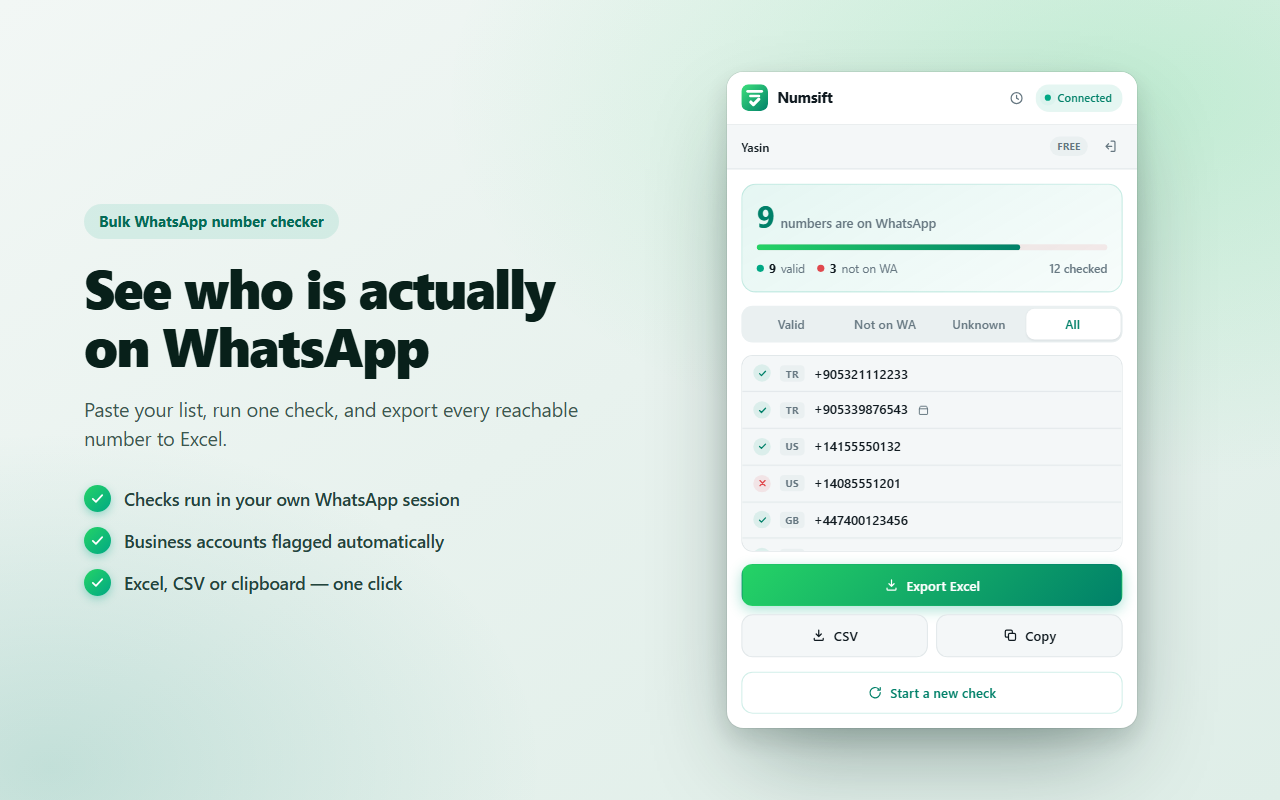
Results arrive grouped as Valid, Not on WA and Unknown, with a country tag on every row and a badge on WhatsApp Business accounts. Filter to what you need, then export to Excel or CSV, or copy the list to your clipboard. Past checks stay available if you want to come back to one.
This is the part most bulk checkers get wrong. Online WhatsApp filters ask you to upload your list to their servers — which means handing over the contact details of real people to a company you know nothing about, and often paying per number for the privilege.
Numsift works the other way around. Every lookup goes through the WhatsApp session already open in your browser. There is no server in the middle. Nothing is uploaded, nothing is stored elsewhere, and no contact is ever saved to your phone.
Validation, deduplication, country detection and export — in one pass.
Check a whole list in one run and get a clear on-WhatsApp / not-registered answer for every number.
Every number is tagged with its country, so you can filter a mixed international list down to one market.
WhatsApp Business accounts are marked separately — useful when you need to treat companies differently from people.
The same number twice only ever costs you one check. Duplicates are dropped as you paste.
Missing country codes and malformed numbers are caught before the check starts, not after.
Safe, Balanced or Fast. Each one explains what it does so you can match the pace to the list and the account.
Finished runs stay in the extension, so you can reopen an old result and export it again.
The interface follows your browser language — from Turkish and Spanish to Hindi, Arabic and Japanese.
Sending to numbers that are not on WhatsApp wastes your daily allowance and inflates your failure rate — which is exactly the signal that gets accounts limited. Clean the list first and every message you send has somewhere to land.
Contact lists rot. Numbers change hands, people switch carriers, records get typed in wrong. Running the export through a checker tells you what is still reachable before you build a campaign on top of stale data.
A list is only worth what you can reach. Checking it up front tells you the real size of what you paid for, and whether the seller's numbers hold up.
The business badge lets you split a mixed list into company accounts and personal numbers, so the right message goes to the right audience.
Country tags turn one big international list into per-country segments — helpful when WhatsApp adoption varies a lot between the markets you sell into.
Knowing in advance which customers are reachable on WhatsApp means you can route the rest to SMS or email instead of waiting on a message that will never arrive.
The three ways people usually try to answer “is this number on WhatsApp?”
| Numsift | Checking by hand | Online paid filter | |
|---|---|---|---|
| Where your list goes | Stays in your browser | Stays with you | Uploaded to their server |
| Saves contacts to your phone | No | Yes, one by one | No |
| Time for 2,000 numbers | One unattended run | Days of clicking | Minutes, if you pay |
| Cost | Free | Your time | Usually per number |
| Business account detection | Yes | Only by eye | Sometimes |
| Country filtering | Built in | Manual | Varies |
| Excel / CSV export | One click | Type it yourself | Usually |
Click any screenshot to see it full size.
Yes. Numsift takes a list of phone numbers — pasted in or uploaded as CSV, XLSX or TXT — and checks each one against WhatsApp to see whether an account exists. You get a clear Valid / Not registered / Unknown result for every number and can export the reachable ones to Excel or CSV in one click.
No. Every lookup runs through the WhatsApp Web session already open in your own browser. There is no server in the middle, nothing is uploaded, and nothing is stored anywhere else. Your list stays on your computer.
No. Numsift checks numbers directly without adding a single contact to your phone or address book.
Without a country code there is no reliable way to know which country a number belongs to — the same digits can be valid in several countries. Numsift flags numbers without a country code as unusable before the check starts so you do not waste a lookup on them.
Yes. Numbers that belong to a WhatsApp Business account are marked with a business badge in the results, so you can separate businesses from personal numbers before you export.
Numsift is built to be careful: it starts with a warm-up ramp, uses randomised gaps between lookups, takes periodic cool-downs, and stops itself if WhatsApp stops responding. You also choose the pace — Safe, Balanced or Fast. Very heavy activity on any tool can get an account flagged, so Safe or Balanced is recommended for large lists and new accounts.
You can upload CSV, XLSX and TXT files, or paste numbers straight from a spreadsheet column. Results export to Excel (XLSX) or CSV, and you can also copy them to the clipboard.
It depends on the list size and the speed you pick. Numsift shows a live time estimate as soon as the check starts, along with running totals, and you can pause or stop at any point. You can close the popup — progress keeps showing on the WhatsApp Web tab.
Yes, Numsift is free to install and use. Your plan is tied to your account, so it follows you to any computer you sign in on.
Every list of phone numbers contains numbers that no longer work. People change carriers, businesses close, digits get mistyped on a form, and a contact export you built two years ago is not the contact export you have today. When those numbers sit in a WhatsApp campaign, they do not simply fail quietly — they drag the whole send down with them.
WhatsApp watches how your account behaves. A high proportion of messages sent to numbers that do not exist looks like exactly what spam looks like, because that is what spammers do: blast an unverified list and hope. Accounts that keep doing it get rate-limited and, eventually, blocked. Cleaning the list first is not a nicety — it is the difference between a campaign that lands and an account that stops working.
There is a second cost that is easier to overlook. Most bulk senders limit how many messages you can push in a day. Every slot spent on a dead number is a slot not spent on a real customer.
It helps to separate two different questions. The first is whether a number is well formed — the right length for its country, with a country code attached. The second is whether an actual WhatsApp account exists behind it. A number can pass the first test and fail the second: a perfectly formatted mobile number belonging to someone who has never installed WhatsApp is still unreachable.
Numsift checks both. Malformed numbers are flagged as you paste, before they cost you anything, and the remaining numbers are checked against WhatsApp itself. The result is three buckets rather than two: on WhatsApp, not registered, and could-not-check — that last one being numbers where the lookup was interrupted, which you can retry later.
This is the single most common reason a check comes back empty. Without a country code there is no reliable way to know which country a number belongs to; the same string of digits can be a valid mobile number in several places at once. Guessing would produce confidently wrong answers, so Numsift refuses to guess and marks those numbers as unusable instead. If you are exporting from a spreadsheet, make sure the phone column keeps its leading + and country prefix rather than being reformatted as a plain number.
Numsift offers three paces because the right one depends on your list and your account. Safe is the slowest and most cautious — the sensible choice for a very large list or an account you have not used much. Balanced keeps a steady pace with randomised gaps and suits most work. Fast gets through a list quickest but is best used in short bursts; sustained heavy activity is what gets accounts flagged, on any tool.
Underneath all three, the same protections apply: a warm-up ramp at the start, randomised gaps rather than clockwork intervals, periodic cool-downs on long runs, and an automatic stop if WhatsApp stops answering.
Most online WhatsApp filters work by having you upload your list. That means the contact details of real people leave your control and land on a server belonging to a company you have probably never heard of. Depending on where you and your contacts are, that transfer may also be the point where a data-protection obligation attaches to you rather than to them.
A browser extension that works through your own WhatsApp Web session avoids the question entirely. Nothing is uploaded because there is nowhere to upload it to — the lookup happens in the session already open on your machine. That is a meaningful difference when the list is customer data.
Export the valid numbers and use those for WhatsApp. Keep the not-registered list too — it is not junk, it is a segment. Those people are reachable somewhere else, usually SMS or email, and knowing which channel to use is worth more than pretending everyone is on the same one. If you split business accounts out as well, you end up with three usable audiences from a single check.
Validating a list tells you who is reachable. It does not tell you who wants to hear from you, and it is not a licence to message strangers. Send to people who asked to hear from you, make it obvious who you are, and make it easy to opt out. Beyond being the decent approach, it is also the practical one: consent-based lists get reported far less, and reports are what end WhatsApp accounts.
Free, works in your own browser, and your numbers never leave your computer.
Add to Chrome — It's FreeEvery tool we build is free to install and works right in your browser.
 Instagram Unfollow AI - Manage Unfollowers Effortlessly
Instagram Unfollow AI detects those who don't follow you back and helps you unfollow them to optimize your account easily.
Instagram Unfollow AI - Manage Unfollowers Effortlessly
Instagram Unfollow AI detects those who don't follow you back and helps you unfollow them to optimize your account easily.
 WASendly – WhatsApp Contacts Extractor
Easily export WhatsApp contacts and group members to Excel, CSV, or vCard.
WASendly – WhatsApp Contacts Extractor
Easily export WhatsApp contacts and group members to Excel, CSV, or vCard.
 Followgap - Instagram Unfollowers Tracker & Unfollow Non-Followers
Find who doesn't follow you back on Instagram. Track unfollowers & mass unfollow non-followers in one click.
Followgap - Instagram Unfollowers Tracker & Unfollow Non-Followers
Find who doesn't follow you back on Instagram. Track unfollowers & mass unfollow non-followers in one click.
 ChatGPT Speed Booster
 is a free Chrome extension that fixes slow ChatGPT performance in long conversations.
ChatGPT Speed Booster
ChatGPT Speed Booster is a free Chrome extension that fixes slow ChatGPT performance in long conversations.
 FollowStack – Instagram Toolkit for Desktop
Instagram toolkit for desktop. Track unfollowers, upload stories from PC, download media, and manage Instagram.
FollowStack – Instagram Toolkit for Desktop
Instagram toolkit for desktop. Track unfollowers, upload stories from PC, download media, and manage Instagram.
 WASendly – WhatsApp Bulk Message Sender
Send bulk and automated WhatsApp messages safely and easily with WASendly.
WASendly – WhatsApp Bulk Message Sender
Send bulk and automated WhatsApp messages safely and easily with WASendly.
 Instagram Follower Export Tool
Export Instagram followers, following, likes, and comments to CSV or Excel in one click
Instagram Follower Export Tool
Export Instagram followers, following, likes, and comments to CSV or Excel in one click
 Instagram Unfollowers – Who Doesn’t Follow Me Back
Instagram Unfollow AI detects those who don't follow you back and helps you unfollow them to optimize your account easily.
Instagram Unfollowers – Who Doesn’t Follow Me Back
Instagram Unfollow AI detects those who don't follow you back and helps you unfollow them to optimize your account easily.
 PromptJolt – AI Prompt Enhancer for ChatGPT, Claude & Gemini
Rewrite any AI prompt into a clear, structured version in one click. Press Ctrl+M on ChatGPT, Claude or Gemini. 50+ languages, free.
PromptJolt – AI Prompt Enhancer for ChatGPT, Claude & Gemini
Rewrite any AI prompt into a clear, structured version in one click. Press Ctrl+M on ChatGPT, Claude or Gemini. 50+ languages, free.
 X Unfollow AI – Manage Your Twitter Following List
Manage your X (Twitter) following, detect users who don't follow you back, and unfollow safely with smart filters.
X Unfollow AI – Manage Your Twitter Following List
Manage your X (Twitter) following, detect users who don't follow you back, and unfollow safely with smart filters.
 IGFollow AI - Auto Follow
IGFollow AI is an AI-powered tool to grow your Instagram. Boost engagement and expand your audience effortlessly
IGFollow AI - Auto Follow
IGFollow AI is an AI-powered tool to grow your Instagram. Boost engagement and expand your audience effortlessly
 Extract AI – Email Extractor
Email Extractor helps you find visible email addresses on websites and works locally with no tracking or data collection.
Extract AI – Email Extractor
Email Extractor helps you find visible email addresses on websites and works locally with no tracking or data collection.
 Instagram Auto Follow
AI-powered Instagram auto follow tool to boost engagement, grow followers, and expand your audience effortlessly.
Instagram Auto Follow
AI-powered Instagram auto follow tool to boost engagement, grow followers, and expand your audience effortlessly.
 Prompt Trove — Visual AI Image Prompts Gallery
A visual gallery of AI image prompts. Use them instantly in ChatGPT, Gemini, Sora, and Nano Banana.
Prompt Trove — Visual AI Image Prompts Gallery
A visual gallery of AI image prompts. Use them instantly in ChatGPT, Gemini, Sora, and Nano Banana.
 Claude Speed Booster
Fix slow Claude.ai in long conversations. Speed Booster hides older messages to stop lag, freezing & high memory use — instantly.
Claude Speed Booster
Fix slow Claude.ai in long conversations. Speed Booster hides older messages to stop lag, freezing & high memory use — instantly.
 Compare Similar - Price Research
Find similar products and compare prices across multiple stores. Make smarter shopping decisions with real-time price research.
Compare Similar - Price Research
Find similar products and compare prices across multiple stores. Make smarter shopping decisions with real-time price research.
 ExportPal - Save & Export ChatGPT, Claude, Gemini to PDF & Word
Save & export ChatGPT, Claude, Gemini, Grok, DeepSeek & Perplexity to PDF, Word, Markdown, HTML, JSON or Image. Private & free.
ExportPal - Save & Export ChatGPT, Claude, Gemini to PDF & Word
Save & export ChatGPT, Claude, Gemini, Grok, DeepSeek & Perplexity to PDF, Word, Markdown, HTML, JSON or Image. Private & free.
 Detechtor AI - Website Technology Checker & Tech Stack Detector
Detechtor AI checks what any website is built with — CMS & WordPress theme detector, frameworks, analytics, CDN, tech stack.
Detechtor AI - Website Technology Checker & Tech Stack Detector
Detechtor AI checks what any website is built with — CMS & WordPress theme detector, frameworks, analytics, CDN, tech stack.
 FeedRank – Instagram & TikTok Feed Sorter
Sort Instagram & TikTok feeds by likes, views, comments or date. See post stats at a glance and find viral content fast. Free.
FeedRank – Instagram & TikTok Feed Sorter
Sort Instagram & TikTok feeds by likes, views, comments or date. See post stats at a glance and find viral content fast. Free.
 ChatPilot – ChatGPT Bulk Delete, Archive & Timestamps
Bulk delete & archive ChatGPT chats, add message timestamps and navigate conversations fast. Clean up ChatGPT in one click.
ChatPilot – ChatGPT Bulk Delete, Archive & Timestamps
Bulk delete & archive ChatGPT chats, add message timestamps and navigate conversations fast. Clean up ChatGPT in one click.
 TikTok Unfollow AI - Mass & Auto Unfollow All, Everyone & Non-Followers
See who doesn't follow you back on TikTok, then bulk unfollow all,
everyone or only non-followers. Safe pacing, one click.
TikTok Unfollow AI - Mass & Auto Unfollow All, Everyone & Non-Followers
See who doesn't follow you back on TikTok, then bulk unfollow all,
everyone or only non-followers. Safe pacing, one click.
 InkShot — Webpage Screenshot & Draw Tool
InkShot is a free screenshot Chrome extension that lets you capture full page screenshots, visible viewport, or selected areas
InkShot — Webpage Screenshot & Draw Tool
InkShot is a free screenshot Chrome extension that lets you capture full page screenshots, visible viewport, or selected areas
 SEO Analyzer Pro AI
AI-powered SEO analysis tool. Analyze and optimize your website's meta tags, titles, images and links.
SEO Analyzer Pro AI
AI-powered SEO analysis tool. Analyze and optimize your website's meta tags, titles, images and links.
 SignedRise - Professional Email Signature
Create custom and professional email signatures effortlessly with SignedRise. Perfect for personal and work emails.
SignedRise - Professional Email Signature
Create custom and professional email signatures effortlessly with SignedRise. Perfect for personal and work emails.
 Clickaroo - Mouse Effect Designer
Transform your cursor with stunning click effects & animations. Perfect for streamers, presenters & content creators.
Clickaroo - Mouse Effect Designer
Transform your cursor with stunning click effects & animations. Perfect for streamers, presenters & content creators.
 Privacy Guard for WhatsApp Web
Secure your WhatsApp Web with smart lock, panic button, and blur mode. Your privacy, your control.
Privacy Guard for WhatsApp Web
Secure your WhatsApp Web with smart lock, panic button, and blur mode. Your privacy, your control.